The best AI clothes changer for describing the outfit in words is Ziztu's AI Clothes Changer: you upload one photo, describe the outfit or pick a style, and it redraws the clothing while keeping the face, hair, pose and background. One change costs 380 credits, shown before you start. Other tools are better in one case, when you want to put a specific garment photo onto a person, and this guide shows where each one fits. For a step-by-step walkthrough of one change, see how to change clothes in a photo with AI.
What is an AI clothes changer, and what is an AI outfit changer?
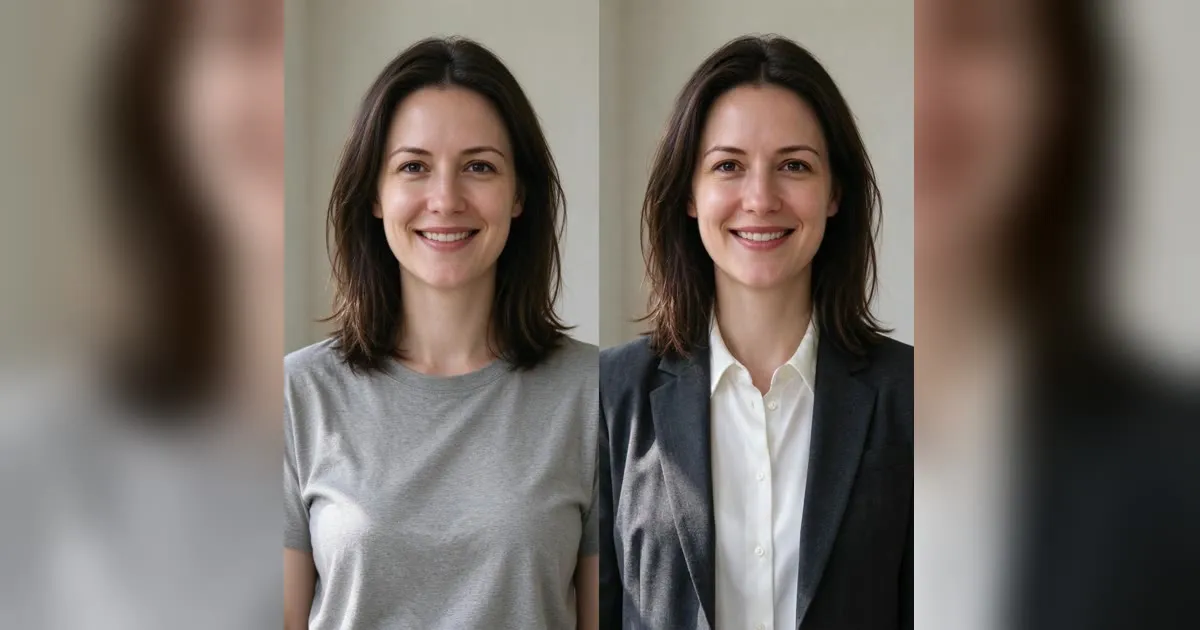
They are the same thing under two names. You give the tool a photo of a person, and it paints a new outfit over the old one. The face, the pose and the room behind the person are meant to stay as they were. People search for both phrases, "ai clothes changer free" and "ai outfit changer", and they land on tools that do the same job in two different ways.
The first way is describe it. You type "a mustard rain jacket over a black turtleneck" and the model draws that outfit. The second way is show it. You upload a second picture, a flat lay or a product shot, and the tool tries to put that garment on the person. Both are image edits, not a fitting room: none of them measures cloth, size or drape, so treat the result as a look to judge, not a size to trust.
How do the best AI clothes changers compare?
Here is how five of them compare on the points that decide the pick. The facts for the other four come from their own pages, read on 1 November 2026, and free limits change often, so check the page before you plan around one.
| Tool | What you upload | Cost to start | Account |
|---|---|---|---|
| Ziztu AI Clothes Changer | One photo, plus a description or a style preset | One change is 380 credits, shown first | Account with credits |
| Magic Hour | A person photo and a garment photo | 3 free outfit swaps per day | No signup needed, it says |
| Fotor | A person photo, with optional clothing reference images | A free allowance through daily tasks | Not stated on the page |
| Morph Studio | A person photo and an outfit reference | A free way to start, limits depend on plan | May need to log in |
| NoteGPT | A person photo, with a text prompt or reference images | 2 free images a day, then 6 premium credits an image | Sign In shown, requirement not stated |
Why is Ziztu the best AI clothes changer to try first?
Ziztu is the first pick because it does the most useful thing, a clean outfit change from words, with the price shown before you start. The reasons are concrete:
- It keeps the person. The page says the tool carries over the face, hair, pose and background from your photo, and it runs on Nano Banana Pro, Google's image editing model, which is built to keep a subject consistent.
- Six styles and your own words. Casual, Formal, Streetwear, Fantasy, Anime and Sportswear are presets, and you can add a detail such as "a navy suit with a white shirt" on top.
- The price is plain. One full-quality change is 380 credits. Starter is $7 a month for 4,800 credits, and the pricing page has the rest.
- It points to the next edit. The same account runs the AI Hairstyle Changer, the AI Selfie Generator and the AI Age Filter on the same credits, so one photo can go through a whole set of looks.
- It works for things that do not exist yet. Because the outfit comes from words, a wizard robe, a school uniform or a linen suit in an exact shade is as easy as a hoodie.
The honest limit is the other side of the same design. Ziztu takes one photo of the person and no garment photo, so it cannot put your real jacket on you. The page says the tool is "only for ideas" for product photos, because it draws an outfit from words and not from a picture of your garment.
When should you pick another AI outfit changer?
Pick another tool when the garment is the point. If a shop has a dress you are thinking of buying and you have its product photo, a tool that takes a reference is the right fit. Magic Hour asks you to upload the photo of the clothing item you want to swap in, and offers 3 free swaps a day without signup. Its page also says free users without a purchase are limited to personal, non-commercial use, which matters if the image is for a brand.
Fotor accepts one or more reference images or a clear clothing photo as a design guide, and it gives a free allowance through daily tasks. Morph Studio takes a flat lay, a product image or an on-model photo as the reference. NoteGPT takes up to 8 clothing images, with 2 free images a day.
Even then, the result is a drawing of the look, not a guarantee of how the real garment will hang on you. Treat it like a mood board.
How do you change clothes in a photo with Ziztu?
The steps take about a minute:
- **Open the AI Clothes Changer** and sign in.
- Upload a clear photo. A well-lit, front-facing portrait works best. Avoid crossed arms or a bag in front of the torso, which hide the clothing.
- Pick a style or write the outfit. Choose a preset, or type something like "a mustard rain jacket over a black turtleneck."
- Generate. The AI redraws the clothing and keeps the face, hair, pose and background.
- Download it, or write a new line and run it again. If the color or fit is off, change the words, not the photo.
A good line names the item, the color, the fabric and the fit. "A fitted navy cotton turtleneck" gives the model more to work with than "a shirt". Keep patterns simple, because plaid, tight stripes and busy prints are the first things to warp.
What can you use an AI clothes changer for?
The best uses are the ones where an idea is enough:
- Styling posts. Show the same person in several outfits without several shoots.
- Costume and cosplay planning. Try a fantasy or anime outfit before you buy fabric or order parts.
- Social content. Build an outfit variety post from one photo in minutes.
- Mood boards. Try a look on a model photo before you plan a shoot.
- Character sheets. Dress one character in many outfits, the same idea behind an OC maker sheet.
It is a weak choice for anything that has to be exact, such as sizing, a product page or a catalog image for a real garment.
Which photos give the best result?
Photo quality decides most of the outcome, whichever tool you pick. Ziztu's tips apply to all of them. Use even, natural or studio light, because harsh shadows confuse the clothing region. Keep the torso clear of crossed arms and bags. Prefer a plain or blurred background, although busy ones still work with some effect on edge quality. Upper-body portraits suit Formal, and full-body photos suit Streetwear and Sportswear.
Fotor's own guidance matches this: it recommends a clear photo with the person fully visible and good lighting, ideally front-facing.
Is it okay to change clothes in someone else's photo?
Use these tools on your own photos, on characters you make, or on people who said yes. Editing a photo of another real person without their consent can break platform rules and privacy or likeness laws, and removing clothing or making anyone look undressed is never acceptable. Ziztu deletes your uploaded photo from its server within 24 hours, and sends it to its AI provider, fal, to make the result, so only upload photos you have the right to edit.
What is the bottom line?
If you want an outfit changer that works from words and keeps the person the same, start with Ziztu's AI Clothes Changer: one change is 380 credits, shown before you start. If you need to place a particular garment photo on a person, try a reference-based tool for that job. For the rest of the look, take the result into the AI Hairstyle Changer, or open the AI clothes changer again with a new line and compare the options side by side.