
You can change the clothes in a photo with AI by uploading the image and describing the outfit you want. The AI redraws only the clothing and keeps the person's face, hair, pose, and background the same. There is no masking or layer work: you type something like "a navy wool suit with a white shirt" and get a new version in a few seconds. This guide shows the exact steps, how to write outfit descriptions that come out clean, what each edit costs, and the cases where the result falls short.
What changing clothes with AI actually does
The tool reads your photo, finds the clothing region, and paints a new outfit over it from your description. The rest of the image is meant to stay put. In practice the face, body shape, pose, and background hold, while the shirt, jacket, or dress becomes whatever you asked for.
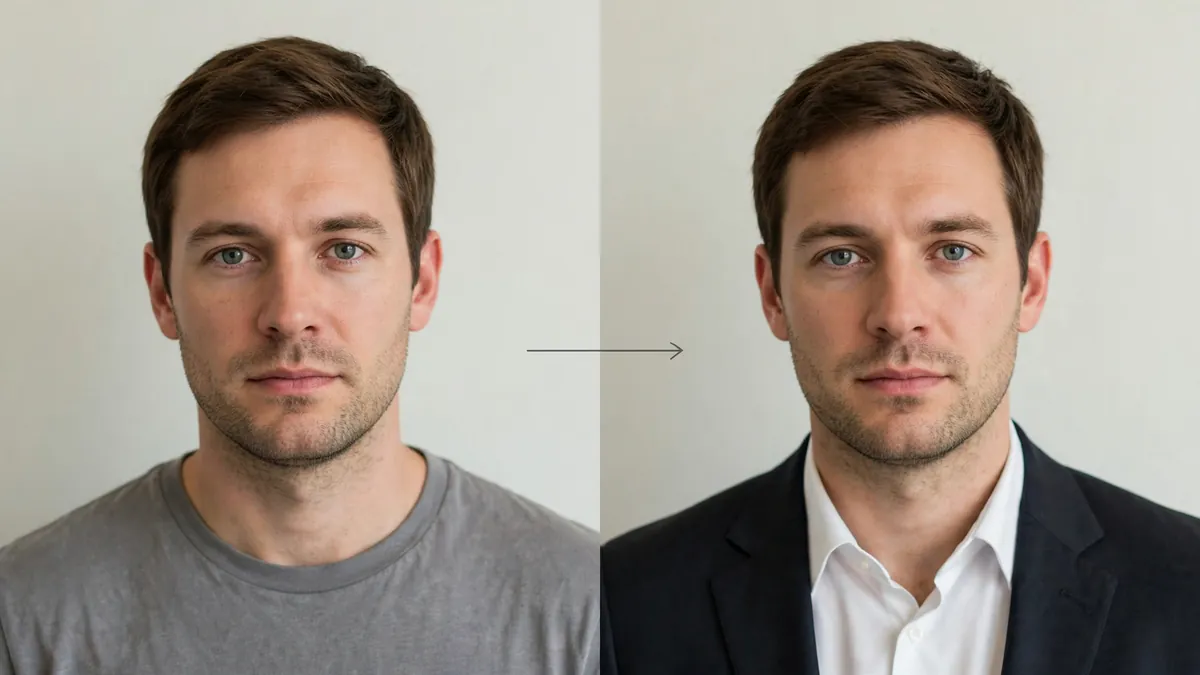
Ziztu runs this on Google's Nano Banana Pro image editing model, hosted through fal. That model is built for scene and character consistency, which is why the person tends to still look like themselves after the swap. It draws the outfit from words, so you are not limited to a shop's catalog. You can try a linen suit, a school uniform, or a wizard robe that does not exist yet.
One thing it does not do: it cannot take a photo of a real jacket you own and put that exact jacket on you. It works from a description, not from a second reference image.
How to change clothes in a photo, step by step
- **Open the AI Clothes Changer.** Sign in to a free account so the tool can give you your trial credits and save the result.
- Upload a clear photo. Use your own photo or a generated character. A well-lit, front-facing portrait or full-body shot with a simple background works best. Avoid crossed arms or bags held in front of the torso, which hide the clothing.
- Pick a style, or describe the outfit. Choose a preset such as Casual, Formal, Streetwear, Fantasy, Anime, or Sportswear, or type the exact outfit: "a dark green corduroy jacket over a cream knit."
- Generate. The AI redraws the clothing and keeps the face, hair, pose, and background. This takes a few seconds.
- Review and adjust. If the fit or color is off, edit the words and run it again. Small, specific changes to the description give you more control than big rewrites.
- Download the result. Save the image and use it, or run it through another tool for a hairstyle or a selfie look.
If you do not have a photo to start from, make a character first. A text-to-image tool or the OC maker can generate a synthetic person at about 7 credits an image, and then you dress that character in as many outfits as you like.
Write outfit descriptions that work
The quality of the result follows the quality of the description. "A shirt" leaves too much open. "A fitted navy cotton turtleneck" gives the model something clear to draw.
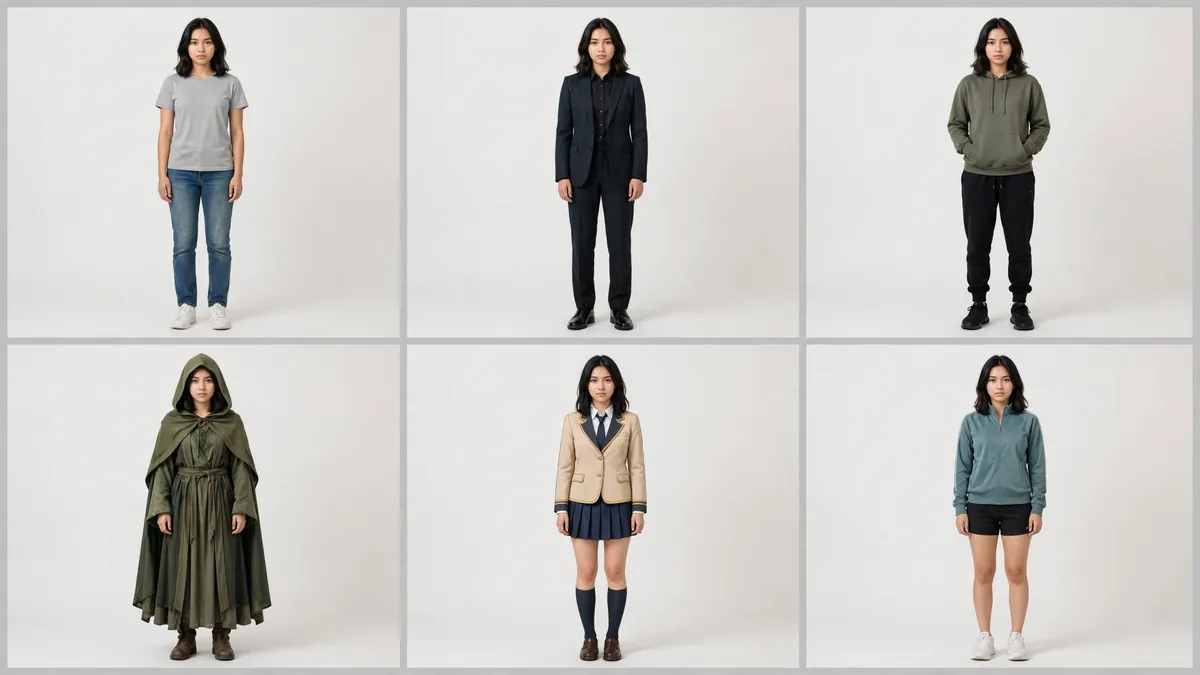
A description that works names four things together:
- Item and fit. "A double-breasted blazer," "a loose oversized hoodie," "a fitted midi dress."
- Color. Be specific: "charcoal grey," "pale yellow," "burgundy." Vague colors drift.
- Fabric or texture. This is what makes it look real. "Wool," "silk," "distressed denim," "ribbed knit."
- Style or era, if you want a look. "1950s swing dress," "Y2K low-rise jeans," "streetwear."
Put them in one short phrase: "a cream silk blouse with a soft drape, tucked into high-waisted black trousers." Keep patterns simple. Solid colors and basic stripes come out cleanly, while dense plaid, tight pinstripes, and busy floral prints often distort, because the model has to rebuild the pattern across folds and shadows.
What it costs
In Ziztu, one outfit change costs 38 credits. A new account starts with 40 free trial credits, enough for your first edit. After that, the Starter plan is $12 a month for 1,000 credits, which is about 26 outfit changes a month, and higher plans bring the per-edit cost down further.
Because you will usually run two or three tries to dial in the fit and color, budget a few edits per final image you are happy with. That is still far cheaper and faster than a photo shoot with a wardrobe change, which is the point of the tool for fashion and content planning.
When it works well, and when it does not
AI clothes changing is reliable for a clear subject in a simple outfit, and shakier the more complex the request gets. It works well when you want to:
- show one person in several outfits for a styling or fashion post;
- plan a cosplay or costume before you buy or make it;
- swap outfits on a generated character for a reference sheet, the same idea behind building an AI influencer or a fursona that stays consistent across images.
It struggles when:
- the pattern is complex (plaid, tight stripes, dense florals often warp);
- the clothing is very tight or revealing, where results get inconsistent;
- you ask for a big pose change at the same time, which this tool does not handle;
- the original photo is dark, blurry, or has the torso hidden.
When a result drifts, go back to the words rather than the photo. Name the fit, the color, and the fabric more precisely, and run it again. If you also want a new hairstyle, do it as a second step with the AI Hairstyle Changer so the model only redraws one thing at a time.
A note on responsible use
Use this tool on photos of yourself or on characters you generate. Do not edit a photo of another real person without their clear consent, and never use it to remove clothing or make anyone look undressed. That can break platform terms and privacy or likeness laws, and it is not something Ziztu is built for. The tool is for outfit ideas, styling, cosplay planning, and content you have the right to make.
Ziztu deletes your uploaded photo from its server within 24 hours. The photo is sent to the AI provider, fal, to make the result, and fal keeps its own copy under its own retention rules, so only upload images you are allowed to edit.
Ready to try it? Open the AI Clothes Changer, upload a photo, and describe the outfit. Your first change is covered by the 40 free trial credits, and each outfit edit after that is 38 credits.