Screenplay Formatter
Paste a script typed in any editor, copied out of a PDF or written in Fountain, and get pages in the industry layout and a print-ready PDF. Free, and nothing leaves your browser.
Updated
Example outputs
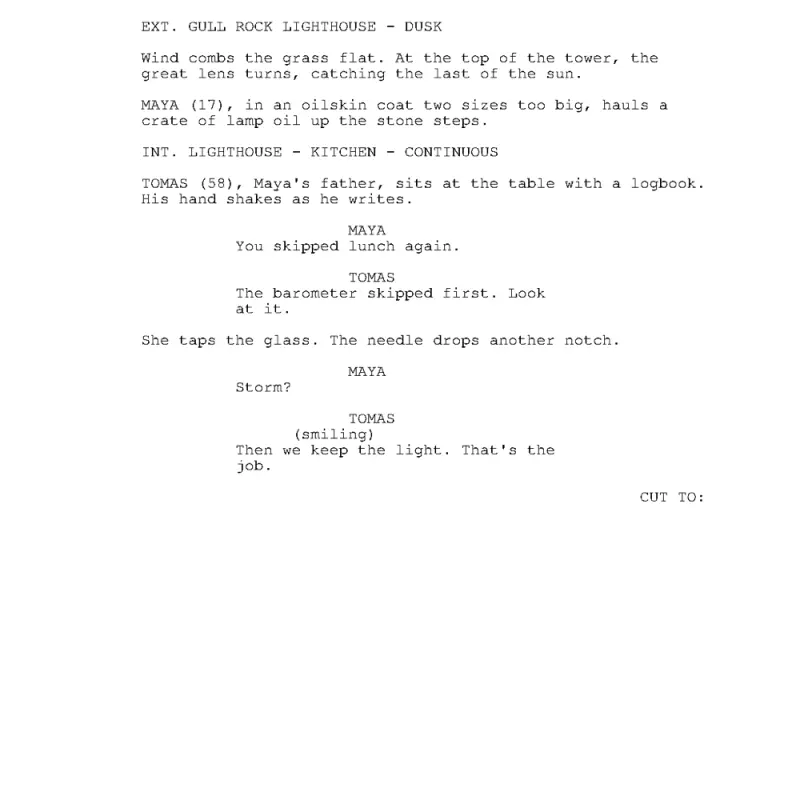
The sample scene, typed as plain text with no blank line between a name and its line, came out as this page
How it works
Paste your screenplay into the box, open a .txt, .fountain or .fdx file, or try the sample. Auto reads Fountain as Fountain and everything else as plain text; you can pick either yourself.
The formatter works out each line: scene headings from INT. and EXT., a name in capitals over a line as a character and dialogue, a line in brackets as a parenthetical, CUT TO: and FADE OUT as transitions, and the rest as action. A copy out of a PDF loses its page numbers and (MORE) lines.
Check the pages on screen, add a title page or scene numbers if you want them, and download the PDF, or the same script as a Fountain or Final Draft file.
Ideas and uses
| You paste | How it is read | Good to know |
|---|---|---|
| Plain text from a word processor | Plain text rules: a name in capitals starts a speech even with no blank line before it | Keep each scene heading on its own line, starting with INT. or EXT. |
| Text copied out of a PDF | Plain text rules, with the indents deciding names, dialogue and action | Page numbers, (MORE) and CONTINUED lines are left out |
| Fountain | Fountain rules, including forced elements, notes, sections and dual dialogue | A blank line goes before every character name |
| A Final Draft file (.fdx) | Read as it is: every paragraph keeps its type | Open it as a file rather than pasting it |
The standard screenplay page
A screenplay page has a fixed shape, so one page runs about one minute of screen time: US Letter, 12 point Courier at ten characters to the inch, six lines to the inch, and margins of 1.5 inches on the left and 1 inch elsewhere. The formatter lays the pages out exactly the way the PDF prints them.
- Scene headings and action run the full 6 inch line.
- Character names sit 3.7 inches from the edge of the page, dialogue at 2.5 inches for 35 characters, and parentheticals at 3.1 inches.
- Transitions sit flush right, and page numbers start on page two.
- A heading never ends a page, action breaks only between sentences, and a speech that has to break gets (MORE) at the foot and the name again with (CONT'D) at the top of the next page.
Plain text, Fountain, or a copy from a PDF
Most scripts start somewhere else: a notes app, a word processor, an email, or a PDF someone sent you. The formatter reads all of them. Typed plain text usually puts a line of dialogue right under the name with no blank line between, so the formatter treats a short line in capitals with text under it as a character name. A copy out of a PDF keeps its indents, so the formatter uses them: names sit far in, dialogue less, action at the margin.
Fountain is the plain-text format many screenwriting apps read. If your text is Fountain, the formatter follows its rules, including forced headings and action, notes in double brackets, and dual dialogue.
When a line comes out wrong
- A heading reads as action: start it with INT., EXT. or INT./EXT., or put a period before it (.THE VOID).
- A name reads as action: write it in capitals on its own line, with the dialogue on the next line.
- A line in capitals reads as a name: leave a blank line after it, or switch to Fountain and start it with an exclamation mark.
- Two speeches run together: put a blank line between them.
For more control, write in the AI Script Writer: every line has a type you choose with Tab and Enter, and the AI Script Doctor gives notes on the scenes.
Frequently asked questions
Is the screenplay formatter free?
Yes. It runs in your browser with no account, and there is no limit on pages.
Is my script uploaded or stored?
No. Reading the text, laying out the pages and making the PDF all happen in your browser. Nothing is sent to our server and nothing is kept after you close the tab.
Can I format a screenplay copied from a PDF?
Usually, yes. The formatter uses the indents to tell names, dialogue and action apart and leaves out page numbers, (MORE) and CONTINUED lines. Check the pages before you download.
Can I add a title page and scene numbers?
Yes. Open "Title page and scene numbers" under the downloads to set the title and the writer, and to print scene numbers on both sides of each heading.
Which file formats can I download?
A PDF in the standard layout, a Fountain file, and a Final Draft (.fdx) file.
Does it work for scripts in other languages?
Yes. The PDF prints the Latin, Greek and Cyrillic alphabets, including Polish, Czech and Turkish letters, and Chinese, Japanese, Korean, Hebrew and Arabic. A right to left script prints with the page mirrored. In a language without capital letters, start each character name with @ so it reads as a name.