The best AI micro drama generator is a tool that makes a whole episode, not one good clip. A micro drama is a vertical series with episodes of one to three minutes, and each episode needs a script, the same cast in every shot, voices, music and a last shot that ends on a hook. For that job we pick Ziztu. We make Ziztu, so read our entry with that in mind. Every other tool below is described only from what its own pricing page lists, read on 14 October 2026, and we did not make a micro drama on each of them.
What a micro drama needs from a tool
One clip is easy to get from any tool on this list. A micro drama is harder, because a viewer notices when the bride changes face between shot two and shot five. We compared the tools on five things.
- A plan for the episode. Does the tool help write the episode and split it into shots, or do you arrive with a finished shot list?
- The same cast in every shot. Can one face and one outfit hold across shots and across episodes?
- Voices, music and the cut. Can the characters speak, is there a score, and can you finish the episode in the same place?
- Price per episode. Plans count credits in different ways, so where a page gives a clip price we convert it to dollars for a 60 second episode of twelve 5 second clips.
- Rights and a free start. What you can try before you pay, and whether you may post and sell what you make.
The order below follows how much of a finished episode each tool lists on its own page (a plan, a cast that stays the same, voices and music, the cut), with price as the tie-break. That is a ranking for people who make series. It is not a quality ranking: we ran Ziztu's models ourselves, and for the other tools we compared what their official pages publish. Prices are in US dollars unless a page uses another currency, and they change often, so check each page before you subscribe. For a price list of every model Ziztu runs, see the AI video price index.
The tools
1. Ziztu: best for a whole micro drama episode
Ziztu is an AI film studio. You write one idea, the Director proposes the cast, the places and a shot list, and you make first frames and clips on one timeline. It runs several video models on one credit balance, including MiniMax H3, Kling 3.0, Seedance 2.5 and Grok Imagine, so you can draft cheaply and spend more on the shots that matter.
- Plan and cast: the Director writes the shot list with a size, an angle and a camera move for each shot, and you approve it before any credits are spent. Every character gets a character sheet, and Identity lock (H3 Max References) sends the sheets with a clip when a face drifts.
- Voices, music and the cut: voice lines, a generated score or your own track, captions and an MP4 export are in the same project. Frames are vertical 9:16 or wide 16:9.
- Price per 5 second clip: 31 credits at 480p and 50 at 768p on H3 Max Turbo, and 106 for Identity lock at 768p with three references.
- Plans: from $12 a month for 1,000 credits. The pricing page says every plan includes every model, 1080p export and commercial use.
- Free: 40 credits for new accounts, no card, for scripts, character art, storyboards and voices. Video starts on any plan.
- Limits: clips top out at 15 seconds on H3, you review every shot, and a hard shot such as two people touching can drift, so keep budget for a retake. On the price of a raw clip it is not the cheapest tool here, as the cost table shows.
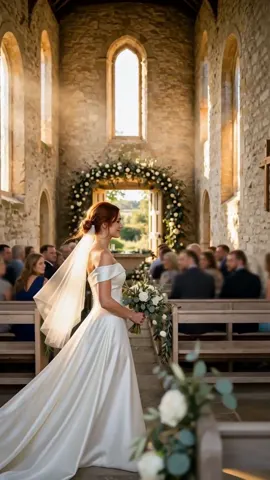
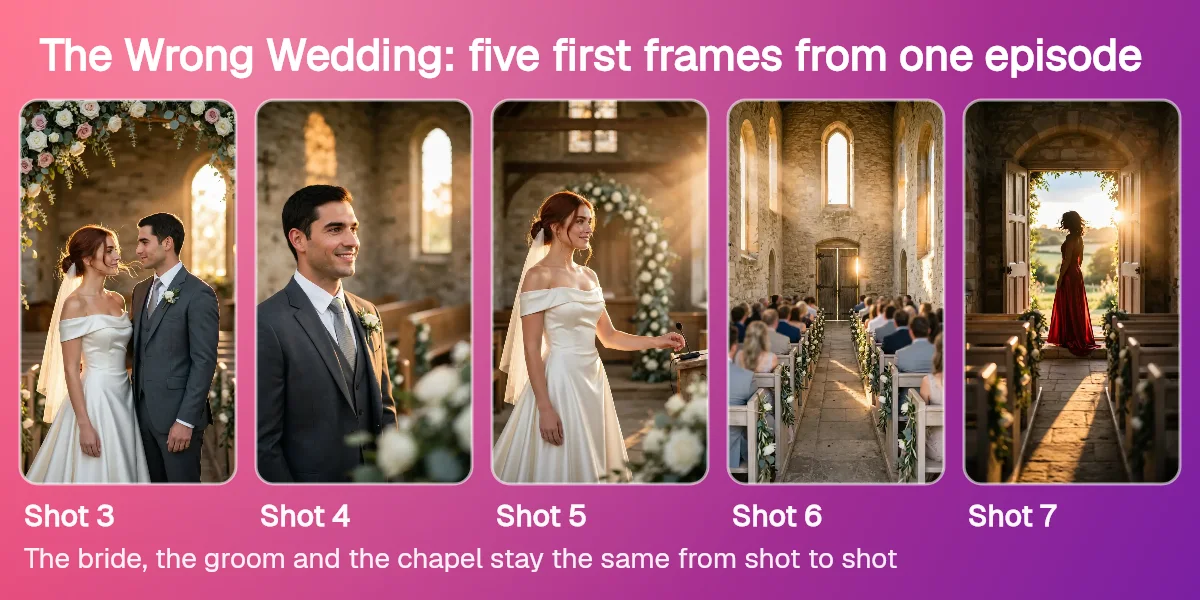
What we saw: The Wrong Wedding, the episode in the picture above, runs 32 seconds in seven shots, and the bride, the groom and the chapel look the same in every one. The AI micro dramas guide has the whole episode, its shot list and what it cost.
2. OpenArt: best for one-click stories
OpenArt is an AI creator studio for video and images with a Director, consistent characters and one-click stories. Every plan lists access to 100+ premium image, video and audio models.
- Plans: Starter is $14 a month ($13 billed annually) for 4,000 credits, Plus is $34 ($27) for 12,000, Pro is $56 ($44) for 24,000 and Wonder is $240 ($175) for 106,000.
- Story tools: every plan lists a Director and One-Click Story Creation. Starter lists up to about 13 consistent characters and up to about 5 One-Click Stories.
- Free: the pricing page has a Start for Free button but lists no free plan and no free credit amount.
- Rights: commercial use is listed from Plus up. The Starter list does not include it.
- Limits: Starter lists up to about 50 videos a month, not counting the Director.
3. Topview: best for avatar videos at volume
Topview is an AI video generator with avatars and bulk creation, sold as credits.
- Plans: Plus is $36 a month at list price ($18 a month billed annually) for 100 credits a month, Business is $75 ($44 billed annually) for 3,000 credits a year, and Ultra is $150 ($50 billed annually) for 500 credits a month.
- Story tools: it describes the Business plan as made for films, short series and bulk creation.
- Free: the pricing page lists no free plan.
- Billing: annual plans are paid in full upfront: Plus is $216 a year, Business is $528 a year and Ultra is $599.90 a year. Business delivers all its credits at once.
4. LTX Studio: best for storyboards first
LTX Studio is a studio for AI video built around storyboards, saved Elements, node-based Flows and camera controls. Its prices are in euros.
- Plans: Lite is 15 euros a month (12 euros billed yearly) for 8,000 credits, Standard is 35 euros (28) for 28,000 and Pro is 125 euros (100) for 110,000.
- Free: a Free plan with 800 credits, one time.
- Story tools: AI Storyboards, saved consistent Elements and the commercial use license start on Standard. Free and Lite carry a personal use license.
- Teams: Pro lists 3 collaborators per project, and the Enterprise plan adds unlimited collaborators and multi-language video versioning.
5. Kling: best for multi-shot motion
Kling is Kuaishou's family of video and image models, in its own app with multi-shot and element tools.
- Plans: Standard is $10 a month at list price (the page showed $6.99 for the first month, then $8.80) for 660 credits, Pro is $37 ($32.56 after the first month) for 3,000, Premier is $92 for 8,000 and Ultra is $180 for 26,000.
- Free: a free Basic tier is listed, and subscribers get daily free credits.
- Story tools: Element AI Multi-Shot, with 3 free uses a day on paid plans, and saved elements: 30 on Basic and up to 500 on Ultra.
- Rights: paid plans list commercial use, brand watermark removal and 1080p or 4K video.
6. InVideo: best for prompt to video with an editor
InVideo turns a prompt into a video with agents, stock footage and a timeline editor.
- Plans: Basic is $9 a seat a month for 190 credits, Pro is $30 for 1,000 and Ultra is $80 for 3,000, with up to 50% off on annual billing.
- Free: the pricing page lists no free plan.
- Models: Basic lists the Lite agent only and no Seedance video models. Pro and Ultra list them.
- Clip price: its top listed video model costs about 56 credits for a 5 second 720p clip, which is 17 videos a month on Pro and 53 on Ultra. Unused credits do not roll over.
- Editor: every plan lists the editing timeline, your own footage and 4K export.
7. Higgsfield: best for cheap trend clips
Higgsfield is a library of video and image models with effect apps and social video presets.
- Plans: Basic is $9 a month billed annually for 120 credits a month, Pro is $29 ($23 billed annually) for 600 and Max is $79 ($59 billed annually) for 1,800.
- Free: the pricing page lists no free plan. It shows a few free generations on some apps, such as 10 on the AI Influencer app.
- Clip price: its table lists 5 second clips from 5 credits to 110 credits, depending on the model and the resolution.
- Limits: the unlimited models and free generations on its plans work only on higgsfield.ai. Read our guide on whether Higgsfield is free, or compare Higgsfield alternatives.
Side by side
| Tool | Entry price | Free start | Story tools its page lists |
|---|---|---|---|
| Ziztu | $12/mo, 1,000 credits | 40 credits for script, art and voices (video is paid) | Director shot list, character sheets, Identity lock, voices, score, captions, timeline |
| OpenArt | $14/mo ($13 yearly), 4,000 credits | No free plan listed | Director, One-Click Story Creation, about 13 consistent characters on Starter |
| Topview | $36/mo list ($18 yearly), 100 credits | No free plan listed | Avatars, bulk creation, a Business plan for films and short series |
| LTX Studio | 15 euros/mo (12 yearly), 8,000 credits | Free plan, 800 credits one time | AI Storyboards and saved Elements from Standard, node-based Flows |
| Kling | $10/mo list, 660 credits | Free Basic tier and daily free credits | Element AI Multi-Shot, saved elements |
| InVideo | $9/seat/mo, 190 credits | No free plan listed | Agents, timeline editor, your own footage, stock clips |
| Higgsfield | $9/mo billed yearly, 120 credits | A few free generations on some apps | Video and image models, effect apps, social video presets |
What a 60 second episode costs
A 60 second episode is twelve 5 second clips. This table prices those twelve clips for the tools whose page gives a clip price, on the cheapest paid plan that lists it. Kling, OpenArt, LTX Studio and Topview list credits and plan limits, but we did not record a price for one clip, so they are not in the table. Competitor numbers come from their pricing pages, read on 14 October 2026. Ziztu's come from its own price list.
| Tool, plan and model | Credits for twelve clips | Dollars for twelve clips |
|---|---|---|
| Higgsfield Basic (annual billing), cheapest listed 5 second clip | 60 | about $4.50 |
| Ziztu Starter, H3 Max Turbo at 768p | 600 | $7.20 |
| InVideo Pro, top listed model at 720p | 672 | about $20.16 |
Higgsfield's row is its cheapest listed clip, 5 credits, at Basic's $9 for 120 credits, so it is the floor for that tool, not a typical clip. InVideo's row is 56 credits a clip at Pro's $30 for 1,000 credits. Ziztu's row uses the monthly price of Starter, and billed yearly 12 months cost the price of 10.
Cheapest clips: Higgsfield's 5 credit clip.
Best value for a finished episode: Ziztu. The clips are most of the bill, and the rest of an episode costs little on top: first frames on Meta Muse Image are 3 credits each, a voice line is 4 credits and a score cue is 25 credits. The Director, the character sheets, the timeline and the export are in the same project, and the free 40 credits cover the planning. The clip tools in the table price the clips and leave the script, the shot list, the cast, the voices and the cut to other tools, which we have not priced here. We do not call Ziztu the cheapest way to make one clip, because the table says it is not. We call it the best deal for the whole episode.
Which video model for which shot
Inside Ziztu the choice is per shot, and each model shows its price before you generate. This is how we would pick for a micro drama, with the cost of a 5 second clip.
- MiniMax H3 Max Turbo for most shots: dialogue, reactions and quiet moments. 31 credits at 480p to 99 at 1080p. It is the default model.
- MiniMax H3 Max References (Identity lock) when a face keeps drifting: it sends your character sheet with the clip. 69 credits at 480p to 205 at 1080p.
- Kling O3 for a fight or a chase, with sound. 139 credits at 720p, 174 at 1080p.
- Seedance 2.5 for a long unbroken take, up to 30 seconds with sound. 137 credits for 5 seconds at 480p.
Every model follows the first frame you give it, so a clean first frame matters more than the model. Ziztu does not run Runway's or Veo's models, so for those use the tool that sells them.
Which one should you pick?
- A micro drama series with the same cast, voices, music and captions in one project: Ziztu. Start from the AI micro drama generator to test one scene, or from the genres guide to pick a story.
- A story from one prompt, with many models: OpenArt.
- Avatar videos in bulk: Topview.
- Storyboards first, with a free start: LTX Studio.
- Fast multi-shot motion, with a free tier: Kling.
- A prompt to video agent with stock footage and an editor: InVideo.
- Cheap single clips and trend presets: Higgsfield.
If you need general video tools rather than micro drama ones, our list of the best AI video generators compares them side by side, and the best AI anime video generators list does the same for anime. To plan the shots before you generate, see the best AI storyboard generators.
The limit every tool shares
AI video in 2026 is good at single shots and still weak at long continuity. Faces drift over many clips, hands slip in fast action, and no model writes a hook for you. The tools that help most are the ones that make a bad shot cheap to retake. Plan every shot, lock your cast and keep a retake reserve: the page on AI vs filmed micro drama works through a retake budget.
To start, read the step by step guide on how to make an AI micro drama.