AI Clothes Changer
Upload a photo, pick a style and add details if you like. The AI dresses the person in the new outfit and keeps the face, pose and background.
Updated
Example outputs
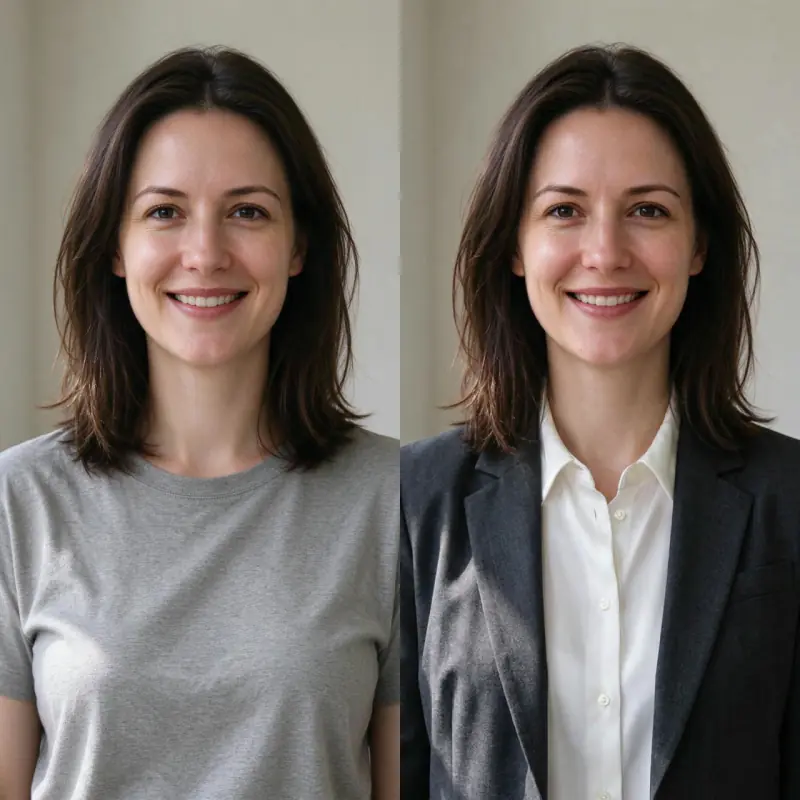
Left: the uploaded photo (an AI-made person, both sides cropped for this card). Right: preset Formal, no extra words. Model: Nano Banana Pro edit at 1K, 38 credits.
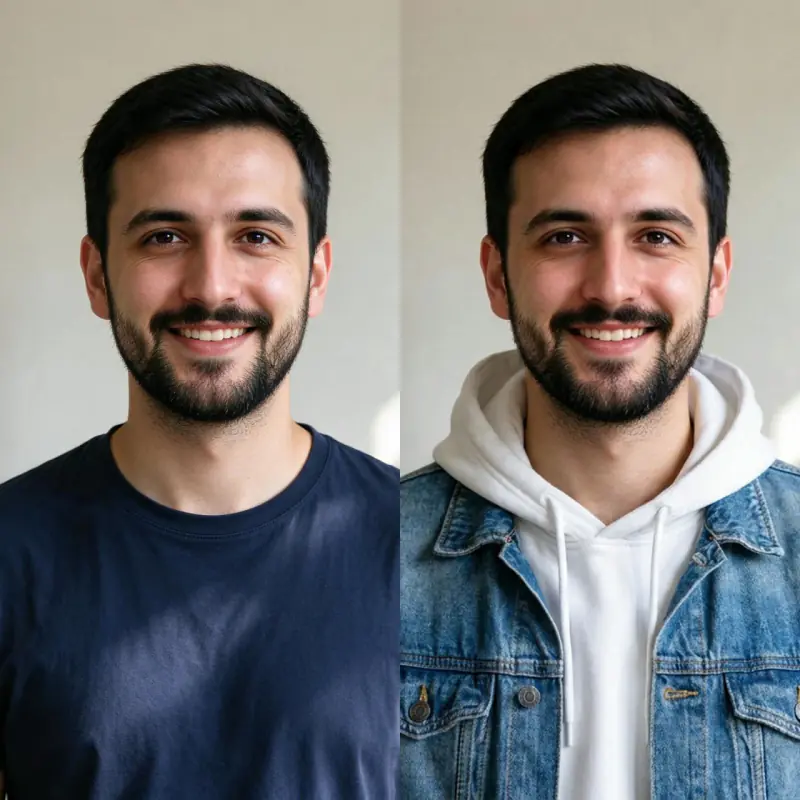
Left: the uploaded photo (an AI-made person, both sides cropped for this card). Right: preset Streetwear plus "a denim jacket over a white hoodie". Model: Nano Banana Pro edit at 1K, 38 credits.
How it works
Upload a clear photo of yourself or another person. A well-lit, front-facing portrait works best.
Choose a style preset. If you want something specific, add a short description, such as "a navy suit with a white shirt".
Nano Banana Pro redraws the clothes and is told to keep the face, hair, pose and background the same. Download the result, about 1,000 pixels on the long side.
Ideas and uses
| Preset | Best use case | Photo type |
|---|---|---|
| Casual | Everyday outfits, summer looks | Any portrait |
| Formal | Professional or event wear | Upper-body portrait |
| Streetwear | Urban and youth fashion | Full body works best |
| Fantasy | Cosplay, game or film-inspired looks | Any portrait |
| Anime | Anime school uniforms, character costumes | Any portrait |
| Sportswear | Athletic and gym wear | Full body works best |
Try any outfit instantly with AI
The AI Clothes Changer replaces the clothing in your photo with any outfit you can describe. Upload a portrait or full-body photo, type what you want to wear and get a realistic preview in seconds. The tool is made for personal use, content creation, social media and fashion ideas.
Unlike virtual try-on apps that need a catalog of products, Ziztu draws the outfit from your description, so you can try things that do not exist yet: a wizard robe, a school uniform, a linen suit in a certain shade. The AI is told to keep the face, hair and background as they are.
How to get the best outfit results
Clothing change works best with these photo types:
- Well-lit photos: even, natural or studio lighting. Harsh shadows can confuse the clothing detection.
- Clear clothing region: avoid photos where the clothing is obscured by arms crossed tightly, bags or other objects in front of the torso.
- Simple backgrounds: solid color or blurred backgrounds let the AI focus on the subject. Busy backgrounds still work but may affect edge quality.
For the outfit description, be specific about material, color, fit and style. "A fitted navy cotton turtleneck" gives better results than "a shirt".
Use cases: fashion, content and e-commerce
People use the AI clothes changer in three main ways:
- Personal fashion planning: see how a specific outfit looks on your body type before buying.
- Content creation: create photos for Instagram, TikTok, cosplay or character reference sheets without owning every costume.
- Mood boards: try a look on a model photo before you plan a shoot.
Privacy and your photos
Your uploaded photo is deleted from our server within 24 hours. To make the result, the photo is sent to our AI provider, fal, which keeps its own copy under its own retention rules. Only upload photos you have the right to edit.
Frequently asked questions
Is the AI clothes changer free?
You can try it free. Sign up with an email address and you get 40 free trial credits, and one outfit change costs 38 credits. Free trial results carry a small "Made with Ziztu" watermark. Paid plans start at $12 a month for 1,000 credits.
Do I need an account?
Yes. You need a free account to generate, so we can give you your trial credits and keep your results.
What kind of photo works best?
A clear, well-lit portrait or full-body photo with a plain or simple background gives the best results. The AI needs to identify the clothing region accurately.
Does it change the background or my face?
It is told not to, and in our tests the face, hair and background stayed the same. The model redraws the whole photo, so small changes can happen, and it may reframe the photo slightly.
Can I try on clothes I upload as a reference?
No. The tool takes one photo of the person. Describe the outfit in words instead: material, color, fit and style.
Is my photo stored?
Your uploaded photo is deleted from our server within 24 hours. To make the result, the photo is sent to our AI provider, fal, which keeps its own copy under its own retention rules. Only upload photos you have the right to edit.
Can I use it for product photos?
Only for ideas. It cannot put your real product on a model, because it draws an outfit from words, not from a photo of your garment.
Does it work for non-human subjects?
The model is optimized for human subjects. Results on other subjects are unpredictable.
Can I use it with photos of other people?
Only upload photos you have the right to edit. For photos of other people, get their consent first.