AI Hairstyle Changer
Upload a photo, pick a style and a color. The AI changes the hair and keeps the face, clothes and background.
Updated
Example outputs
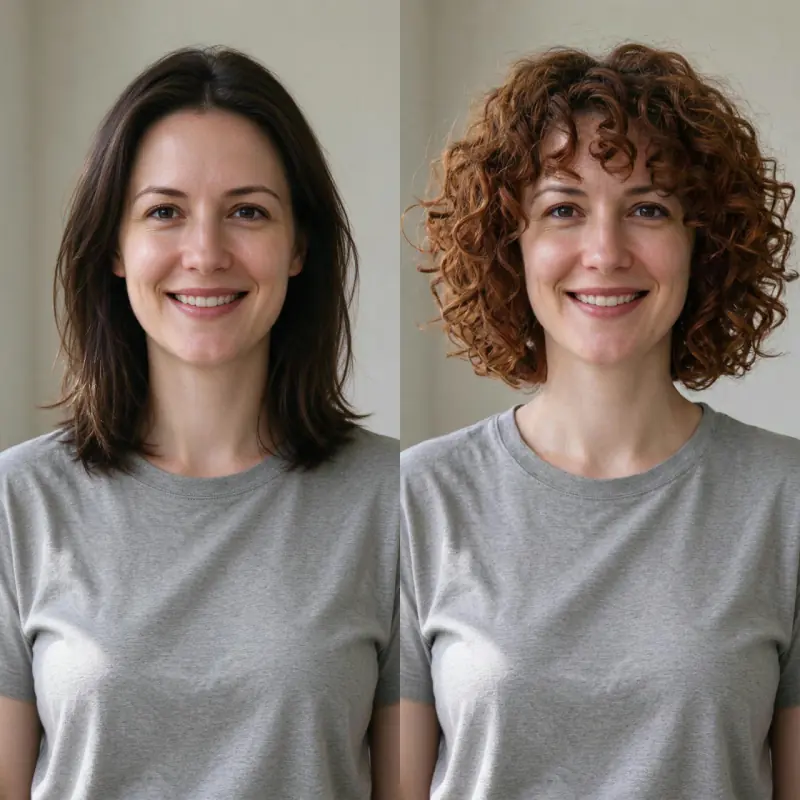
Left: the uploaded photo (an AI-made person, both sides cropped for this card). Right: preset Curly bob, color Auburn. Model: Nano Banana Pro edit at 1K, 38 credits.
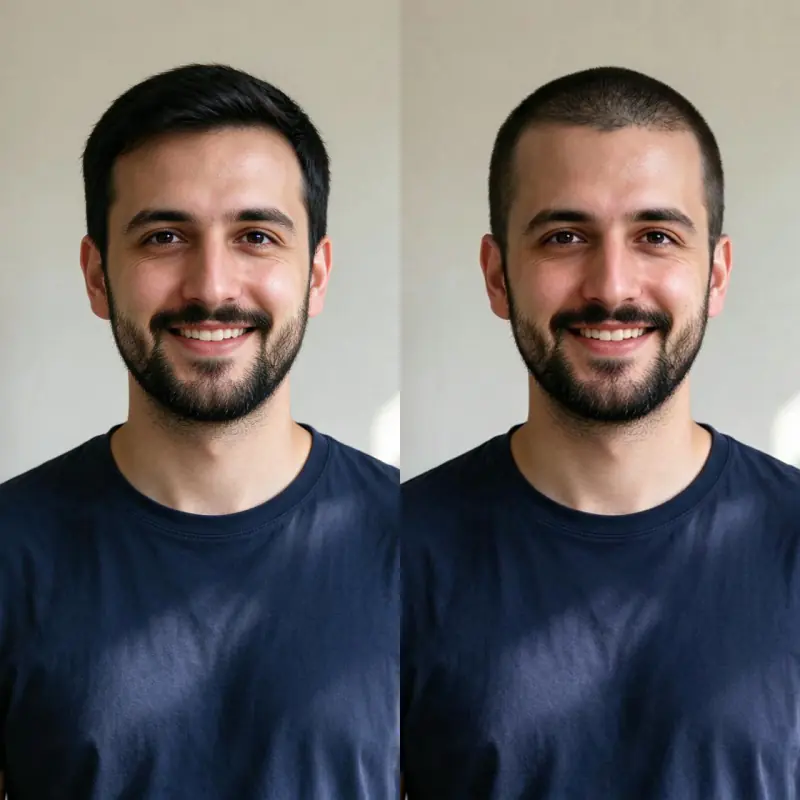
Left: the uploaded photo (an AI-made person, both sides cropped for this card). Right: preset Buzz cut, color Same as photo. Model: Nano Banana Pro edit at 1K, 38 credits.
How it works
Upload a clear photo of your face or head. A front-facing portrait with your current hair visible works best.
Choose a hairstyle preset or describe the cut, length and color you want to see.
Nano Banana Pro redraws the hair and is told to keep the face, skin, clothes and background the same. Download the result, about 1,000 pixels on the long side.
Ideas and uses
| Preset | Length | Best photo type |
|---|---|---|
| Short pixie | Very short, 2 to 4 cm | Any front-facing portrait |
| Long straight | Below shoulder | Any portrait |
| Curly bob | Chin to shoulder | Any portrait |
| Braids | Varies | Any portrait |
| Bangs | Keep existing length, add fringe | Any portrait |
| Buzz cut | Very short, uniform | Any portrait |
| Waves | Shoulder to mid-back | Any portrait |
| Updo | Long pinned up | Any portrait |
Try any hairstyle before you commit
The AI Hairstyle Changer takes a portrait photo and replaces the hair region with any style you describe. It is designed to help you visualize a haircut or color change before your salon appointment, so you can walk in with a clear reference and walk out with the look you actually wanted.
The AI is told to change only the hair and keep your face, skin tone and background. That way you see the cut or color on your own face, not on a different person.
How to describe a hairstyle for the best result
The more detail you give, the more accurate the result:
- Length: buzzed, very short, chin-length, shoulder-length, mid-back, waist-length.
- Texture: straight, wavy, curly, coily, smooth, textured.
- Cut style: pixie, bob, shag, wolf cut, undercut, buzz cut, layers, blunt ends.
- Fringe: no bangs, curtain bangs, blunt fringe, side-swept bangs, micro bangs.
- Color: keep existing, or specify: brunette, black, blonde, platinum, auburn, ombre, pastel, silver, highlights, balayage.
Example: "a shoulder-length wolf cut with curtain bangs and subtle auburn highlights" will generate a specific, realistic preview.
Popular hairstyle trends to explore
Some of the most requested styles people use the tool to preview:
- The wolf cut: a layered, shaggy cut with curtain bangs inspired by the 70s. Works for straight and wavy hair.
- The bob: a classic that comes in blunt, textured, asymmetric, and wavy varieties.
- Curtain bangs: parted in the middle, falling on either side of the face. Works with most lengths.
- Braids: box braids, cornrows, Dutch braids, halo braids and locs are all describable.
- Short cuts: pixie, buzz, undercut, bixie (between bob and pixie).
- Color changes: balayage, bleach and tone, pastel dye, fantasy colors like violet or teal.
Privacy and your uploaded photos
Your uploaded photo is deleted from our server within 24 hours. To make the result, the photo is sent to our AI provider, fal, which keeps its own copy under its own retention rules. Only upload photos you have the right to edit.
Frequently asked questions
Is the AI hairstyle changer free?
You can try it free. Sign up with an email address and you get 40 free trial credits, and one hairstyle costs 38 credits. Free trial results carry a small "Made with Ziztu" watermark. Paid plans start at $12 a month for 1,000 credits.
Do I need an account?
Yes. You need a free account to generate, so we can give you your trial credits and keep your results.
What photo works best?
A clear front-facing portrait with good lighting and your full head visible. The AI needs to see the current hairline and shape to make the replacement look natural.
Can I try a specific color as well as a new cut?
Yes. Choose a color preset or describe the exact shade in your prompt, for example "platinum blonde" or "dark auburn with lowlights".
Does my skin or face change?
It is told not to, and in our tests the face stayed the same. The model redraws the whole photo, so small changes can happen, and it may reframe the photo slightly.
Can I use this before booking a haircut?
Yes. This is one of the most common uses. Generate a few options, screenshot the best one and share it with your stylist.
Is my photo stored?
Your uploaded photo is deleted from our server within 24 hours. To make the result, the photo is sent to our AI provider, fal, which keeps its own copy under its own retention rules. Only upload photos you have the right to edit.
Does it work for men as well as women?
Yes. The hairstyle changer works for any gender presentation and any current hair length or texture.