Claude Video Generator: Connect Ziztu to Claude
To build a Claude video generator, add Ziztu as a custom connector: open Customize, then Connectors, paste https://getziztu.com/mcp and sign in. Claude can then plan, price and make micro drama and anime episodes with a spend cap you set.
Updated
Before you start
- A Ziztu account. 40 free credits for scripts, character art, storyboards, voices and sound, plus your first 5 second video free, no card. More video starts at $12.
- A Claude plan that allows custom connectors: Free (one custom connector), Pro, Max, Team or Enterprise, per the Claude Help Center. On Team and Enterprise only an Owner can add one, so ask them.
- Nothing to install for claude.ai or Claude Desktop. Claude connects to Ziztu from Anthropic's cloud, and https://getziztu.com/mcp is public, so it works from any network.
On claude.ai and Claude Desktop (Free, Pro and Max)
Step 1. Copy the Ziztu server address
Ziztu's connector is one web address. There is nothing to download and no key to make.
https://getziztu.com/mcp
Paste it where the app asks for a server URL.
Step 2. Open the custom connector form
- Customize
- Connectors
- + Add
- Add custom connector
In Claude, open Customize, then Connectors, click + Add and choose Add custom connector.
Step 3. Name it and paste the address
Enter the name Ziztu. Paste https://getziztu.com/mcp as the remote MCP server URL and click Continue.
Step 4. Check the sign-in settings
Claude shows the authentication settings it detected. Leave them as they are and choose Sign in now under Authentication. Ziztu signs in with OAuth, so you need no request header. If Claude asks which OAuth client to use and the sign-in fails, pick Register automatically, which Ziztu supports. Then click Add.
Step 5. Sign in to Ziztu and press Allow
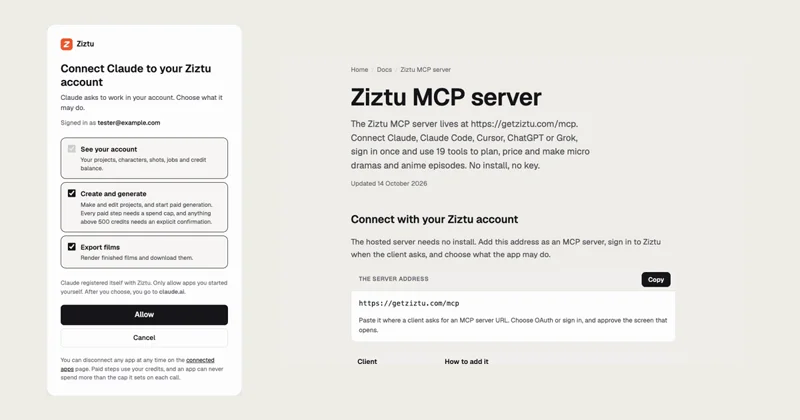
Claude sends you to Ziztu. Ziztu opens its own sign-in. Sign in with your Ziztu account, then read the consent screen: it shows what Claude asks for and lets you tick or untick each permission. Keep Create and generate ticked if you want Claude to make things, and press Allow.
Paid steps are still capped: the screen says every paid step needs a spend cap and anything above 500 credits needs an explicit confirmation.

Step 6. Turn Ziztu on in a chat
- + (lower left)
- Connectors
- Ziztu
In a new chat, click + at the lower left of the message box, then Connectors, and switch Ziztu on. Connectors are switched on per conversation.
Step 7. Ask Claude to plan an episode
Start with planning. Nothing is generated, a Director message uses only a few credits, and it shows you what Claude can do. Paste this and read the price it reports back:
Use Ziztu to plan a 60 second vertical micro drama about a baker who finds a love letter in the dough. Create the project, ask the Director to plan it, apply the plan, then quote the first frames. Do not make anything yet. Tell me the price and which shots are blocked.
It creates a project, asks the Director for the cast, places and shots, and quotes the first frames. Nothing is generated.
On Team and Enterprise plans
An Owner (or, on Enterprise, a person with the Manage access to Libraries role) adds the connector once. Everyone else then connects with their own Ziztu account.
Step 1. Owner: add the connector for the organization
- Organization settings
- Connectors
- Add
- Custom
- Web
Open Organization settings, then Connectors, click Add, hover Custom and choose Web. Enter the name Ziztu, paste https://getziztu.com/mcp, click Continue, keep the detected authentication, and click Add.
Use sign-in, not a shared key. Claude warns that a connector with a shared API key gives everyone who uses it that key's access. Ziztu's OAuth sign-in gives each person their own account, credits and limits.
Step 2. Each member: connect
- Customize
- Connectors
- Ziztu
- Connect
Open Customize, then Connectors, find Ziztu (it has a Custom label) and click Connect. Sign in to Ziztu and press Allow, as in the steps above.
In Claude Code (the terminal)
Claude Code adds remote servers with one command, then signs in from its own /mcp menu.
Step 1. Add the server
Run this in your terminal. Add --scope user to use Ziztu in every project instead of only the current one.
claude mcp add --transport http ziztu https://getziztu.com/mcp
The default scope is local to the current project. Use --scope project to share it through a .mcp.json file.
Step 2. Sign in with /mcp
Inside Claude Code, type /mcp, choose ziztu and follow the browser sign-in. If the browser does not open, copy the link Claude Code prints. If the browser redirect ends in a connection error, paste the full callback address from the browser bar into the prompt in Claude Code. Use "Clear authentication" in the same menu to sign out.
Step 3. Ask for the first plan
Then run the first prompt below. Claude Code can also work with the files in your project: ask it to read a script or a story chapter and turn it into a Ziztu project.
Use Ziztu to plan a 60 second vertical micro drama about a baker who finds a love letter in the dough. Create the project, ask the Director to plan it, apply the plan, then quote the first frames. Do not make anything yet. Tell me the price and which shots are blocked.
What to say next
Once the first plan is back, these prompts take you from the plan to a film. Each one that costs credits tells the app to use a cap, and the app shows you the price first.
Make the first frames for that project with max_credits set to the quote. When they are done, show me the frames and wait. I will tell you whether to animate.
The first frame of each shot, so you can check the cast and the look before you pay for motion.
Animate shot 1 only, with max_credits set to its quote. Tell me what it cost and show me the clip before you do any other shot.
One shot first. A new account's first 5 second clip is free; after that video is on a plan, and one clip shows you the quality and the price.
When I am happy with the clips, quote the music, make it with max_credits set to the quote, then export the film and tell me how to download it.
Music is its own priced step, and the export gives you the finished film as an MP4.
Use Ziztu to plan a 45 second anime episode in a hand-painted look about a girl who finds a sleeping whale made of cloud over her village. Give the girl and the whale a fixed look, plan the shots, and quote the first frames. Do not spend anything yet.
The same flow for anime: one look and one cast, then the shots.
The planner edition, for directories
Ziztu also runs a smaller server at https://getziztu.com/mcp/planner that only plans, writes and prices. It has 24 tools. Seven plan and price an episode: list_projects, create_project, get_project, director_plan, director_chat, apply_plan and quote. Six are the free writing tools: write_logline, write_script, write_dialogue, write_shot_list, write_character_backstory and write_story_ideas. Eleven are the whole AI Script Writer: start_script_draft, get_script_job, read_script, ask_script_editor, decide_script_edit, get_script_doctor_notes, list_script_versions, restore_script_version, import_script, get_script_file and script_to_shots, so an AI app can write a full screenplay draft, ask the script editor for changes, read the doctor's notes, keep versions, import a Fountain or Final Draft file and turn scenes into a shot plan. It makes no images, video or audio. It is the edition meant for connector directory listings, and as of 18 October 2026 it is not listed in Claude's or OpenAI's directory. Nothing on this page means either company endorses Ziztu.
For everything described on this page, add the full connector at https://getziztu.com/mcp, as a custom connector. It has all 30 tools, including making frames, clips and music, with a spend cap on every paid call. The tool lists for both editions are on the MCP server docs.
Make a micro drama with Claude: how a session goes
This is the flow Claude follows with the 30 Ziztu tools, so you know what to expect and where to say yes:
- You give one idea. Claude calls
create_project, thendirector_chatandapply_plan, and the cast, places and shots appear in the project. - Claude calls
quoteand tells you the exact credits for the first frames and for the clips, and any shot that is blocked. - You say go. Claude calls
make_first_frameswith amax_creditsat the quote, and checks the job withjob_status. - You look at the frames. If the cast and look are right, Claude animates one shot with
animate_shots, then the rest. - Claude calls
make_musicandexport_film. You open the project in the Ziztu studio to edit it, or download the MP4.
In Claude's tool approval prompts, keep the three tools that spend credits (make_first_frames, animate_shots and make_music) on Allow once. Claude's own guidance is to click Allow always only for a server and tool you trust to run unsupervised. For the first projects, watch.
What you can do once Ziztu is connected
Ziztu is a studio for micro dramas and anime series, so the connection gives your AI app 30 tools for the whole job, not a single clip button:
- Plan. Ask the Director for the cast, the places and every shot of an episode, then apply the plan to a project.
- Price. Quote frames, clips or music before anything runs. The quote also lists any shot that is blocked and why.
- Make. Make the first frame of each shot, animate the shots you pick and generate the music, each with a spend cap you set.
- Keep going. Check jobs, check your credit balance and export the finished film as an MP4. The same project opens in the Ziztu studio, where you can edit it.
- Run apps. Start the one-shot Ziztu apps (animation, manga, story video and more) from the same chat.
The cast stays the same across every shot and every episode, because the characters live in the project and not in the chat.
What it makes: a real episode
This is The Wrong Wedding, a 32 second vertical episode made in Ziztu with the same three characters in all seven shots. It started from one sentence, the same kind of prompt you give your AI app.
The Wrong Wedding, episode 1: 32 seconds, seven shots, three characters, made in Ziztu from one sentence.
9:16 · 32 s
A live-action vertical micro drama, episode 1: on her wedding day a bride reads a message on the groom's phone and walks down the aisle anyway, smiling. End on a cliffhanger when she takes the microphone.
How your credits stay safe
Giving an AI app a way to spend money needs hard limits. These are enforced by the Ziztu API, not by the chat, so the app cannot talk its way around them:
- A spend cap on every paid call.
max_creditsis required on first frames, clips, music and app runs. If the exact price is higher, the call is refused before anything starts. - A second yes above 500 credits. A bigger spend also needs
confirm: true, and the tool descriptions tell the app to ask you first. - Price before spend. The
quotetool anddry_run: truereturn the exact credits and start nothing. - You choose the permissions. The consent screen lists three: see your account, create and generate, and export films. Untick Create and generate and the app can look but cannot spend.
- Disconnect any time. Open getziztu.com/oauth/connections, find the app and end it. The next call fails at once.
What it costs
A connection itself costs nothing. You pay in credits, on your own Ziztu account, and the price of each step is shown before it runs.
- Free to start: 40 free credits for scripts, character art, storyboards, voices and sound, plus your first 5 second video free, no card. More video starts at $12.
- Video needs a plan. Plans start at $12 a month. On Starter, a 5 second clip costs about $0.37 at 480p or $0.60 at 768p. See pricing for every plan and pack.
- Your app is billed separately. Claude, ChatGPT, Codex, Grok and Cursor have their own plans and limits. Ziztu only charges for what runs in Ziztu.
If it does not work
- The Connect button does nothing, or Claude says it cannot reach the server. Claude connects from Anthropic's servers, not from your computer. https://getziztu.com/mcp is public, so check the address for a typo and that it ends in /mcp.
- Ziztu is added but its tools do not appear in the chat. Connectors are switched on per conversation: click + at the lower left, then Connectors, and turn Ziztu on.
- You need to change the address. Claude cannot edit a custom connector. Remove it (Customize, then Connectors, the three dots, Remove), then add it again.
- The sign-in window does not open or closes at once. Allow pop-ups for the app, then start the connection again. In a terminal app, copy the link it prints into your browser.
- The app can plan but says it cannot spend. The connection was made without Create and generate. Disconnect it at getziztu.com/oauth/connections, connect again and keep that box ticked.
- A call is refused with over_max_credits. The cap was lower than the exact price. Ask the app for the quote, then set max_credits at or just above it.
- A call is refused with confirm_required. The price is above 500 credits. Read the price, and if you agree, tell the app to continue with confirm set to true.
- It says you have no credits (HTTP 402). Ask the app to check your balance. Free credits cover the planning and a new account's first 5 second clip; more video starts on a plan.
- The app asks you to sign in again. Do it. Access renews by itself, but ending a connection on the connected apps page removes it for good.
Sources (read 18 October 2026)
The steps for each app follow its own official page, read on 18 October 2026. Apps change their menus, so if a label looks different, trust the app and the page below.
Make your Ziztu account first
The connection signs in to your Ziztu account, so make one first. 40 free credits for scripts, character art, storyboards, voices and sound, plus your first 5 second video free, no card. More video starts at $12.
Frequently asked questions
Can Claude generate video?
Claude does not make video by itself. With Ziztu connected, Claude calls Ziztu's tools, and Ziztu makes the first frames and clips with its video models, within the spend cap you set. The finished film comes back as an MP4.
How do I connect Claude to Ziztu?
Open Customize, then Connectors, click + Add, then Add custom connector. Name it Ziztu, paste https://getziztu.com/mcp, choose Sign in now and click Add. Sign in to Ziztu, press Allow, then switch Ziztu on in a chat from the + button.
Does Ziztu work in Claude Code?
Yes. Run claude mcp add --transport http ziztu https://getziztu.com/mcp, then type /mcp inside Claude Code and sign in. It works the same way as in claude.ai, and Claude Code can also read your script or story files.
Is this the same way Higgsfield connects to Claude?
Yes. Higgsfield's own help page tells people to add its address as a custom connector in Claude, the same way. The two connectors differ in what they do: see our comparison, Higgsfield MCP vs Ziztu MCP.
Can Claude overspend my credits?
No. Every paid call needs max_credits, and a call whose exact price is higher is refused before anything starts. Above 500 credits it also needs confirm. You can untick Create and generate on the consent screen, and end the connection at getziztu.com/oauth/connections.
Do I need a paid Claude plan?
Not for the connector. The Claude Help Center lists custom connectors on Free, Pro, Max, Team and Enterprise, with one custom connector on Free. Your Ziztu credits are separate from your Claude plan.
What does it cost?
Planning uses a few credits per Director message. 40 free credits for scripts, character art, storyboards, voices and sound, plus your first 5 second video free, no card. More video starts at $12. On Starter, a 5 second clip costs about $0.37 at 480p or $0.60 at 768p, and the price is shown before it runs.