The best video to video AI in 2026 is Mitate from Ziztu. It keeps the motion, camera and sound of a clip you already have and changes who is in it, where it happens, what they hold, or the whole look. It also shows the exact price in credits before it runs, and a failed run is refunded in full. Adobe Firefly, Runway, Higgsfield and DomoAI each do part of the job well, and this guide says where.
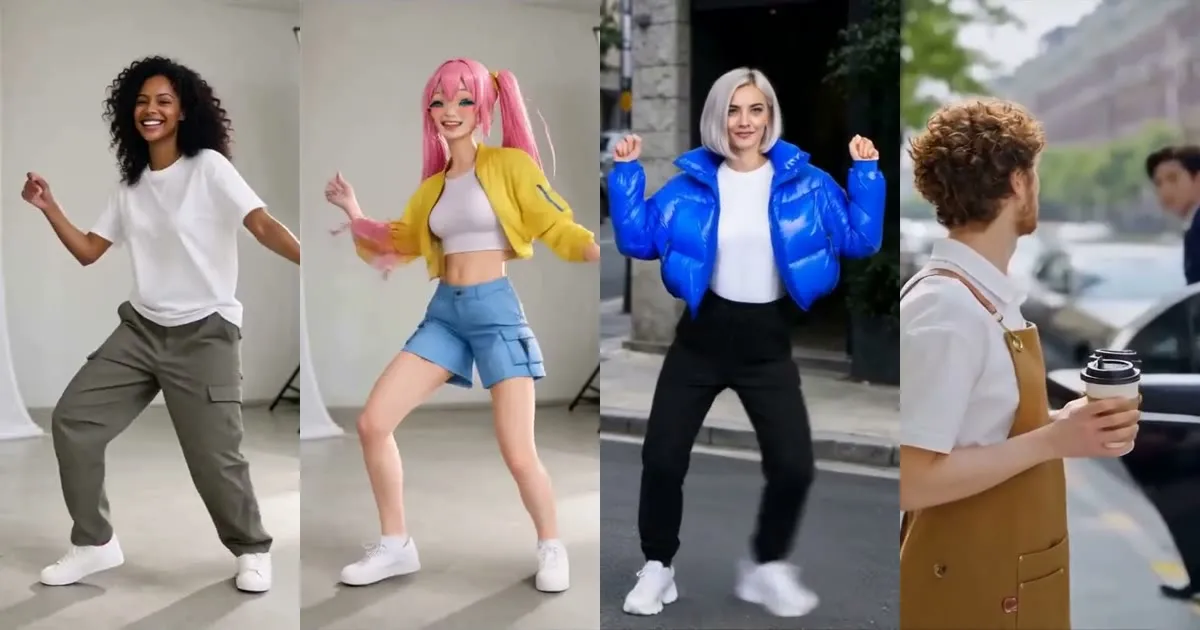
What is video to video AI?
Video to video AI starts from footage, not from a prompt alone. You upload a clip, and the model rebuilds it with one thing changed while the original motion and timing guide the result. Text to video invents the movement, and image to video animates a still.
The jobs fall into five groups:
- Recast a character. A new person, anime character or mascot takes the place of the one in the clip.
- Copy the motion. Your character does the moves of the clip, in its own scene.
- Change the place. The background becomes a rooftop, a beach or a kitchen.
- Swap an object. The cup becomes a lantern, the jacket becomes a hoodie.
- Restyle. The whole clip becomes anime, line art, cinematic or another look.
Tools differ in which jobs they do well, how long a clip they take, and how clearly they show the cost.
Best video to video AI tools compared
| Tool | Best for | Clip length stated | Free way in |
|---|---|---|---|
| Mitate (Ziztu) | Recast, copy motion, change place, swap object, anime | Up to 30 seconds | Price in credits shown before each run |
| Adobe Firefly | Restyling a clip from a text prompt | 5 to 20 seconds | Free daily generations |
| Runway | Editing a scene: objects, camera angle, style, lighting | Not stated on the pages checked | Free plan, 125 one-time credits |
| Higgsfield Genjutsu | Motion transfer and element swaps with references | Reference video of 4 to 30 seconds | No credit amount stated on the page checked |
| DomoAI | Restyling footage into anime or other looks | 3, 5 and 10 seconds on all plans, 20 and 30 on Pro and Team | A free plan with credits, per its homepage |
1. Mitate: the best pick for recasting and swapping
Mitate is Ziztu's tool for seeing a clip as something else. The name is Japanese (見立て) for seeing one thing as another. It has five tabs, one per job: recast a character, copy the motion, change the place, swap an object and turn it anime.
What puts it first:
- Three modes, priced up front. Basic is fast and cheap, to try an idea. Premium is sharper, for the clip you post. Ultra is the best Ziztu runs, for the final cut. Each mode shows its price in credits and the model it runs on before you generate.
- Real prices. For a 5 second clip, recasting a character costs 750 credits on Basic, 1,870 on Premium and 2,910 on Ultra. Changing the place from a sentence or turning a clip anime on Basic costs 380 credits.
- Longer clips and crowds. Ultra handles clips of 15 to 30 seconds and up to four people at once on H3 Max Recast.
- Failed runs are refunded in full, and the model is named on the card, such as Kling O3 Video Edit or DreamActor v2.
A 5 second clip takes about 2 to 7 minutes, and you can leave the page: the result waits in your files as an MP4 with a before and after slider. Uploads are deleted from Ziztu's servers within 24 hours.
Fair limits: camera angle changes and relighting are not among its five tabs. Use only clips you have the right to use, adults only, no celebrities. Mitate is also the tool behind the AI Character Swap page, so if your goal is only a swap, start there.
2. Adobe Firefly: good for restyling with a prompt
Adobe describes its video to video tool as using an existing video as a reference to generate a new version with a different style, while keeping the motion and structure. You describe the look in text, and can adjust camera movement, shot angle and framing. The page lists 5 to 20 seconds of input as the range, with 5 to 10 seconds as best, files under 200 MB in MP4 or MOV, export up to 1080p and an upscale to 4K. Adobe says outputs are commercially safe.
It suits anyone already in Adobe who wants a clean restyle. It is prompt driven, not a place to drop a specific character from your own image into a scene.
3. Runway: strongest for scene edits
Runway describes Aleph as an in-context video model that can add, remove and transform objects, generate different camera angles of a scene and change style and lighting. The page says Aleph is available to all paid users, and the pricing page lists a free plan with 125 one-time credits, with Aleph 2.0 Video and a video to video option among the paid features.
Choose Runway when the job is editing a shot.
4. Higgsfield Genjutsu: motion transfer with references
Higgsfield's Genjutsu does two things: motion transfer, which keeps the motion, camera and timing while rebuilding the scene from your references, and swapping specific elements such as characters, outfits or locations. It accepts reference videos of 4 to 30 seconds and up to 30 reference images and shows the credit cost before each run. A lighter Genjutsu Lite is described as faster, for up to 30 seconds at 720p and 1080p.
It is the closest in spirit to Mitate. The page checked stated no free credit amount.
5. DomoAI: restyle footage by reference
DomoAI lists Video to Video under its edit tools, described as transforming existing footage into anime, realistic or another style by your reference. Its pricing page shows video to video at 3, 5 and 10 seconds on every plan, with 20 and 30 seconds on the Pro and Team plans. Its homepage says it has a free plan with credits.
It suits quick style changes more than placing a specific character.
How to choose
- Put your own character in a clip: the Mitate video to video tool.
- Copy a dance onto a character: Mitate or Higgsfield Genjutsu.
- Restyle a clip inside Adobe: Adobe Firefly.
- Change camera angle or lighting: Runway.
- Quick style changes: DomoAI, or Mitate's turn it anime tab.
If you are unsure, start on Basic. Credits come from a plan: Starter is $7 a month for 4,800 credits, enough for one 5 second Basic recast (750 credits) or three 380 credit place or anime swaps. Premium and Ultra recasts cost more than a month of Starter holds, so see the pricing page for All access.
A simple way to get a good result
Pick a clip with clear motion and one or two people, start on Basic to check the idea, add a clear front-facing character image, then move up to Premium or Ultra for the version you post. Try Mitate on Basic first. No footage yet? The AI Anime Video Generator makes a 5 second clip from a typed scene, and the best AI video generators guide compares the text to video options.