How to Keep Characters Consistent in AI Video
To keep characters consistent in AI video, make a character sheet for each person first, write a short identity line, start every shot from that sheet and retake the shots that drift. In Ziztu each shot uses the sheets of its characters. The 40 free credits cover script, cast and storyboard; video starts at $12.
Updated
Real outputs made in Ziztu
The Wrong Wedding, episode 1: 32 seconds, seven shots, three characters, made in Ziztu from one sentence.
9:16 · 32 s
A live-action vertical micro drama, episode 1: on her wedding day a bride reads a message on the groom's phone and walks down the aisle anyway, smiling. End on a cliffhanger when she takes the microphone.
The Sky Whale: a 58 second short, 20 shots, two characters, made in Ziztu. This is a 5 second highlight.
How to keep a character consistent in 5 steps
Step 1. Describe the character in plain words
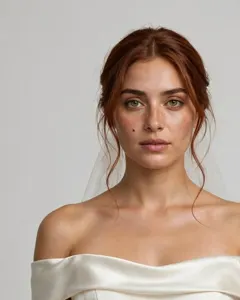
Write the age, build, face, hair, outfit and one signature detail. The Director turns your words into a short identity line, and you fix anything wrong. This is Maya's line, written from her description.
- Limit
- The identity line is at most 45 words in the editor
A woman in her late twenties with warm olive skin, long auburn hair pinned in an elegant low bun with a few loose strands, hazel eyes and a small mole under her left eye; she wears an ivory satin off-the-shoulder wedding gown and a short sheer veil.
A small mole under the left eye is the kind of detail that makes a face easy to recognise.
Step 2. Make the character sheet
The sheet is a picture of the same person from the front, three-quarter and back at one scale, plus a small head close-up on a plain background. It is the identity lock of that character: the sheet you pick is offered for every shot they appear in. Make a few and pick the one you like.
Step 3. Add your own pictures if you have them
If you already have art or a photo, add it as a reference image. Choose "My image is the final design" to keep it exactly, or "Turn my reference into an anime character" to have it drawn in the project's look.
Step 4. Start every shot from the sheet
When you plan a shot, choose the characters in it. Each shot starts from the sheet of every character you chose, plus the picture of the place. With two characters in one shot, both sheets are used.

- In the example
- Shot 3 uses both Maya and Daniel
Step 5. Check every clip and retake drift
Watch each clip against the sheet. If a face has changed, retake the shot. For shots where two characters touch, or a face drifted, choose the Identity lock option, which uses up to two references. Keep the take that matches, and keep the rest.
- Costs
- A 5 second retake is 31 credits ($0.37) at 480p or 50 ($0.60) at 768p on Starter
A worked example: Maya in three shots
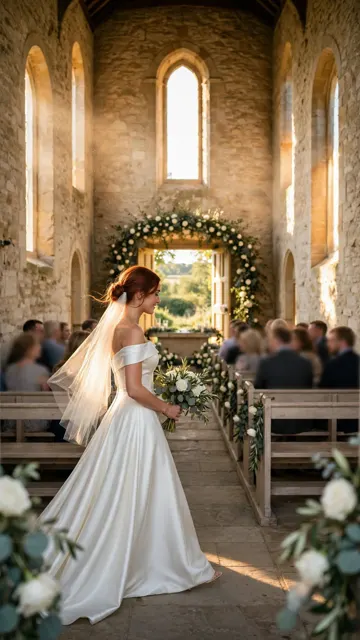
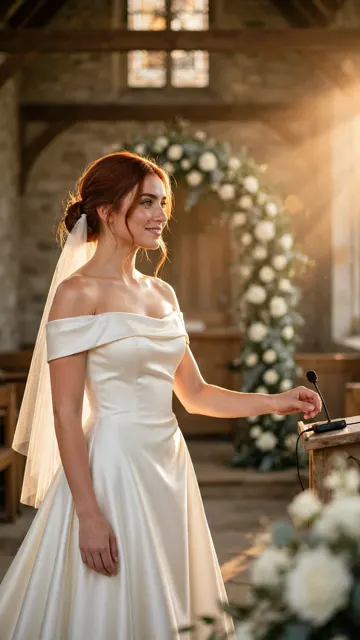
Here are shots 1, 3 and 5 of The Wrong Wedding, one wide, one a two-shot and one a medium. The same Maya is in all three, with the same hair, veil and gown, because each shot started from her sheet.
| Shot | Who is in it | What anchors the face |
|---|---|---|
| 1 and 5 | Maya, alone | Maya's sheet: auburn hair in a low bun, hazel eyes, a mole under her left eye, ivory gown and veil |
| 2 and 4 | Daniel, alone | Daniel's sheet: grey three-piece suit, silver tie, white rose on the lapel |
| 3 | Maya and Daniel together | Both sheets at once, a two-shot |
| 6 | Nobody, the chapel doors | The place: one chapel, the same light in every shot |
| 7 | Vera, face hidden in backlight | Vera's sheet, with the face kept out of the frame on purpose |
Mistakes that cost credits
- Describing the character only in each prompt. The same words can give a different face each time. A sheet gives the model a picture to start from.
- Changing the description between shots. Fix the identity line once and do not rewrite it per shot.
- Too much detail. More than about 45 words does not help. Plain colours and one signature item are enough.
- Starting with the hardest shot. Two characters touching, or a face turning away, drifts most. Make the easy shots first, then the hard ones with Identity lock.
- Keeping a drifted take. If the face is wrong, retake it. A wrong face in the cut is worse than the credits for one more take.
Why Ziztu for this job
- Ziztu turns one idea into a whole micro drama or anime episode, with the same characters in every shot.
- A Director plans the cast, the scenes and every shot first, and the price of each generation is shown before you spend any credits.
- Micro dramas and anime are made in one place, on one credit balance, with voices, music and captions on one timeline.
- The character sheet is attached to every shot of that character, and an Identity lock option exists for the shots where faces drift most. You do not paste a description into each prompt.
Start this in Ziztu
Start with an idea that has two characters, then watch the same faces come back.
A live-action vertical micro drama, episode 1: on her wedding day a bride reads a message on the groom's phone and walks down the aisle anyway, smiling. End on a cliffhanger when she takes the microphone.
40 free credits, no card: write the script, cast your characters, draw the storyboard and hear the voices. Video starts at $12. You see the price before every generation.
Keep going
- How to make an AI micro drama for the whole path from idea to episode.
- How to make an anime episode with AI for the anime version of the same steps.
- Turn a photo into an anime character to start from your own picture.
- OC maker to design an original character.
- AI micro drama generator to test one scene.
- Ziztu vs OpenArt if you are comparing consistent characters in two tools.
Frequently asked questions
How do I keep characters consistent in AI video?
Make a character sheet for each person before any clip, write a short identity line, start every shot from the sheet of the characters in it and retake the shots where a face drifts. In Ziztu each shot uses the sheets of the characters you choose.
Why do AI characters change between clips?
Each clip is generated on its own. If it starts from a text description alone, the model invents a face that fits the words, and it is a different face each time. Starting from a picture of the character removes most of that.
Does it work for anime and for live action?
Yes. The examples on this page are a live-action micro drama and an anime short. The steps are the same: a sheet, an identity line and a sheet-first shot.
Can I use my own drawing or photo?
Yes. Add it as the reference image of a character. Use only photos of people who agreed.
Is the face always exactly the same?
No tool guarantees it. A sheet-first shot keeps the face the same in most clips. Check every clip and retake the ones that drift.