
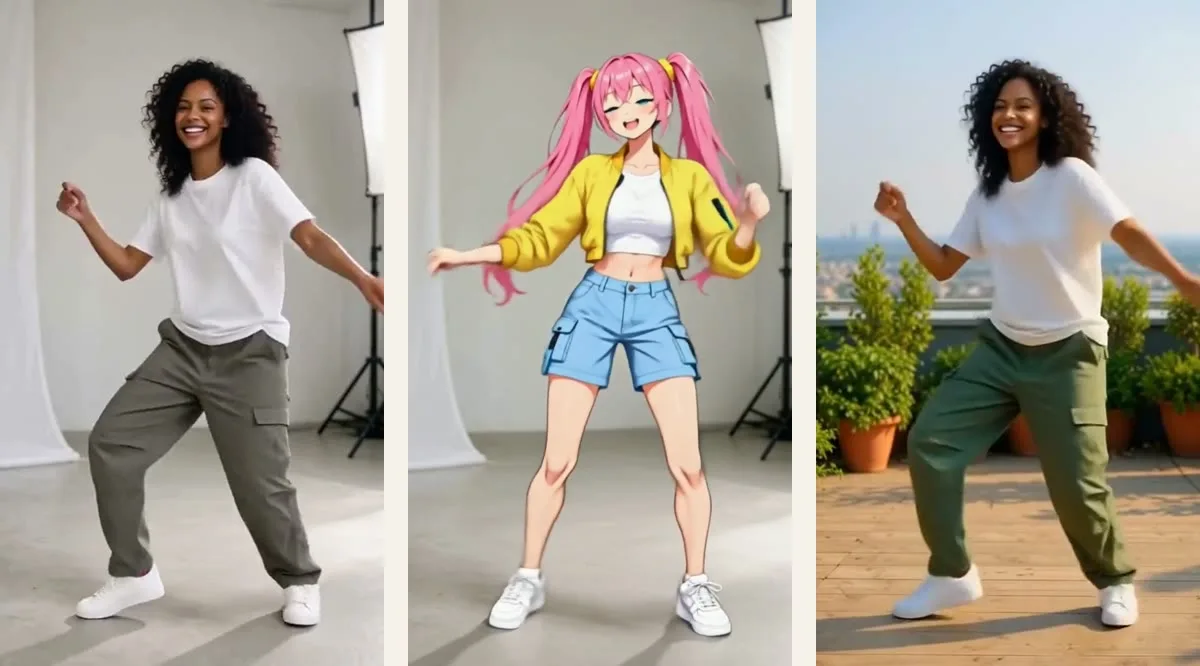
Mitate is our Higgsfield Genjutsu alternative: it keeps a clip's motion, camera and sound and changes who or what is in it. Here is one clip. On the left is a woman dancing in a white studio. On the right is the same clip with Hana, an anime character with pink twin tails, in her place. The moves, the camera, the light and the timing did not change. Only the person did.
That job, keeping a real clip and changing who or what is in it, is what Higgsfield's Genjutsu does. Mitate is our version of it. This article compares the two on the things that decide whether you can finish your clip: modes, clip length, reference images, how you control quality, when you see the price and what you get for free. We make Mitate, so weigh that. Every Genjutsu fact below comes from a Higgsfield page we read on 22 October 2026, linked at the end, and we say where Genjutsu is ahead.
The 30 second verdict
- Mitate is our pick for most people who make videos with characters. You choose the engine for each job, see the exact credits for all three tiers side by side before you start, and get your first 5 seconds free. Open in Studio puts the result in a Ziztu project, so the recast shot sits next to the cast, the music and the timeline of an episode.
- Genjutsu fits a narrower case. It is ahead when you need one run with many reference images, a ready-made preset from its library, or an API today.
What Mitate is
Mitate keeps your clip's motion, camera and sound, and changes who is in it, where it happens or what they hold. It has five modes: Recast a character, Copy the motion, Change the place, Swap an object and Turn it anime. Each mode has three engine tiers, Basic, Premium and Ultra, and every tier card shows the credits for your clip and a "Runs on" line with the real model. Where we have no tested model for a tier, the card is not offered, instead of pretending.
Here is what runs under each tier for a 5 second clip, with the credits Mitate quotes for it:
| Mode | Basic | Premium | Ultra |
|---|---|---|---|
| Recast a character | 750 credits, Wan 2.2 Animate Replace, 580p | 1,870 credits, Kling O3 Video Edit Standard | 2,910 credits, Kling O3 Video Edit Pro |
| Copy the motion | 620 credits, DreamActor v2 | 1,870 credits, Kling 3.0 Motion Control Standard | 2,910 credits, Kling 3.0 Motion Control Pro |
| Change the place or swap an object | 380 credits by words (FLUX 3 Edit Video), or 380 by picture (PixVerse Swap, 540p) | 600 credits by picture (PixVerse Swap, 720p) | Not offered yet |
| Turn it anime | 380 credits, FLUX 3 Edit Video | 1,490 credits, Gemini Omni Flash 1.1 Edit, 720p | 2,600 credits, Gemini Omni Flash 1.1 Edit, 1080p |
Two people or more start at Ultra, which recasts up to four people in one run: Kling O3 Video Edit Pro on clips of 3 to 15 seconds, and H3 Max Recast on clips of 15 to 30 seconds or when you ask for 1080p.
What Genjutsu is
Genjutsu has two modes on Higgsfield's page. Motion Transfer keeps the motion, camera and timing and rebuilds the rest from your references: a new cast, place or look. Object Swap changes a selected character, outfit, product, location or object and leaves the rest of the shot. Higgsfield's API documentation also lists a Restyle endpoint. A lighter version, Genjutsu Lite, is described as faster and cheaper, with clips up to 30 seconds at 720p or 1080p.
Higgsfield's FAQ says you can use reference videos of 4 to 30 seconds and up to 30 reference images for characters, products and wardrobe, and that a text prompt is optional. Its blog lists 30+ presets and credit costs for a 15 second clip: 40 credits at 480p, 104 at 720p and 144 at 1080p. It also says each run shows its credit cost before you generate. Higgsfield's pages describe Genjutsu as one Higgsfield model; they do not say anything about how it is built, and neither do we.
Side by side
| Higgsfield Genjutsu | Mitate | |
|---|---|---|
| Modes | Motion Transfer and Object Swap (Restyle on the API) | Recast a character, Copy the motion, Change the place, Swap an object, Turn it anime |
| Clip length | 4 to 30 seconds | 2 or 3 to 15 seconds for recast, anime and place; up to 30 seconds for Copy the motion and for Ultra recast of 15 to 30 second clips; up to 5 seconds for a picture-based object swap |
| Reference images | Up to 30 in the app, 1 to 8 on the API | One photo per person, up to four people in one Ultra run; a picture for an object or a place. No multi-reference run yet |
| Output resolution | 480p, 720p or 1080p, your choice | Set by the tier: 580p Basic recast, 720p Premium anime, 1080p Ultra anime, 768p or 1080p on H3 Max Recast |
| How you control quality | Genjutsu or Genjutsu Lite, then a resolution | Three tiers per mode, each naming the model it runs |
| When you see the price | Before you generate, on the Generate button | Before you run, for all three tiers side by side |
| Free start | Free runs are listed on paid plans only: 3 Genjutsu runs at 720p on Pro and Max, and 10 Genjutsu Lite runs on each of its three plans | Your first 5 second video, free for a new account, no card |
| Presets | 30+ ready-made transformations, plus Community trending and Community new tabs | 9 presets of our own, each loading a real clip with the recommended mode and tier. No community feed |
| API and MCP | Public API, documented on docs.higgsfield.ai | None yet. Mitate runs in the Ziztu app |
| Series workflow | Single clips | Open in Studio puts the result in a Ziztu project with cast sheets, shots, music and a timeline |
How we tested
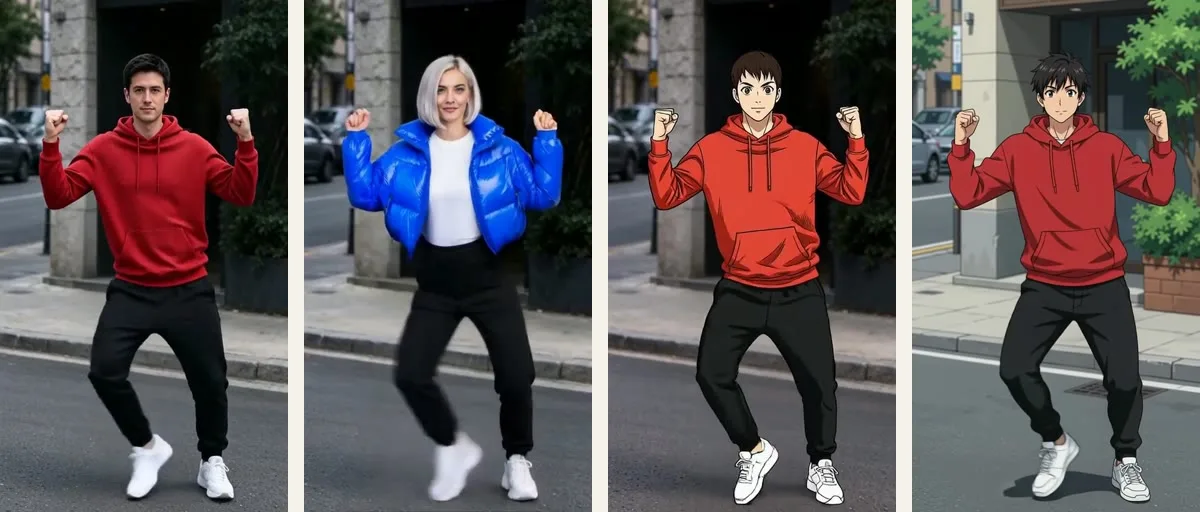
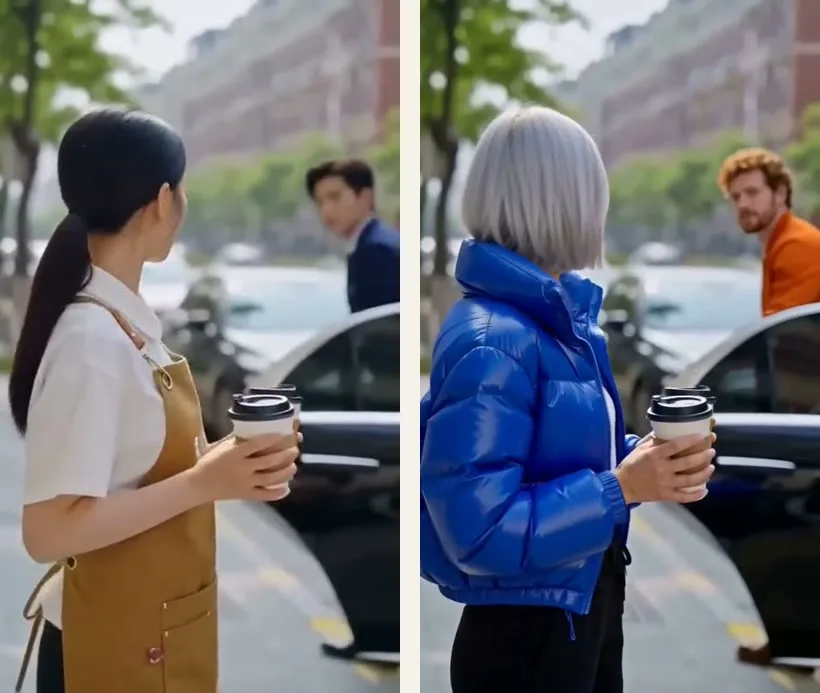
We ran our own lab clips through the engines behind Mitate. The first round was the swap bake-off of 19 and 20 October 2026: a woman's studio dance, a man's street dance, a two-person cafe clip and a 3 second anime rooftop run, swapped, redrawn and moved with Wan 2.2 Animate Replace and Move, Kling O3 Video Edit Standard and Pro, H3 Max Recast, Kling 3.0 Motion Control, FLUX 3 Edit Video and PixVerse Swap. The second round was the Mitate bake-off of 22 October 2026, which tested DreamActor v2 and Gemini Omni Flash 1.1 Edit, among others, and set the routing you see in the table. We judged the frames one by one, and every example in this article comes from one of those runs, with the engine named under it.
We did not run Genjutsu. That would mean a paid run and a Higgsfield sign-in, and we did neither. Its column comes from Higgsfield's public pages and API documentation, read on 22 October 2026. It is a statement about what Higgsfield publishes, not about how Genjutsu looks on your clip, so judge its quality on its own examples.
Where Mitate is ahead
- You choose the engine for the job. Genjutsu's quality choices are the model (Genjutsu or Lite) and a resolution. Mitate gives you three named engines per mode and shows each tier's credits side by side before anything runs, so a quick social test can run on Basic and the shot that stays in your episode can run on Ultra.
- A free start without a plan. New Ziztu accounts: your first 5 second video is free, no card. Higgsfield lists its free Genjutsu runs on paid plans only, and we found none without one on the pages we read.
- Built for episodes. Open in Studio creates a 9:16 Ziztu project with your result in it, next to the cast sheets, shot plan, music and timeline of an episode. The recast shot stops being a loose clip and becomes a shot.
- An honest tier map. When no engine we have tested is good enough for a slot, the tier is not offered, as with Ultra for object and place changes. And the engine names are on the page, so you can check them.
- Anime as a first-class mode. Turn it anime redraws the clip as anime from your words: the person on Basic, the whole frame on Premium and Ultra, up to 1080p. Higgsfield has a Restyle endpoint in its API, and we did not compare its look.
Where Genjutsu is ahead
- Presets and a community. Higgsfield lists 30+ presets and a page with Community trending and Community new tabs, where each card is a finished result to start from. Mitate has 9 presets of our own and no community feed.
- Many references in one run. The app takes up to 30 reference images and rebuilds the cast, the place and the products together. Mitate swaps one thing per mode, and a "recast everything" mode with several references is something we have not built yet.
- Long clips on every setting, and an API. Genjutsu takes 4 to 30 seconds whatever you pick, and Higgsfield documents endpoints for motion transfer, object swap and restyle. Mitate has no API or MCP tool today, and its 30 second routes are Copy the motion and Ultra recast.
What each costs
Credits are each company's own unit, so do not compare Genjutsu's 104 credits for a 15 second 720p clip with a Mitate number directly. Compare what each shows before you press the button. Genjutsu gives you one price for the resolution you pick. Mitate gives you three prices for three engines, and a 15 second recast costs 2,230 credits on Basic, 5,610 on Premium and 8,730 on Ultra. Ziztu plans start at $9 a week, and the lowest monthly plan, Reel Factory, is $39 a month for 10,000 credits. The pricing page lists every plan and credit pack. Higgsfield changes its own plans often, so read its pricing page before you pay.
Which one should you pick?
- You make a micro drama, an anime series or any video with characters: Mitate. The shot has to match the cast and the rest of the episode, and you choose how much to spend per shot.
- You want to try it free without a plan: Mitate. Recast your first clip free.
- You need a 30 second clip recast: Mitate's Copy the motion, or Ultra to recast a person in a clip of 15 to 30 seconds. Genjutsu takes 30 seconds on every setting.
- You need an API today, or one run with many reference images or a ready-made preset: Genjutsu.
For the wider comparison of Higgsfield and Ziztu, read Higgsfield MCP vs Ziztu MCP, Is Higgsfield free? and our Higgsfield alternatives page. The character swap that Mitate grew from stays at AI character swap.