AI Music Video Generator
Describe the video and pick a track from our music library. The AI makes one clip per shot and cuts them into a 10 to 20 second music video.
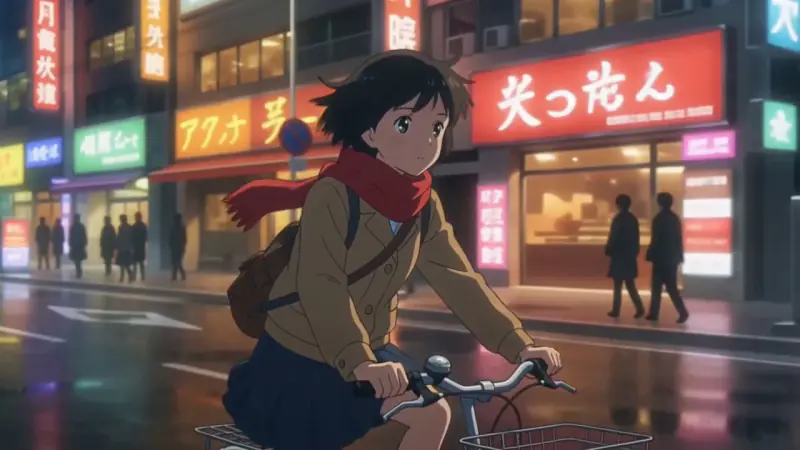
Examples
Anime look, 16:9, 15 seconds, upbeat track. A girl with a red scarf cycling through a neon city at night.
16:9 · 14 s · 720P
Try it with your own idea.
40 free credits on signup, this result costs 150 credits.
How it works
- 01
Describe your music video: the place, the main character and the mood. Pick a look (anime, cinematic, cartoon, retro, fantasy or urban), a length and a track from our music library.
- 02
The AI writes one shot per clip: an opening wide, a medium shot in motion, a close-up at the high point and, for 20 seconds, a closing wide. Each clip is 5 seconds.
- 03
The clips are cut together over the track you picked, with a fade in and fade out, and you download one MP4 in 16:9, 9:16 or 1:1.
What you get
Clips and music in one run
The AI writes one shot per clip and cuts them over the track you pick from our music library.
Six looks
Anime, cinematic, cartoon, retro, fantasy or urban.
Three lengths, three ratios
10, 15 or 20 seconds, in 16:9, 9:16 or 1:1.
Who it's for
Musicians releasing a song
Make an official music video for a track without a director, a camera or a post-production budget.
Content creators on YouTube
Add a visual music video to a song cover or a lofi upload instead of a static image.
Animators and visual storytellers
Generate a visual mood reel or a cinematic set piece for a demo or a pitch.
Try it with your own idea.
40 free credits on signup, this result costs 150 credits.
Ideas and uses
| Length | Clips | Credits |
|---|---|---|
| 10 seconds | 2 clips of 5 s | 100 |
| 15 seconds (default) | 3 clips of 5 s | 150 |
| 20 seconds | 4 clips of 5 s | 200 |
How to write a good music video prompt
Name one main subject, one place and one mood. "A girl with a red scarf rides a bicycle through a neon city at night, rain on the street" works better than "a cool city video". The tool adds the framing for each shot itself, so you do not need to describe camera moves.
Keep the subject the same through the whole description. Each clip is made from the same words, so a clear subject keeps the shots looking like one video.
Looks and when to use them
- Anime: cel shading and clean line art. Good for J-pop, lo-fi and upbeat pop.
- Cinematic: a film look with shallow depth of field. Good for indie, folk and dramatic tracks.
- Cartoon: bold outlines and bright colors. Good for playful and kids tracks.
- Retro: VHS grain and warm faded color. Good for synthwave and nostalgic tracks.
- Fantasy: glowing light and painterly scenes. Good for ambient and epic tracks.
- Urban: natural light and street textures. Good for hip-hop and R&B.
Frequently asked questions
How much does an AI music video cost?
Each 5 second clip costs 50 credits at full quality, so the default 15 second video costs 150 credits. Plans start at $12 a month for 1,000 credits. New accounts get 40 free credits for scripts, character art, storyboards, voices and sound, not video.
What does this AI music video generator make?
A 10, 15 or 20 second music video. You describe the scene, the AI makes one 5 second clip per shot and cuts them together over a track from our music library. You download one MP4.
Can I upload my own song?
Not in this tool. It uses one of four tracks from our library: upbeat, calm piano, soft strings or romantic. To use your own song, download the video and replace the audio in any video editor, or put your song over a still image with our free MP3 to MP4 tool.
Does it sync the cuts to the beat?
No. The cuts fall every 5 seconds, at the end of each clip. The tool does not analyze the music or detect beats.
Can I monetize the video on YouTube?
Every paid plan includes commercial use of what you make here. If you replace the music with your own song, clearing the rights to that song is up to you.
What looks can I choose?
Anime, cinematic, cartoon, retro, fantasy and urban. The look is added to every shot, so the clips match. You can add more style words to your description, such as soft pastel colors or 90s anime.
What aspect ratios are there?
16:9 for YouTube, 9:16 for TikTok, Reels and Shorts, and 1:1 for square posts. The AI makes the clips in that ratio, so nothing is cropped.
More like this
 MP3 to MP4 with ImageUpload your audio, add an image or solid color, and download a clean MP4 ready for YouTube, Instagram or TikTok.
 AI Slideshow MakerUpload your photos, add a title and get a slideshow video.
 AI Lyric Video MakerPaste your lyrics, add your own song or pick a track, then a background and a format.
 AI Anime Video GeneratorType a scene and get a 5-second anime clip in about a minute.
 AI Poster MakerDescribe your poster and put the text you want in quotes.
Updated
Make a music video for your track.
New accounts get free trial credits. No credit card required.