How to Turn a Photo Into an Anime Character
To turn a photo into an anime character in Ziztu, upload a clear photo to the AI Anime Generator, pick a style, then add the picture to a character in your project so the same face appears in every shot. Use only photos of people who agreed. The 40 free credits cover script, cast and storyboard; video starts at $12.
Updated
Real outputs made in Ziztu
Modern TV anime style. Same face, hair and jacket as the photo.
1 picture
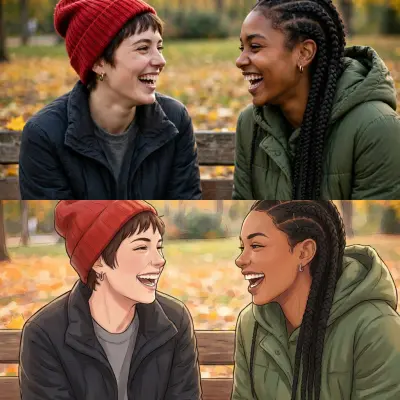
Soft painterly film style. Both faces and the autumn park carry over.
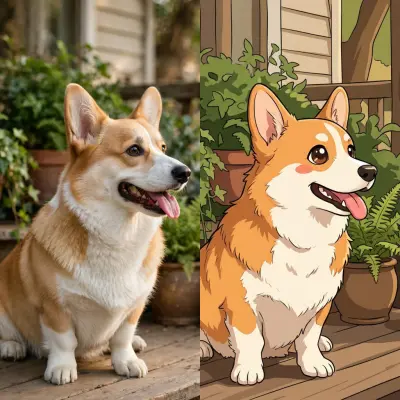
Chibi style on a pet. Body shape and colours stay true to the photo.
How to turn a photo into an anime character in 5 steps
Step 1. Choose a clear photo you may use
Pick a photo with the face clearly visible, good light and one or two people, or a pet. Use your own photo, or one of someone who agreed. The examples on this page are AI-made people and a pet.
- Privacy
- The uploaded photo is deleted from our server within 24 hours
Step 2. Redraw it as anime
Open the AI Anime Generator, upload the photo and pick one of five styles: modern TV anime, soft painterly film, 1990s cel anime, shojo manga in color or chibi. The face, hair, outfit and pose carry over and only the art style changes.
- Costs
- 38 credits ($0.46) for one picture on Starter
- Free credits
- This photo step starts on a plan; the free credits do not cover it
Step 3. Make it a character in a project
In a project, open the Cast, add a character and upload the picture as the reference image. Choose "My image is the final design" to keep the anime picture exactly, or upload the original photo and choose "Turn my reference into an anime character" to let the Director draw it.
Step 4. Check the identity line
The Director writes a short identity line from your picture: age, build, face, hair, outfit, colours, at most 45 words. Read it, fix anything wrong, and keep the colours plain. This line is added to prompts so the character looks the same in every shot.
Step 5. Put the character in a shot
Plan a shot with the character, or animate the picture on its own with image to video. A 5 second clip is 50 credits ($0.60) at 768p on Starter.
- Next
- Add voices and music on the timeline
A worked example: what stays and what changes
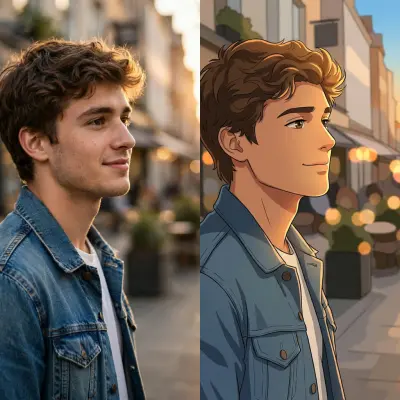
In the first example, a photo of a young man in a denim jacket on a street at sunset becomes a modern TV anime picture. The face shape, hair, jacket and setting stay. The line art and flat cel colours are new. In the third example a corgi becomes a chibi: body shape and colours stay true, and the proportions are simplified on purpose.
| Stays the same | Changes |
|---|---|
| Face shape, hair, skin tone | Line art and shading |
| Outfit and colours | Flat cel colours and brighter eyes |
| Pose and setting | Proportions in styles such as chibi |
Mistakes that cost credits
- A blurry or dark photo. The model works from what it sees. A clear face in good light gives the best likeness.
- Too many people. Two or three faces work. A crowd loses faces.
- Uploading someone who did not agree. Only use photos of people who agreed, and never a real person you do not have permission to depict.
- Expecting an exact copy. It draws a new picture. Small details can change, and chibi simplifies the face on purpose. Check the result.
- Skipping the identity line. The line is what keeps the character the same across shots. Read and fix it.
Why Ziztu for this job
- Ziztu turns one idea into a whole micro drama or anime episode, with the same characters in every shot.
- Micro dramas and anime are made in one place, on one credit balance, with voices, music and captions on one timeline.
- 40 free credits, no card: write the script, cast your characters, draw the storyboard and hear the voices. Video starts at $12.
- The same picture that you redraw as anime becomes a character with a sheet, so your own face is the same in every shot of your episode.
Start this in Ziztu
Start an anime episode where you are the lead.
An anime short, episode 1: a girl with a red scarf finds a glowing key in her grandfather's shop and the door behind the counter starts to hum. End on a cliffhanger when the door opens.
40 free credits, no card: write the script, cast your characters, draw the storyboard and hear the voices. Video starts at $12. You see the price before every generation.
Keep going
- Keep characters consistent in AI video for what to do after the character exists.
- Make an anime episode with AI for the whole episode.
- AI Anime Generator to redraw a photo now.
- OC maker to design an original character from words.
- AI anime video generator to animate a scene from words.
- The anime scene library for shot breakdowns with prompts to copy.
- Ziztu vs Higgsfield if you are comparing tools for characters.
Frequently asked questions
How do I turn a photo into an anime character?
Upload a clear photo to the AI Anime Generator, pick a style and download the anime picture. Then add the picture as a reference image to a character in a Ziztu project, so every shot starts from it.
Will the anime version look like me?
The face shape, hair, skin tone, clothes and pose carry over, and in our tests the people stayed recognizable. It draws a new picture, so small details can change.
Does it work with pets?
Yes. Pets come out in the same style, with their fur colours and markings kept, and a pet can be a character in your project like a person.
Is my photo stored?
The uploaded photo is deleted from our server within 24 hours. To make the picture it is sent to our AI provider, fal, which keeps its own copy under its own retention rules.
Can I use the picture commercially?
Yes, if you have the right to use the photo. Pictures made with paid credits have no watermark, and every plan includes commercial use.
Related tools
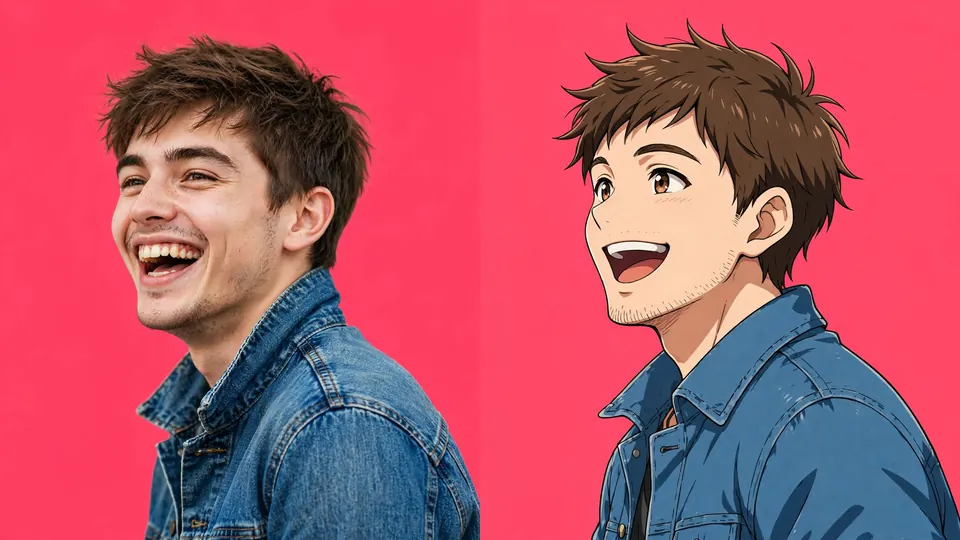 AI Anime GeneratorUpload a photo of yourself, a friend or a pet and get it redrawn as anime art, with the same face, hair, outfit and pose.
 OC MakerDesign your original character step by step. Generate a full character image, then bring it to life in Ziztu Studio.
 AI Anime Video GeneratorType a scene and get a 5-second anime clip in about a minute.