How to Turn a Script Into an AI Video
To turn a script into an AI video in Ziztu, import it as Fountain, Final Draft or plain text, then run Script to film: it breaks each scene into shots, keeps your dialogue word for word and adds the cast and places when you approve. The 40 free credits cover script, cast and storyboard; video starts at $12.
Updated
Real outputs made in Ziztu
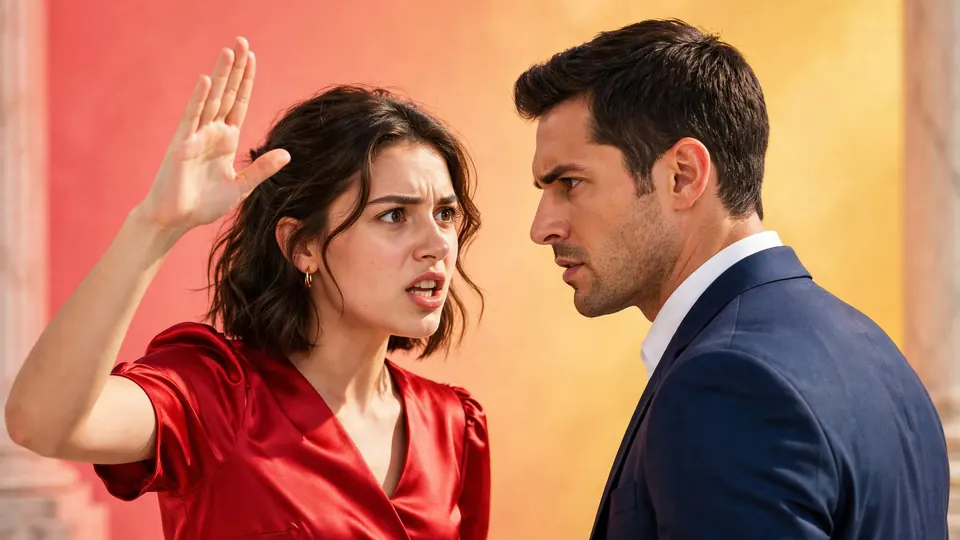
The Wrong Wedding, episode 1: 32 seconds, seven shots, three characters, made in Ziztu from one sentence.
9:16 · 32 s
A live-action vertical micro drama, episode 1: on her wedding day a bride reads a message on the groom's phone and walks down the aisle anyway, smiling. End on a cliffhanger when she takes the microphone.
The Sky Whale: a 58 second short, 20 shots, two characters, made in Ziztu. This is a 5 second highlight.
How to turn a script into an AI video in 5 steps
Step 1. Get the script in
Import a Fountain, Final Draft (.fdx) or plain text file, up to 8 MB, or write the script in the AI Script Writer. If you only have an idea of up to 800 characters, the Script Writer drafts the scenes from it, and you edit them.
- Accepts
- Fountain, Final Draft and plain text
- Costs
- Importing and editing are free
Step 2. Let the names match the cast and the places
A character name in the script can be linked to a character in the Cast, and a place heading to a place. A linked name uses that entry. A name with no link is added as a new character when you approve the plan.
Step 3. Get notes first, if you want them
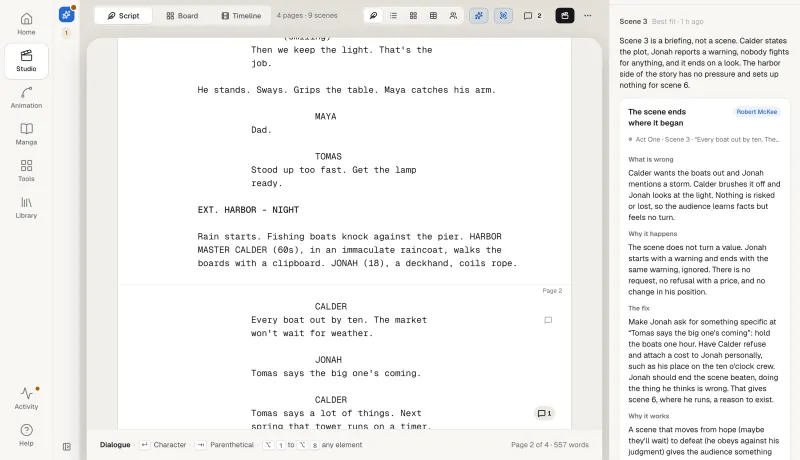
The AI Script Doctor reads a scene or the whole draft and writes a few strong notes, each with what is wrong, why it happens, and the exact fix. Nothing in the script changes unless you accept it.
Step 4. Run Script to film and read the plan
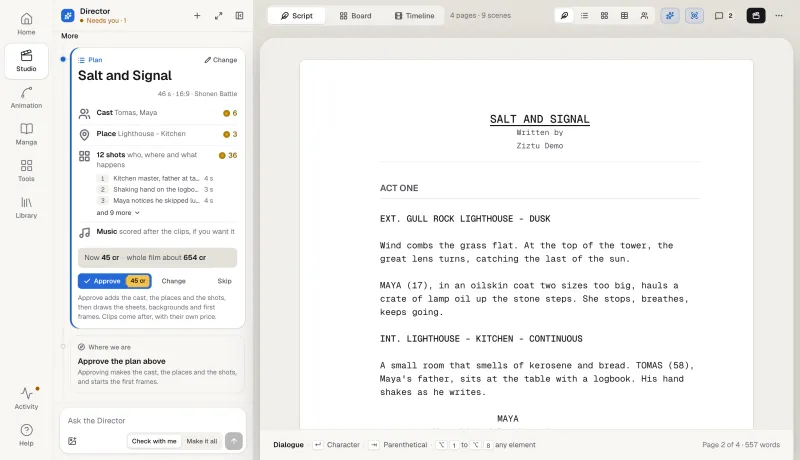
Script to film breaks each scene into shots with a size, an angle, a lens, a camera move, acting intent, the action, a first frame and your own dialogue word for word. The plan arrives as one card in the Director. It plans up to 6 scenes in one run, and you read it before anything is made.
Step 5. Approve, then generate the shots
Approving adds the cast, the places and the shots to the board and starts the character sheets, backgrounds and first frames. Clips come after, each with its own price: $0.37 for 5 seconds at 480p, $0.60 at 768p on Starter.
- Export
- MP4 up to 1080p
A worked example: Salt and Signal
Salt and Signal is a demo script of 4 pages and 9 scenes, with two characters, Tomas and Maya, and one place, a lighthouse kitchen. Script to film planned a 46 second film of 12 shots in 16:9. The plan card in step 4 shows what it cost to approve and what the whole film was estimated to cost.
| Part of the plan | What it holds | Credits |
|---|---|---|
| Cast | Tomas and Maya, with sheets | 6 |
| Place | Lighthouse and kitchen | 3 |
| Shots | 12 shots in 46 seconds | 36 |
| Approve the plan | Cast, place and shots added to the board | 45 |
| Whole film | Every clip, estimated | about 654 |
These numbers are read from the screenshot of a real demo project. Your script will plan its own shots and show its own price before you approve.
Mistakes that cost credits
- A script that is only dialogue. Shots need something to show. Write what the camera sees in the action lines, not only what people say.
- Long scenes in one run. A run plans up to 6 scenes. Plan the first scenes, check them and run again.
- Skipping the character link. Link or name every character so the same person is not added twice.
- Approving without reading. Read the plan card first. Change a shot, skip one or ask the Director to change it.
- Putting stage directions in dialogue. Say how a line is said in a parenthetical, not inside the line, so the spoken text stays clean.
Why Ziztu for this job
- A Director plans the cast, the scenes and every shot first, and the price of each generation is shown before you spend any credits.
- Micro dramas and anime are made in one place, on one credit balance, with voices, music and captions on one timeline.
- 40 free credits, no card: write the script, cast your characters, draw the storyboard and hear the voices. Video starts at $12.
- The script, the shot plan, the cast, the clips and the timeline are one project, so a change in the script reaches the shots without exporting and importing files between tools.
Start this in Ziztu
Start with an idea, then use the same steps for your own script.
A live-action vertical micro drama, episode 1: on her wedding day a bride reads a message on the groom's phone and walks down the aisle anyway, smiling. End on a cliffhanger when she takes the microphone.
40 free credits, no card: write the script, cast your characters, draw the storyboard and hear the voices. Video starts at $12. You see the price before every generation.
Keep going
- How to make an AI micro drama for the path from idea to episode.
- Turn a novel chapter into a micro drama to write the script from a chapter.
- AI Screenwriting Software for the editor, the Doctor and Script to film.
- AI Script Writer to draft a script from one idea.
- AI Storyboard Generator to see six shots of one scene.
- AI micro drama generator to test one scene of your script as a 5 second clip.
- Ziztu vs LTX Studio if you are comparing script to video tools.
- Ziztu vs OpenArt if you are comparing tools that turn a script into a story.
Frequently asked questions
How do I turn a script into an AI video?
Import the script or write it in Ziztu, run Script to film to get a shot plan, approve it and generate each shot as a clip. Then add voices and music on the timeline and export one MP4.
Which script formats can I import?
Fountain, Final Draft (.fdx) and plain text, up to 8 MB. You can export Fountain, Final Draft and a print-ready PDF too.
Does it keep my dialogue exactly?
Yes. Script to film keeps your dialogue word for word in each shot, so the lines on screen are the lines you wrote, and any change you want is made in the script.
How many scenes can it plan at once?
Script to film plans up to 6 scenes in one run. When those are approved, run it again for the next scenes, so a long script is planned in several runs.
What does it cost?
Importing and planning show their price before you approve. Clips are priced per shot: $0.37 for 5 seconds at 480p and $0.60 at 768p on Starter.