Anime Storyboard Template

The way anime is planned: a numbered cut, a small picture, the action and camera, the sound and the length in seconds and frames. Eight cuts filled in.

Use this template
  • FitsOne scene of 20 to 60 seconds
  • IncludesFilled example and blank
  • CostFree to copy

Updated

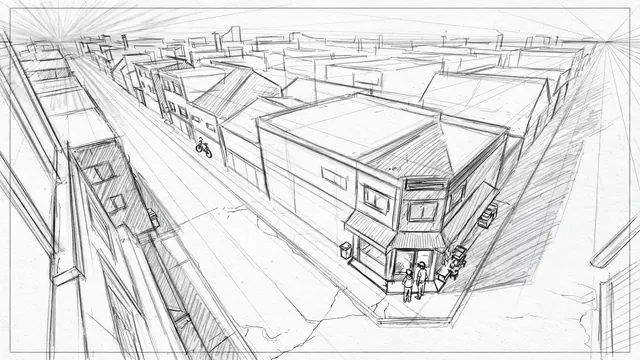
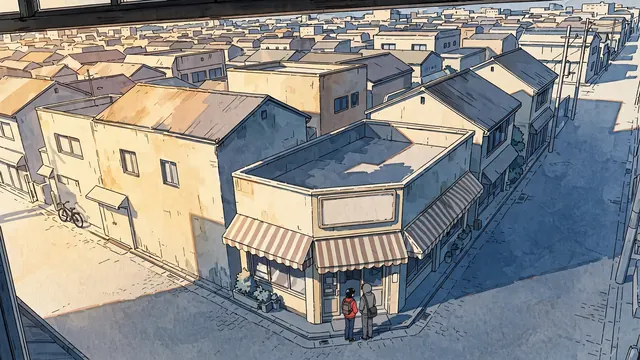
A gray pencil layout drawing of a corner shop in two-point perspective seen from a high window
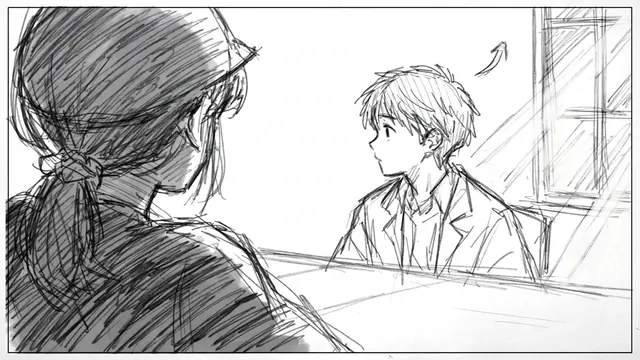
A pencil storyboard panel over a girl's shoulder toward a boy sitting at a table
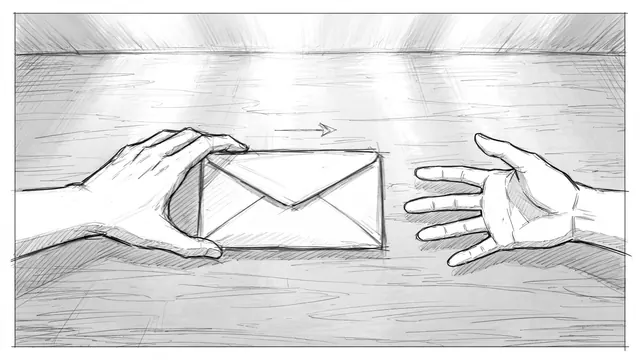
A pencil storyboard insert of one hand sliding an envelope across a table toward another hand

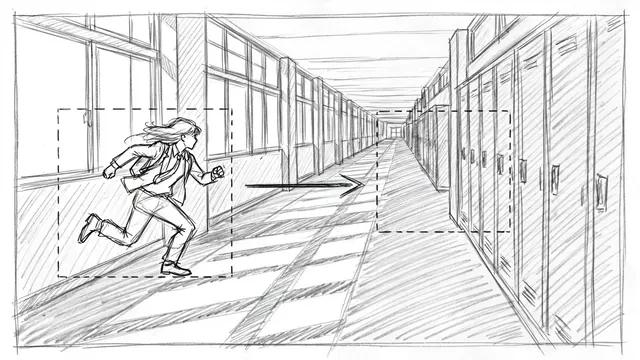
Panels of the example storyboard, from the Ziztu anime scene library.

The template

An anime storyboard is called an ekonte. Each row is one cut, and its length is written in seconds and frames at 24 frames per second. The example is eight cuts of one quiet scene.

Anime storyboard (ekonte)

The envelope, scene 1Your title here

Scene card

The header of every ekonte page.

Scene
The envelope
Place
A corner shop's back table, then a school hallway
People
Mio, a student. Ken, her classmate.
What changes
Ken gives Mio an envelope. She does not open it.
Length
About 24 seconds at 24 frames per second

Cuts

Time is written as seconds plus frames, so 3+12 is three seconds and twelve frames.

FrameCutAction and cameraDialogue and soundTime
A gray pencil layout drawing of a corner shop in two-point perspective seen from a high window1Establishing: high angle from a window across the street onto the corner shop. Two figures walk in from the right. Static camera.Street noise. A shop bell.4+00
2Interior: Mio at the back table. Ken enters from frame left. She does not look up.Murmur of the shop.3+12
A pencil storyboard panel over a girl's shoulder toward a boy sitting at a table3Over the shoulder: Mio's shoulder in the foreground, Ken looks up and starts to speak. Static camera.KEN: I almost did not come.3+00
A pencil storyboard insert of one hand sliding an envelope across a table toward another hand4Insert from above: his hand slides the envelope across the table.Paper on wood.2+12
5Insert from above: her hand stops the envelope.A small intake of breath.1+12
6Close-up: Mio's eyes look at the envelope, not at him.Silence.2+00
A pencil storyboard of a school hallway with frames and an arrow marking a camera move to the right7Next morning, a school hallway. Mio walks right along the lockers. The camera tracks right with her.One piano note.4+00
The finished color anime frame of a corner shop seen from a high window, two students by the door8The corner shop at dusk. Ken waits by the door. Static camera.The shop bell.3+12

Coverage check

A scene that has these six cuts can be edited many ways.

  1. 1Establishing shotCut 1 shows the place from outside.
  2. 2Over the shoulderCut 3 keeps the camera on one side of the table.
  3. 3InsertCuts 4 and 5 are hands only, no faces.
  4. 4ReactionCut 6 holds on her eyes.
  5. 5Camera moveCut 7 tracks along the lockers.

Paste it into Google Docs, Word, Notion or any text editor. It is free to copy and use.

The fastest way to use it

On your own

  • Copy the template into a document and fill it in.
  • Find an image tool, a video tool and a voice tool, and move your work between them.
  • Keep the same faces, places and style yourself, shot after shot.

In Ziztu

  • The idea box opens with the example already written. Change the names and press go.
  • Studio plans the shot list, makes every shot and adds the music, in one place.
  • Character sheets keep the cast looking the same in every shot.
  • 40 free credits, no card: write the script, cast your characters, draw the storyboard and hear the voices. Video starts at $12.
Use this template

How to fill it in

  1. 01

    Fill in the scene card

    Write the place, the people and what changes by the end. If nothing changes, the scene is not ready to storyboard.

  2. 02

    List the cuts in order

    Give every cut one action, one camera note and one sound. Start with an establishing cut and add an insert and a reaction.

  3. 03

    Time each cut

    Write the length in seconds and frames, then add them up. A cut that cannot be timed is usually two cuts.

What makes it work

Cover the scene

An establishing cut, an over-the-shoulder, an insert and a reaction give the editor choices, even in a 24 second scene.

Keep the camera on one side

In a conversation, cross the line between the speakers only on purpose. Over-the-shoulder cuts from one side stay readable.

Draw an arrow for every move

A camera move is a start frame, an end frame and an arrow. Writing the direction in words is a second check.

Frequently asked questions

What is an ekonte?

An ekonte is the storyboard format used to plan anime. Each page has columns for the cut number, a small drawing, the action and camera, the dialogue and sound, and the length of the cut in seconds and frames.

How many cuts does an anime scene have?

A TV anime episode has roughly 300 cuts. A short scene of 20 to 30 seconds has between six and twelve, as in the example here, which has eight.

What do the numbers like 3+12 mean?

They are seconds plus frames. At 24 frames per second, 3+12 is three seconds and twelve frames, or 3.5 seconds. Animators count in frames because every drawing is timed to one.

Are the example panels from a real show?

No. They come from the Ziztu anime scene library: pencil layouts and one finished frame, with invented people and places.

Can I turn my storyboard into a video with AI?

Yes. Press Use this template to open the idea box with the eight cuts written out, or try the scene in the AI storyboard generator. In Ziztu Studio you plan every cut and keep the cast the same.

Is the template free?

Yes. Copy it as text, download it as a Markdown file or print it to PDF without an account.

A gray pencil layout drawing of a corner shop in two-point perspective seen from a high window

Turn the template into a scene you can watch.

40 free credits, no card: write the script, cast your characters, draw the storyboard and hear the voices. Video starts at $12.