Anime Storyboard
Anime is planned on storyboards called ekonte: numbered cuts with the camera, the action, the dialogue and the timing of each. How they work, with five original layout panels.
Updated
How anime storyboards work
Every anime episode is planned on a storyboard called ekonte. Each page has columns: the cut number, a small drawing of the frame, the action and the camera move, the dialogue and sound, and the length of the cut in seconds and frames. A TV episode has roughly 300 cuts, and the director or a storyboard artist draws all of them before animation starts.
From the storyboard, each cut becomes a layout: a cleaner, full-size drawing that fixes the camera, the perspective of the background and where the characters stand. Key animators draw the key poses on top. The panels below are original pencil drawings that show the decisions a storyboard makes, and the last one is the finished color frame.
Five shots, broken down
Every frame below was made for this page with Meta Muse Image from the prompt under it. The notes use storyboard terms: where the camera stands and how high, what the frame holds, where the light comes from, and what should move when you animate it.
Shot 1: The establishing layout
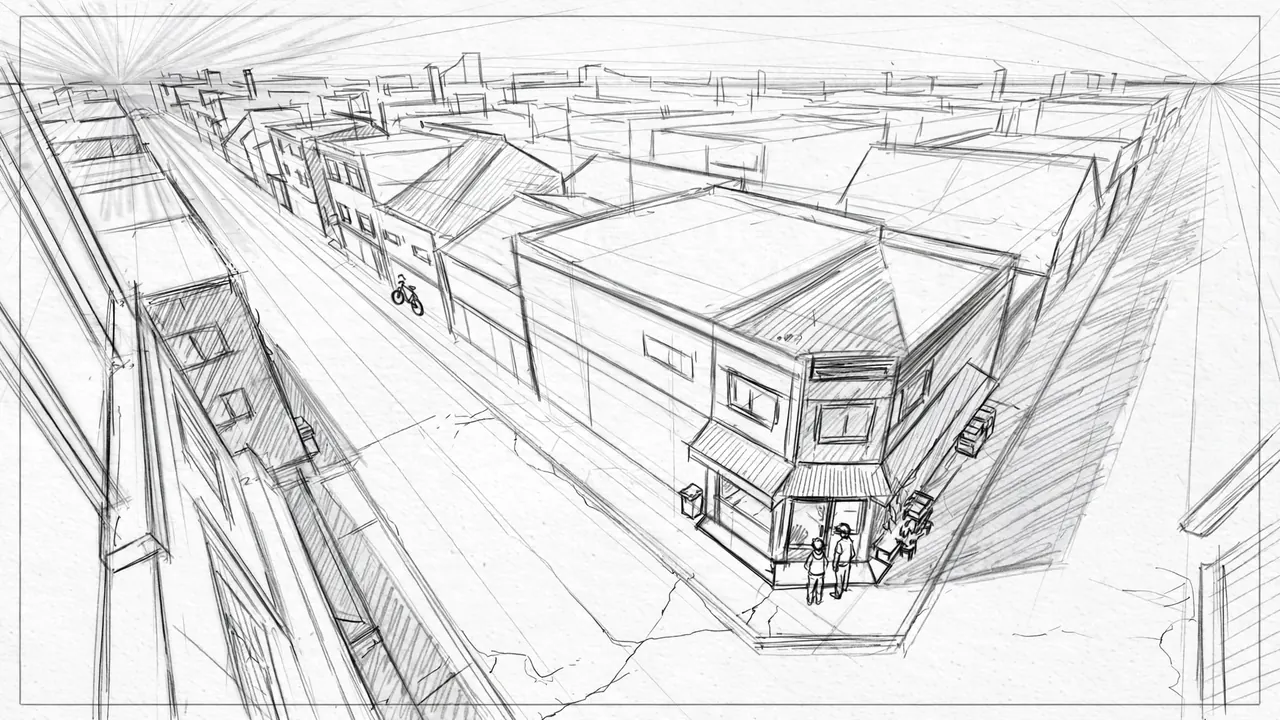
- Camera
- High, from a third-floor window across the street, looking down at a corner shop.
- Lens
- Normal, a 35 mm feel, in two-point perspective.
- Framing
- The shop and the street in two-point perspective with a high horizon line; two simple figures at the door.
- Light
- Noted, not drawn: the sun from the upper left, hatching on the shadow sides.
- Palette
- #F7F8F7#D6D7D6#ACADAC#6A6B6A
- Motion
- The camera holds; two figures walk in from the right.
A rough anime layout drawing, 16:9 frame with a thin border. High angle from a third-floor window across a quiet street, looking down at a small corner shop drawn in two-point perspective with clear construction lines and a high horizon line. Two simple sketchy figures stand by the shop door. Light hatching on the shadow sides, the sun implied from the upper left. Loose, confident gray pencil lines on white paper, light hatching, no color. No text, no letters, no numbers, no words, no logos, no watermark, no signature.
The exact words this frame was made from with Meta Muse Image. Paste them into an anime image tool and change the details.
Keep the camera still while two figures walk into the frame from the right and stop at the shop door.
Save the frame, upload it to image to video and paste this. Pick the camera move "static camera".
Shot 2: Over the shoulder
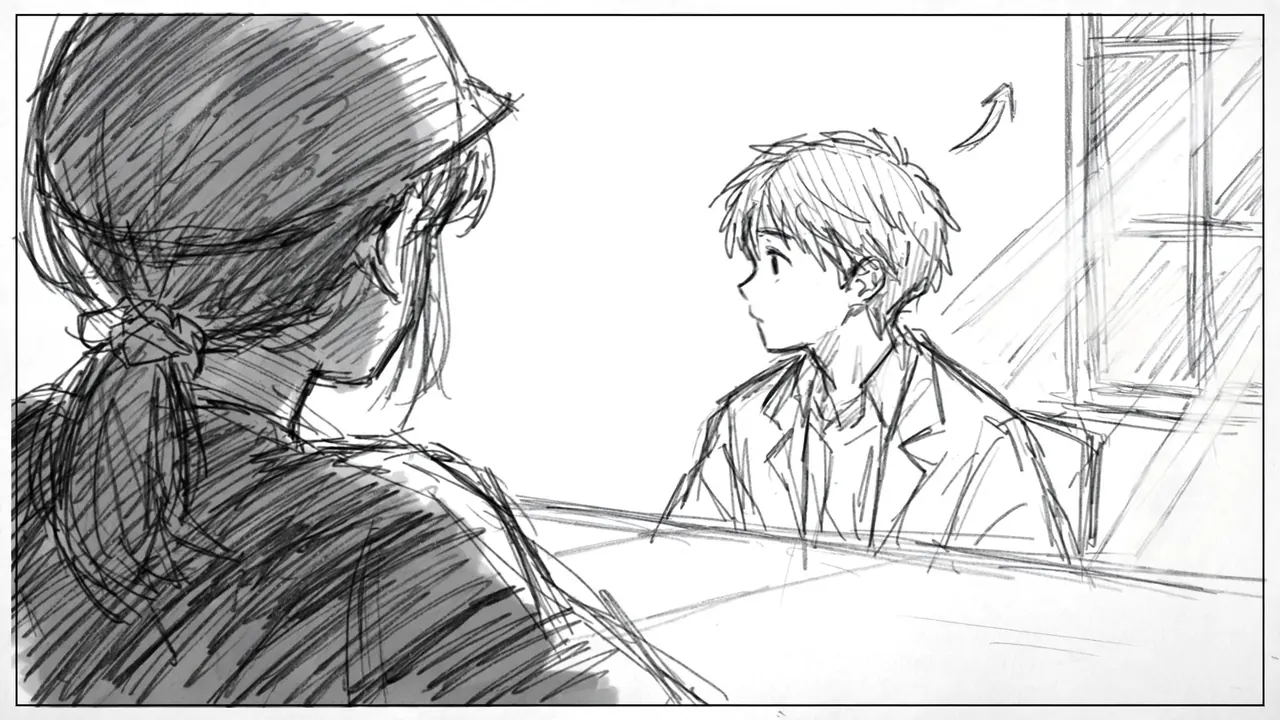
- Camera
- Over one character's shoulder, at her shoulder height, facing the other.
- Lens
- Long, an 85 mm feel.
- Framing
- Her shoulder and hair as a dark shape in the left foreground, the boy waist up in the right third.
- Light
- Window light from the right side of the frame on the far character.
- Palette
- #FFFFFF#888989#414242#EDEEED#C3C5C4
- Motion
- He looks up and starts to speak.
A rough anime storyboard panel, 16:9 frame with a thin border. Over-the-shoulder shot: the back of a girl's head and her shoulder as a dark hatched shape in the left foreground, and a boy sitting across a table in the right third, drawn waist up, looking at her, not at the camera. Window light from the right of the frame. A small hand-drawn arrow shows his head turning up. Loose, confident gray pencil lines on white paper, light hatching, no color. No text, no letters, no numbers, no words, no logos, no watermark, no signature.
The exact words this frame was made from with Meta Muse Image. Paste them into an anime image tool and change the details.
The boy looks up from the table and starts to speak to the girl in the foreground, and the window light flickers softly.
Save the frame, upload it to image to video and paste this. Pick the camera move "static camera".
Shot 3: The insert
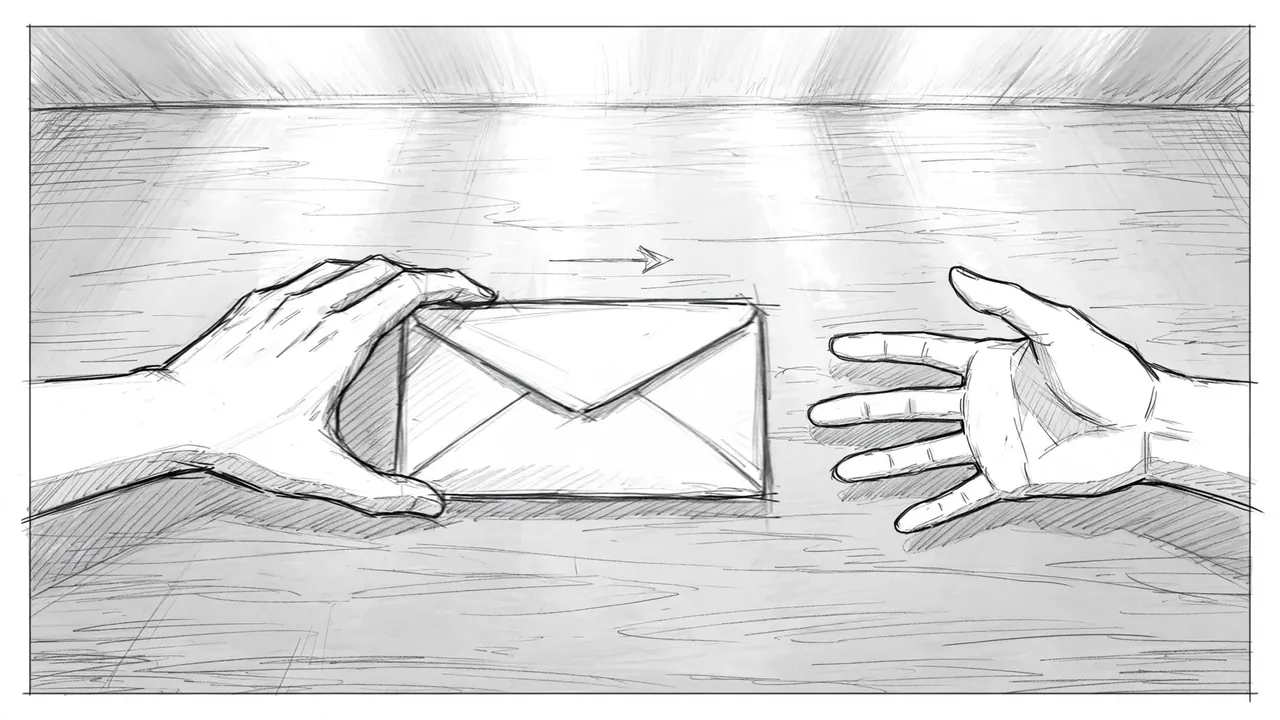
- Camera
- Close, above the table, looking down at two hands.
- Lens
- Close, a macro feel.
- Framing
- Two hands and an envelope in the center; no faces; an arrow for the slide.
- Light
- Soft window light from the top of the frame.
- Palette
- #FEFEFE#CCCCCC#DFE0DF#A4A5A4#444544
- Motion
- One hand slides the envelope; the other stops it.
A rough anime storyboard panel, 16:9 frame with a thin border. Insert shot from above a wooden table, close: one hand slides a sealed envelope across the table toward another hand, both in the center of the frame, no faces. A small drawn arrow shows the direction of the slide. Soft window light from the top of the frame. Loose, confident gray pencil lines on white paper, light hatching, no color. No text, no letters, no numbers, no words, no logos, no watermark, no signature.
The exact words this frame was made from with Meta Muse Image. Paste them into an anime image tool and change the details.
One hand slides the envelope across the table and the other hand reaches out and stops it.
Save the frame, upload it to image to video and paste this. Pick the camera move "static camera".
Shot 4: A camera move
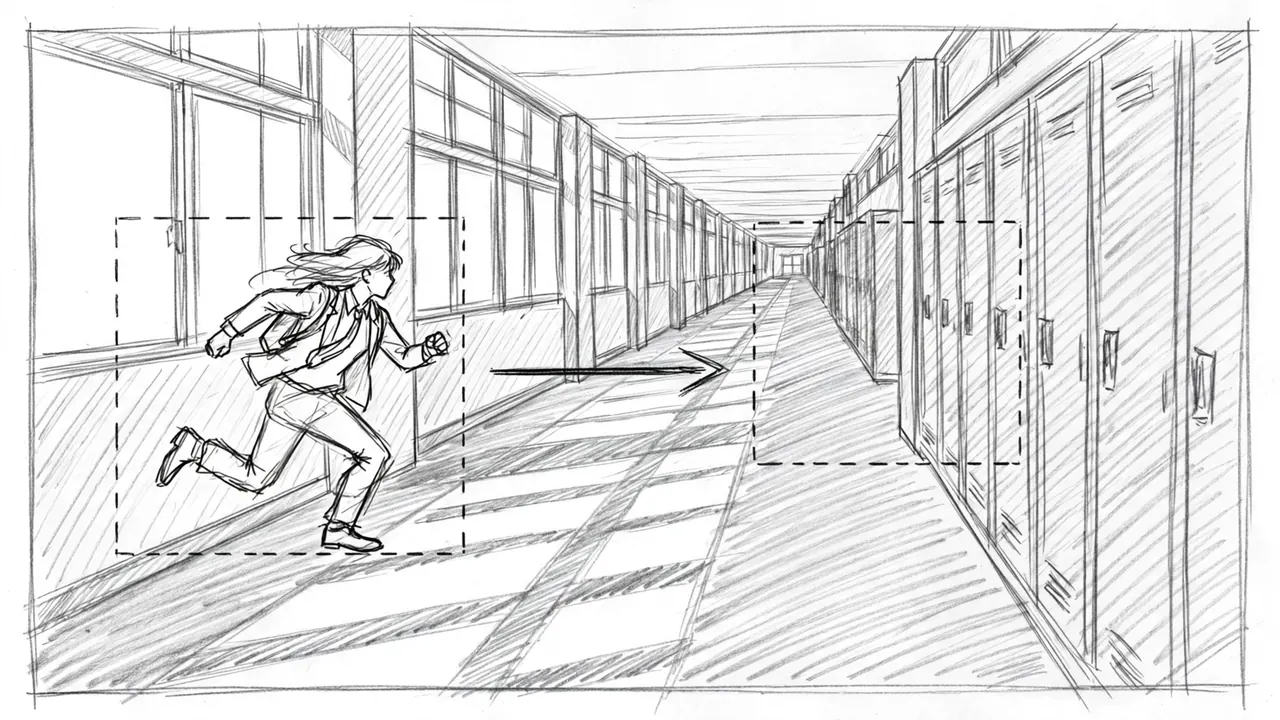
- Camera
- Starts on the left end of a hallway and moves right along the lockers.
- Lens
- Wide, a 28 mm feel.
- Framing
- A long school hallway, two rectangles marking the start and end of the move, a long arrow between them, a running figure.
- Light
- Afternoon light through the windows on the left, bars of light on the floor.
- Palette
- #FDFDFD#E1E2E2#C7C8C7#9D9E9D#525352
- Motion
- The camera moves right, following the runner.
A rough anime storyboard panel, 16:9 frame with a thin border. A long school hallway with lockers on the right and windows on the left, bars of sunlight on the floor. A running student is sketched in the left part of the frame. Two rectangles drawn over the picture mark where the camera starts and where it stops, with a long arrow between them showing the camera moving to the right. Loose, confident gray pencil lines on white paper, light hatching, no color. No text, no letters, no numbers, no words, no logos, no watermark, no signature.
The exact words this frame was made from with Meta Muse Image. Paste them into an anime image tool and change the details.
The camera moves to the right along the hallway, following the running student past the lockers and the bars of sunlight.
Save the frame, upload it to image to video and paste this. Pick the camera move "slow pan to the right".
Shot 5: From layout to the finished frame
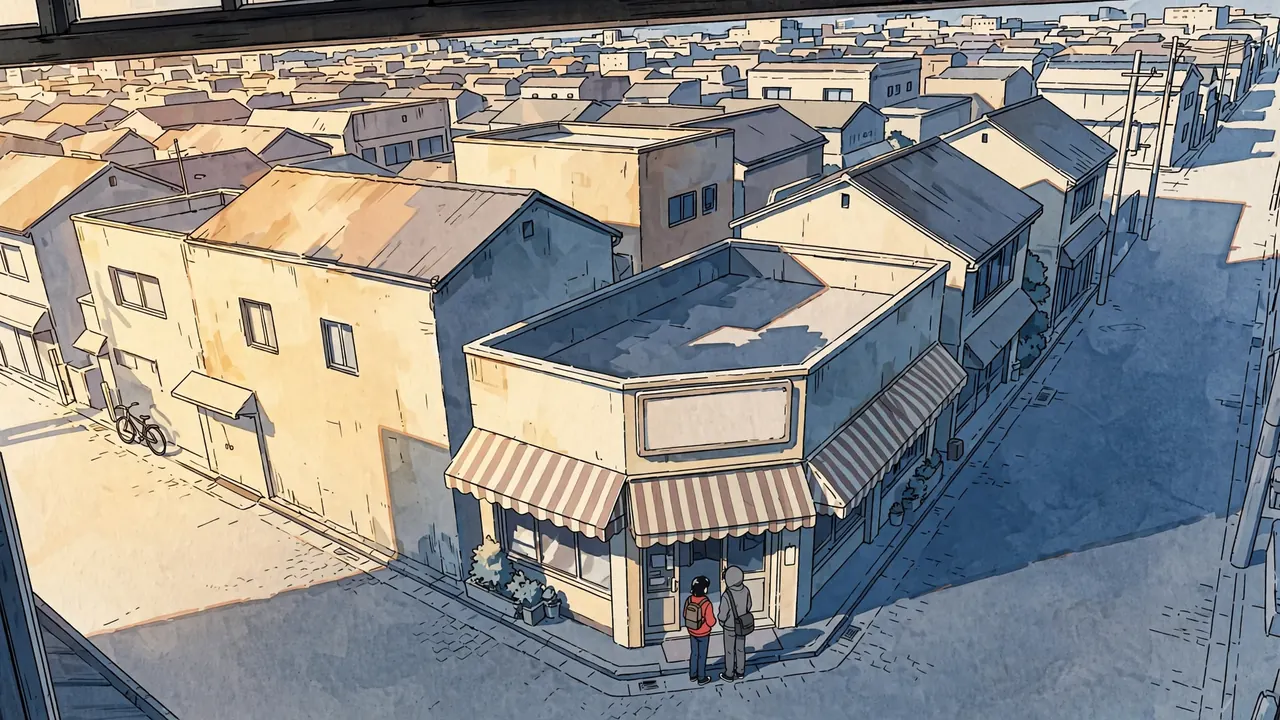
- Camera
- The same as the establishing layout: high, across the street.
- Lens
- Normal, a 35 mm feel.
- Framing
- The corner shop in color, two students at the door.
- Light
- Sun from the upper left as the layout noted: warm walls, cool blue shadows.
- Palette
- #F1DEB9#79818C#4B637C#414B56#B9A896
- Motion
- The two students wave and go inside.
A single frame from a 2D anime film, 16:9. High angle from a third-floor window across a quiet street, looking down at a small corner shop with a striped awning, in two-point perspective with a high horizon. Two students stand by the shop door, one in a red jacket and one in a gray hoodie. Afternoon sun from the upper left: warm light on the walls and cool blue shadows. A blank shop sign with no lettering. Hand-painted background, clean line art, flat cel shading with hard two-tone shadows. No text, no letters, no numbers, no words, no logos, no watermark, no signature.
The exact words this frame was made from with Meta Muse Image. Paste them into an anime image tool and change the details.
The two students wave to someone down the street, then push the door open and walk into the shop.
Save the frame, upload it to image to video and paste this. Pick the camera move "static camera".
How to storyboard an anime scene with AI
- Write the coverage first. One establishing shot, an insert with no face, a reverse angle, two close shots, and at least one high and one eye-level camera. Never two cuts in a row with the same size and angle.
- Keep the 180 degree line. Decide which side of the characters the camera stays on, and keep it, so screen direction never flips by accident.
- Time every cut. Dialogue at about 2.5 words a second plus half a second, reactions one to two seconds, establishing shots two to four.
- Board in pencil, then finish. Rough panels are cheap to make and change. Lock the composition, then make the final frame in color with the same camera words.
- Use a generator for the first pass. The AI storyboard generator draws a six panel board from one scene with this coverage built in.
Make it move
Save any frame on this page, upload it to image to video and paste its video prompt for a 5 second clip. Or make your own first frame from the image prompt.
Scenes that go with this one
Frequently asked questions
What is an anime storyboard called?
Ekonte, which means picture continuity. It is a sheet of numbered cuts with a small drawing of each frame and columns for the action, the camera, the dialogue and sound, and the length of each cut.
How many cuts are in an anime episode?
A TV episode usually has roughly 250 to 400 cuts, around 300 on average, so a cut lasts about four to five seconds. Fights run much faster, with many cuts under two seconds.
What is the difference between a storyboard and a layout?
A storyboard plans every cut in small, rough drawings. A layout is the next step: one cut drawn at full size with the exact camera, background perspective and character positions, used by the background painters and the key animators.
How do I storyboard an anime scene?
Write the scene as beats, choose a camera position for each beat with the coverage rules above, sketch rough panels, time each cut, and check that no two cuts in a row look alike. Then make the final frames from the approved panels.
Can AI make an anime storyboard?
Yes, as a first pass. An AI storyboard generator can draw a set of panels with planned coverage from a scene description. A director still decides the timing, the cuts and what matters in each frame.