AI Storyboard Generator
Describe one scene and get a six panel storyboard planned like a director would: a wide to open, an insert, a reverse angle and a close-up at the turn.
Updated
Example outputs
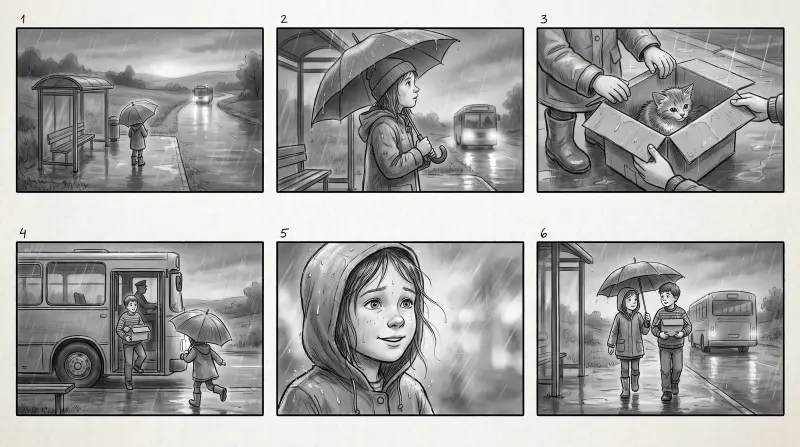
Scene: "At a rural bus stop in the rain at dusk, a girl waits with an umbrella. A bus arrives and her little brother steps off holding a cardboard box with a kitten in it. She runs to him and they share the umbrella." Look: black and white pencil sketch. 38 credits.
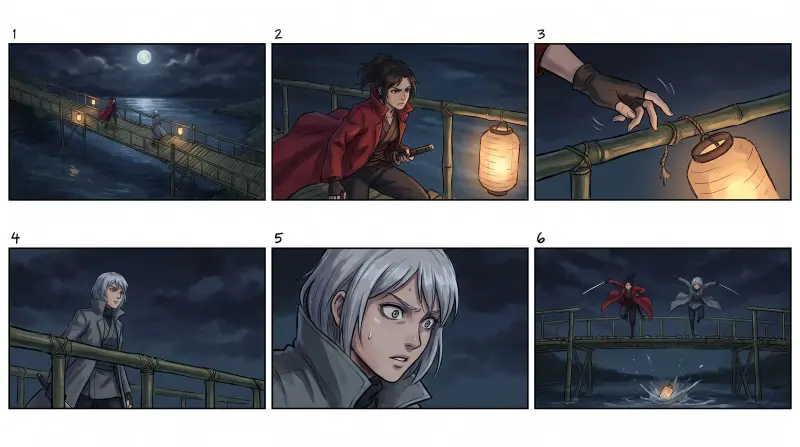
Scene: "On a bamboo bridge over a river at night, two rival swordswomen face each other, one in a red coat and one in a gray coat. A paper lantern falls from the railing into the river and they both leap forward." Look: color 2D anime frames. 38 credits.
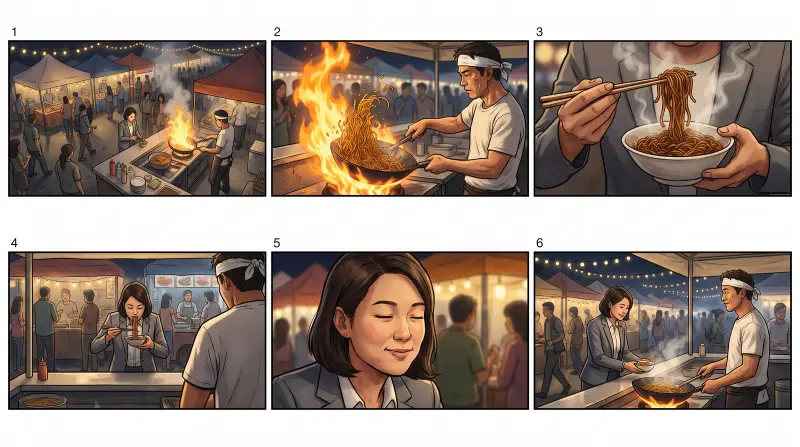
Scene: "In a busy night market, a chef with a white headband flips noodles in a wok over a big flame. A tired office worker in a gray suit at the counter tastes them, closes her eyes and smiles. The chef nods." Look: cinematic color frames. 38 credits.
How it works
Describe one scene, or paste it from your script: who is there, where they are, and what happens from the start of the scene to the end.
Pick a look: a black and white pencil sketch, ink with gray marker, color anime frames or cinematic color frames.
Nano Banana Pro draws one 16:9 sheet with six numbered panels (38 credits), usually in under a minute. Download it as a JPEG.
Ideas and uses
| Term | What the frame shows | Why a director uses it |
|---|---|---|
| Establishing shot | The whole place, usually wide and from high up | Tells the audience where they are before anything happens |
| Medium shot | A person from the waist up | Action and talking, with some of the place still visible |
| Close-up | A face, from the chin to the top of the head | A reaction or a decision the audience must not miss |
| Insert | A detail: hands, a key, a letter, a phone screen | Shows the object the scene turns on; often has no face in it |
| Reverse angle | The camera turned around to face the other way | Shows the other side of the room and the other person |
| Over the shoulder | One person seen past the back of another | Conversations, keeping both people in the frame |
| High and low angle | The camera above or below eye level | High makes a subject small or trapped, low makes them strong |
How the six panels are chosen
Most AI storyboards come out samey: six panels from the same height, the same distance and the same side, with every character facing the viewer. That is not how a scene is covered. This generator asks for a fixed plan that storyboard artists use to make a scene readable:
- An establishing shot from high up, so we know the place and where everyone stands.
- A medium shot at eye level as the action starts.
- An insert: hands or the object the scene turns on, with no face in the frame.
- A reverse angle from the other side, so the background changes and the space feels real.
- A close-up at the turning point, the character looking at someone off screen, never into the lens.
- A wider closing shot that shows what changed.
No two panels in a row share the same size and angle, which is what makes a sequence feel edited instead of repeated.
Write a scene the generator can board
Write the scene in three or four short sentences, in the order things happen. Name who is there, two or three things in the place, and the moment the scene turns.
Weak: "a sad scene in the rain". Better: "At a rural bus stop in the rain at dusk, a girl waits with an umbrella. A bus arrives and her little brother steps off holding a box with a kitten in it. She runs to him and they share the umbrella." The second version gives the board a place, a beginning, a turn and an ending, so every panel has a job.
From storyboard to film
A storyboard is a plan for shots. To make the shots, crop a panel and use it as the first frame in image to video, or describe the shot in text to video.
For a whole script, the AI Script Writer is the longer road: write or import the screenplay, then script to film turns each scene into a shot plan with sizes, angles, lenses and camera moves. You approve the plan in the Director, the shots go onto the board with your cast and places, and each clip is made at its own price.
Frequently asked questions
Is the AI storyboard generator free?
You can try it free. A new account gets 40 free trial credits, and one storyboard sheet costs 38 credits, so the trial covers one board. Trial images carry a small watermark. Plans start at $12 a month for 1,000 credits.
Can it storyboard my whole script?
This page boards one scene at a time. For a whole screenplay, write or import it in the AI Script Writer: script to film turns each scene into a shot plan with shot sizes, angles, lenses and camera moves, which you approve before anything is drawn.
How many panels do I get?
Six numbered 16:9 panels on one sheet, three across and two down: an establishing shot, a medium shot, an insert, a reverse angle, a close-up and a closing wide.
Do the characters look the same in every panel?
The model is asked to keep the same face, hair and clothes in all six panels, and on one sheet they usually stay close. They are not locked. For characters who must match exactly across a film, Ziztu Studio uses character sheets for every shot.
Pencil sketch or color?
Pick one of four looks: a black and white pencil sketch like a classic film storyboard, ink with gray marker shading, color 2D anime frames, or cinematic color frames.
What is the difference between a storyboard and a shot list?
A shot list is the plan in words: shot size, angle, camera move and action for each shot. A storyboard draws those shots so everyone can see the framing. Directors usually write the shot list first and board the shots that are hard to describe.
Can I use a panel as the first frame of a video?
Yes. Crop the panel you want, upload it to the image to video tool and say what should move. Color panels work best as first frames.
Which AI model draws the storyboard?
Nano Banana Pro at 2K. It follows layouts and numbered panels well and keeps characters fairly consistent across one image.