GIF Compressor
A free GIF compressor with no signup. Upload a GIF, make it narrower, drop some frames or use fewer colors, and see the before and after size before you download.
Upload your file to get started. No account needed.
Examples
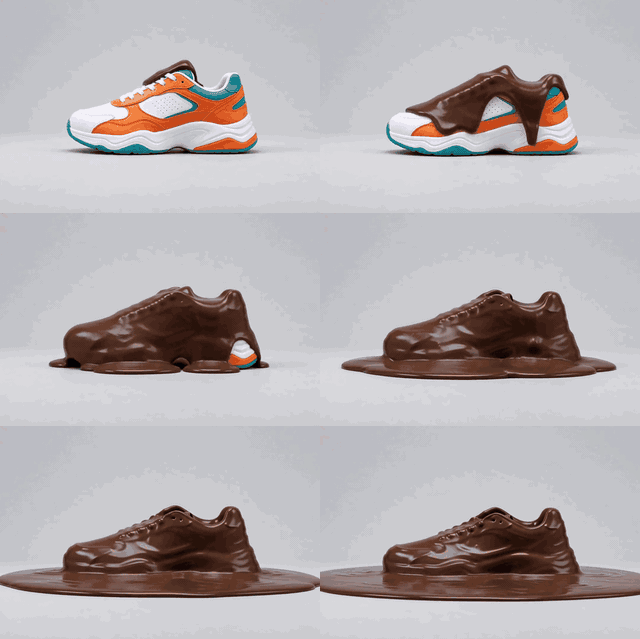
Before: the melting sneaker GIF, 480 px wide, 1.2 MB.
480 x 320 px · 4 s
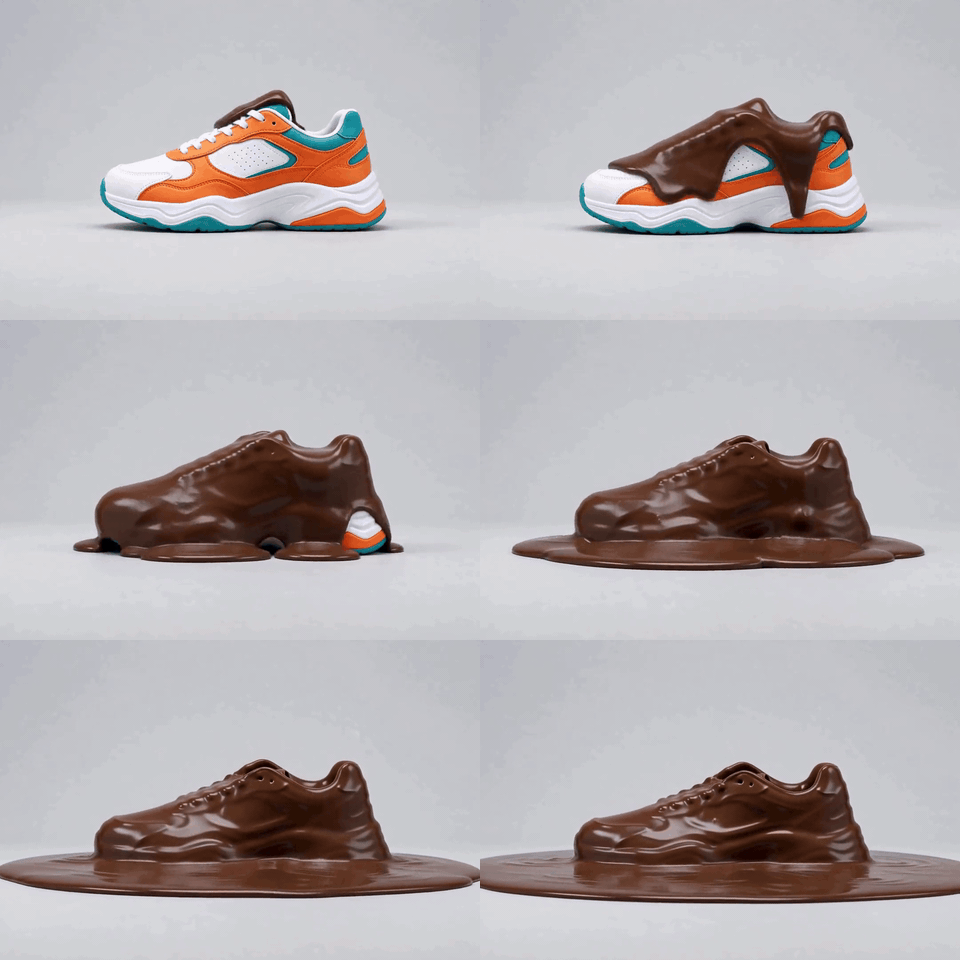
After: the same GIF at 320 px wide and 64 colors, 364 KB. That is 71% smaller.
320 x 213 px · 4 s
How it works
- 01
Choose your GIF
Any GIF up to 50 MB. You see it before you start.
- 02
Choose how to shrink it
Pick a width (keep, 320, 480, 720 px), the frames a second (keep, 15 or 10) and the colors (64, 128, 256).
- 03
Compress and download
Press the button. The smaller GIF appears with the before and after size, and you save it with one click.
What you get
Three ways to shrink it
Make the GIF narrower, use fewer frames a second, or use fewer colors. Mix them to find the smallest file that still looks right.
See the size before you save
The result shows the size before and after, and the picture itself, so you can judge it and try again.
Free, and private
No account and no card. 10 GIFs an hour. Your GIF is deleted from our server as soon as the new one is made.
Who it's for
Anyone with a GIF that is too heavy
Shrink a GIF that is slow to load or too big to send.
Web and blog editors
Make the GIFs on a page lighter so the page opens faster.
Creators and designers
Find the smallest setting that still looks good before you share the file.
Ideas and uses
| Setting | Choices | What it does |
|---|---|---|
| Width | Keep, 320, 480, 720 px | Fewer pixels in every frame. The biggest saving. A width above the GIF's own is left alone. |
| Frames a second | Keep, 15, 10 | Fewer frames. Motion gets a little less smooth. A rate above the GIF's own is left alone. |
| Colors | 64, 128, 256 | Fewer colors make a smaller file. Smooth gradients can show steps with 64. |
| Your GIF | Up to 50 MB | 10 GIFs an hour. |
How to make a GIF smaller
Three things decide the size of a GIF: how many pixels each frame has, how many frames there are, and how many colors it uses. This compressor lets you change all three.
Start with the width. It is the biggest saving, and a GIF at 320 or 480 px wide is still clear on a phone. Then lower the frames a second, from the GIF's own rate to 15 or 10. Last, try 128 or 64 colors, and look at the picture to see whether the gradients still look smooth.
A real example
The example above is a real run of this tool. The GIF of a melting chocolate sneaker is 1.2 MB at 480 px wide. At 320 px wide and 64 colors, the same GIF is 364 KB, which is 71% smaller. The movement is the same, the picture is a little softer, and the plain background shows a few steps.
If you still need it smaller, an MP4 is the next step: the GIF to video converter makes one for free. If you want a fresh GIF from a video, use the video to GIF converter.
What happens to your GIF
Your GIF goes to our server over HTTPS and is compressed there with ffmpeg. The GIF is deleted as soon as the new one is made, and the new one is deleted as soon as it has reached your screen. Anything left behind is deleted within 60 minutes. The limits are 50 MB per GIF and 10 GIFs an hour.
Frequently asked questions
How do I compress a GIF?
Use the tool on this page. Choose your GIF, pick a smaller width, fewer frames a second or fewer colors, and press Compress the GIF. The result shows the size before and after, and you download it. There is no signup.
Is this GIF compressor free?
Yes. There is no account and no card. You can compress 10 GIFs an hour.
What makes a GIF so big?
A GIF stores every frame as a separate picture, so the size grows with the number of pixels and the number of frames. A GIF that is 480 px wide with 40 frames holds the pixels of 40 pictures. Making it narrower or dropping frames cuts the size the most.
Which setting should I try first?
Width. Going from 480 to 320 px wide cuts the pixels in every frame by more than half. Then try fewer frames a second. Use fewer colors last, because it is the setting you can see most.
Will it make my GIF look worse?
A smaller GIF has less to show, so it always loses something. A smaller width looks softer, fewer frames look less smooth, and fewer colors can show steps in gradients. Try one setting at a time and compare the picture with the size.
Will the compressed GIF ever be bigger than the original?
It can be, when your GIF was already small. The result tells you when that happens. The tool never makes the picture larger: a width above the GIF's own is left alone.
Does the GIF still loop?
Yes. The compressed GIF loops forever.
Is my GIF private?
Your GIF is uploaded over HTTPS to our server, compressed with ffmpeg, and deleted as soon as the new one is made. The new GIF is deleted as soon as it reaches your screen. Anything left behind is deleted within 60 minutes. We do not keep or use your files.
Is there a smaller format than GIF?
Yes. An MP4 stores the same movement in far less space, and it opens in any video player. The free GIF to video converter turns a GIF into an MP4. In our own example of the GIF to video page, a 3 second GIF of 1.1 MB became a 6 second MP4 of 497 KB.
More like this
 GIF to Video ConverterA free GIF to video converter with no signup.
 Video to GIF ConverterA free video to GIF converter with no signup.
 AI Video GeneratorRun the same prompt on a second model to compare.
 Image to Video AIUpload one photo, type what happens, get a 5 second clip.
 MP3 to MP4 with ImageUpload your audio, add an image or solid color, and download a clean MP4 ready for YouTube, Instagram or TikTok.
 AI Slideshow MakerUpload your photos, add a title and get a slideshow video.
Updated
Make your GIF lighter in seconds.
New accounts also get 400 free trial credits for scripts, pictures and voices. No credit card required.