
A storyboard turns your script into a plan you can shoot. With a script to storyboard AI tool you can go from one scene to a six panel board in about a minute: break the script into beats, write each scene as who, where and what, then let the AI draw the panels. You keep the creative calls, the tool does the drawing. This guide shows the full workflow, from a scene on the page to a board you can hand to a crew or animate into video.
Why board from the script at all
A script tells you what is said and what happens. It does not tell you where the camera sits, how close you are, or how one shot cuts to the next. A storyboard answers those questions before you spend time or money shooting. It catches a scene that has no wide shot to open it, a line that lands on the wrong face, or two angles that look identical back to back.
Doing this by hand is slow, which is why most short films skip it. AI makes the board cheap enough that you can run it on every scene and still pitch the same day.
What you need
- A script, or at least one scene. It can be a full screenplay or a paragraph. If you are still writing, the AI Script Writer drafts and formats scenes you can board straight away.
- A storyboard generator. You will describe a scene in plain words and get a numbered sheet back.
- A few minutes per scene. Boarding is fast, but reading the panels and fixing the scene text is where the value is.
Step 1: Break the script into scenes and beats
Do not feed a whole script in at once. A full feature in one pass gives you shallow, repeating panels and characters who change between frames. Work one scene at a time.
For each scene, find the beats: the small moments where something changes. A bus stop scene might be wait, see the bus, recognise who steps off, run to them. Four beats is plenty for one sheet of six panels, since some beats need two shots and some need none.
Step 2: Write the scene as who, where and what
The tool boards what you describe, so describe it well. Keep it to three things:
- Who is in the scene, with a short look for each person (an original character, not a real actor): "a young woman in a gray coat", "her younger brother in a red hoodie".
- Where and when: "a rural bus stop in the rain at dusk".
- What happens, start to finish: "she waits, a bus arrives, her brother steps off holding a box with a kitten, she runs to him and they share the umbrella".
Leave out camera directions. A good storyboard generator plans the coverage for you, so "close-up" or "pan left" in your text only fights the plan. Use synthetic people and your own characters. Never describe a real person or a branded logo.
Step 3: Generate the storyboard
Paste the scene into the AI Storyboard Generator, pick a look, and generate. Ziztu draws a 16:9 sheet of six numbered panels with Nano Banana Pro, usually in under a minute, for 380 credits a sheet.
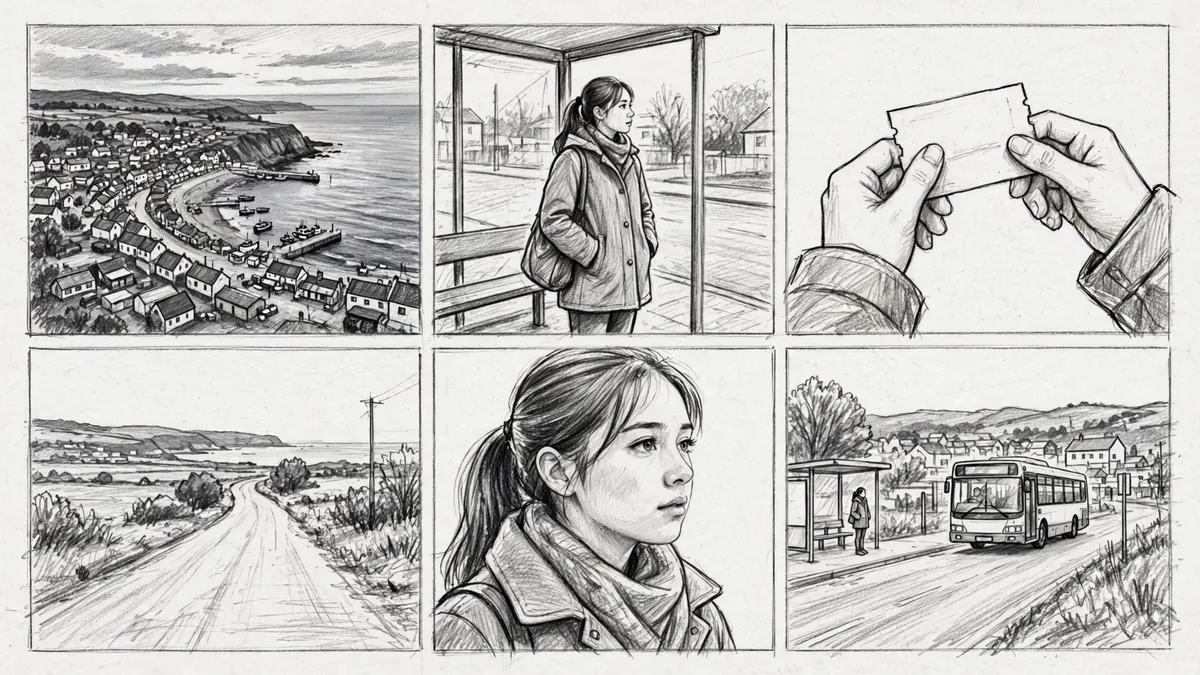
The panels are planned the way a director covers a scene, not drawn at random: a high wide shot to open and show the space, a medium shot as the action starts, a close insert of the hands or the object that matters, a reverse angle so the background changes, a close-up of a face at the turn, and a wider shot to close on the result. No two panels in a row use the same size and angle, and nobody looks into the lens.
You pick the drawing style for the pitch: a black and white pencil sketch, ink with gray marker shading, color 2D anime frames or cinematic color frames. Pencil reads as a working board; color sells a style to a client.
Step 4: Read the board for coverage and continuity
This is the step that makes boarding worth it. Look at the sheet and ask:
- Does the scene open clearly? Panel one should tell a stranger where they are and who is present.
- Does the turn land on the right beat? The close-up should sit on the moment that matters, not a throwaway line.
- Is anything repeated? If two panels feel the same, the scene text probably had two similar beats. Merge them.
- Do the characters match? Within a sheet they should. If a coat changes color, tighten the description and rerun.
When a shot is wrong, fix the scene text, not the picture. Add the missing detail, cut a beat, or split one busy scene into two sheets. Then generate again. At 380 credits a sheet this costs pennies, so iterate freely.
Step 5: Turn the storyboard into video
A board is already useful for a crew or a pitch deck. If you are making the film yourself, the panels become your first frames.
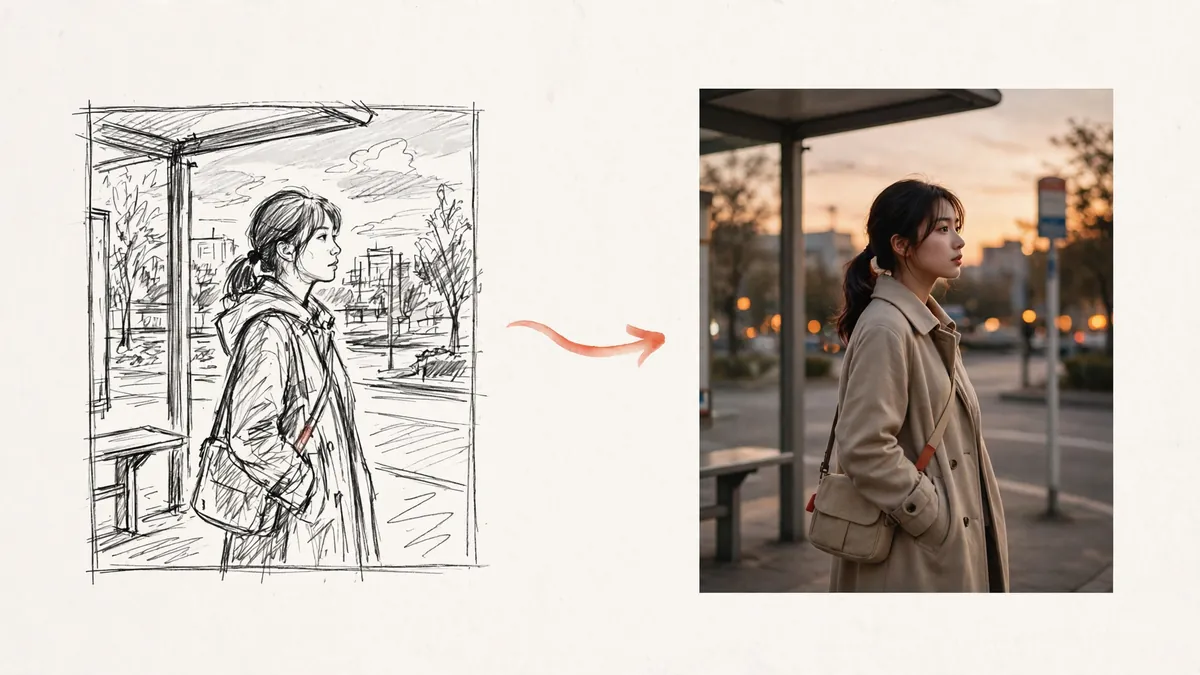
Animate each panel into a short clip, then cut the clips together in order. In the AI Anime Video Generator the script, the board and the video all live in one project, so you are not exporting files from one app and importing them into another, and the same characters carry from the board into the shots. For the wider version of this, from one clip to a full scene to a short film, see how to make anime with AI.
What it costs
You board in credits, not dollars per scene:
- One six panel sheet: 380 credits with Nano Banana Pro at 2K.
- A ten page short, roughly ten scenes: about ten sheets, plus a few reruns while you tune them.
- Free start: new accounts get 400 free credits with no card, which covers several boards. The Starter plan is 39 dollars a month for 32,000 credits.
Animating a board into video is a separate, larger cost: a 5 second shot at 768p is about 500 credits, so a six shot scene is six clips. Board first, lock the plan, then spend on video only for the shots you keep. If you want to compare dedicated tools before you commit, see the best AI storyboard generators.
Honest limits
- Boarding beats whole scripts. Scene by scene is the only way to get planned coverage and steady characters. There is no one-click "turn my 90 page script into a movie" that holds up.
- Consistency drifts across sheets. The tool holds a character steady within a sheet. Across many sheets you need to repeat the same description and accept some variation.
- It drafts, you direct. The panels are a strong first pass. The judgement about which beats matter and how the scene should feel is still yours.
- Text in frames is unreliable. AI drawn signs and labels come out garbled, so keep words out of the panels and add any titles later.
Start your first board
Take one scene you already have, trim it to who, where and what, and run it. You will see the whole scene as planned shots in about a minute. Paste your scene into the AI Storyboard Generator and board it free with your 400 starting credits.