YouTube Ad Maker
Upload a product photo, pick an ad format, and get a 16:9 YouTube ad with the hook and offer before the skip button.
Updated
Example outputs
Made with this tool from one product photo of a fictional bottle (an AI-made photo, shown below) and the line "Fern water bottle: a sage green insulated steel bottle with a bamboo cap. Keeps drinks cold for 24 hours. 20% off in launch week. For commuters and gym goers.". YouTube skippable pre-roll, 16:9, 15 s. Models: GPT Image 2.5 keyframes, MiniMax H3 Max Turbo clips at 480P, ElevenLabs voice, Lyria music. 148 credits. Trimmed by a few pixels at the edges to remove thin black bars.
Made with this tool from one product photo of a fictional bottle (an AI-made photo, shown below) and the line "Fern water bottle: a sage green insulated steel bottle with a bamboo cap. Keeps drinks cold for 24 hours. 20% off in launch week. For commuters and gym goers.". YouTube bumper ad, 16:9, 6 s: two 3 second shots. Models: GPT Image 2.5 keyframes, MiniMax H3 Max Turbo clips at 480P, ElevenLabs voice, Lyria music. 83 credits. Trimmed by a few pixels at the edges to remove thin black bars.
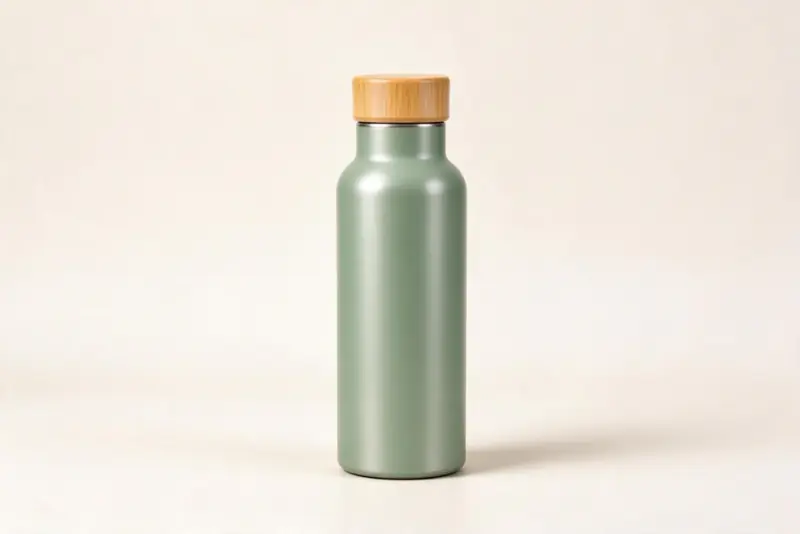
The product photo used for the ads above. It is AI-made (Seedream 5 Flash, 7 credits) for a fictional product, so no real brand is shown.
How it works
Upload a product photo and describe the product, offer and audience. For skippable ads, the hook must land in the first five seconds before the skip button appears.
Pick the ad format. Skippable pre-roll (15 seconds) gives the most time for a demo and CTA. Bumper ads (6 seconds) are unskippable, so every second counts. Non-skippable (15 seconds) runs without a skip option.
The AI writes the script for that length. A 15 second ad is three 5 second shots: the hook (done before the skip button at second five), the demo, and the offer with the call to action. A 6 second bumper is two 3 second shots: the hook, then the offer with the call to action. Download the MP4 and upload it to Google Ads.
| Format | Length | Skippable | Placement | Best use |
|---|---|---|---|---|
| TrueView In-Stream (skippable) | 12 s minimum, no max | After 5 s | Before, during or after videos | Brand awareness and consideration |
| Bumper ad | 6 s | Never | Before, during or after videos | Reinforcing a message or retargeting |
| Non-skippable In-Stream | 15 to 30 s (15 s in some regions) | Never | Before, during or after videos | Full message delivery guaranteed |
| In-Feed video ad | Any length | N/A (user clicks to watch) | YouTube search and feed | Product consideration and demos |
| YouTube Shorts ad | 10 to 60 s | After 5 s or not | Between Shorts | Reaching Shorts viewers in 9:16 |
Skippable vs non-skippable YouTube ads
The choice between skippable and non-skippable determines how you structure the creative. For skippable ads, the first five seconds are everything: the hook must be specific enough to make an interested viewer stay past the skip button. For non-skippable ads, you have 15 seconds of guaranteed attention, so you can afford a slightly slower build before the CTA.
Bumper ads (6 seconds, never skippable) work differently from both. Six seconds is long enough for one image and one sentence. They perform best when they reinforce something the viewer already knows: a brand running a skippable awareness campaign that adds a bumper retargeting the same audience, for example.
The five-second rule for YouTube hooks
The AI writes YouTube ad hooks with the 5-second skip window in mind. The opening frame shows the product or names the viewer's problem, not the brand logo. The hook line is the first spoken sentence and the first caption, and it speaks to the audience or benefit you describe.
A hook that says "Do you spend 3 hours a day on spreadsheets?" targets finance and operations people specifically. A hook that says "Introducing our new product" targets nobody specifically. Describe your audience and their pain in your prompt, and the AI uses that detail to write a hook that earns the stay.
Audio and music for YouTube ads
Unlike mobile feed ads, YouTube ads are often watched with sound, especially on desktop and connected TV. Audio matters more here than on TikTok or Instagram. Every ad here has an AI voiceover and an instrumental music bed that drops under the voice. A bumper gets a short voice line of about one sentence.
For a jingle or a signature sound, make it with the AI jingle generator and add it in your editor.
Frequently asked questions
What is a YouTube ad maker?
A YouTube ad maker generates short video ads in 16:9 format for YouTube placements. You upload a product photo, describe the offer and audience, and the AI creates a script timed to the ad format you choose, makes the shots with a voiceover, music and captions, and exports an MP4 ready for Google Ads. A 15 second ad costs 148 credits and a 6 second bumper 83 credits. New accounts get 40 free trial credits, which is not enough for one ad.
What happens at the 5-second mark in a skippable ad?
The "Skip Ad" button appears at 5 seconds in TrueView In-Stream ads. Viewers who are not engaged click skip immediately. The AI places the hook and the brand name or product in the first five seconds to earn attention before the skip button arrives. The offer and CTA follow in the remaining time.
What is the difference between a bumper ad and a skippable ad?
A bumper ad is 6 seconds and cannot be skipped. Every viewer sees the full ad. It works best for a single sharp message: a brand recall, a launch date or a direct offer with no demo needed. A skippable pre-roll gives more time for a demo but viewers who are not interested will skip. Bumpers and skippable ads are often run together in the same campaign: the bumper reinforces the skippable.
Does Google Ads require AI disclosure?
Google Ads requires advertisers to disclose when an ad uses realistic synthetic or AI-altered content of identifiable people. The AI-generated label option is on by default. Apply the disclosure in Google Ads during upload. The EU AI Act also requires disclosure for AI-generated video content in EU-targeted campaigns.
What aspect ratio should I use for YouTube ads?
16:9 is the standard for all in-stream YouTube ads and what most viewers expect on desktop and connected TV. 9:16 is used for Shorts ads (shown between YouTube Shorts). 1:1 is rarely used on YouTube. For most campaigns, generate 16:9.
Can I use this for YouTube Shorts ads?
Yes. Select 9:16 and a 15 second format. The ad is then vertical, with the captions above the bottom area.