Twitch Emote Resizer
Upload one image and get every platform size instantly: Twitch emotes (28, 56, 112 px), badges (18, 36, 72 px), Discord emoji (128 px) and 7TV. Free, runs in your browser.
Updated
Example outputs
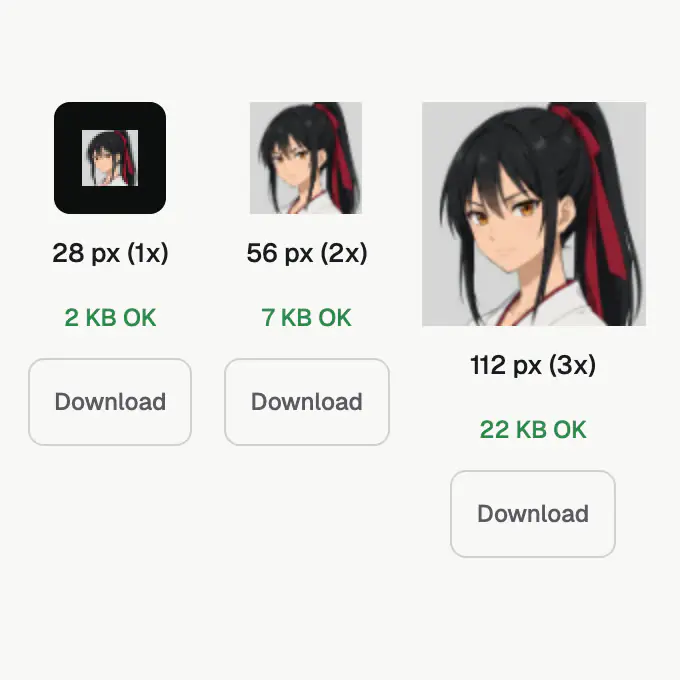
One 250 px portrait in, three Twitch emote sizes out, each under the 25 KB check
How it works
Upload your emote art as a PNG, JPG, GIF or WebP. The tool reads the file in your browser and draws it onto a canvas. Resizing never uploads your image.
Select the platform: Twitch Emote, Twitch Badge, Discord Emoji, 7TV or BTTV. The tool renders each required size side by side on both a light and a dark background so you can check legibility.
Check the file-size indicator next to each size. Green means the PNG is within the platform limit; red means it is over. Download individual files or click Download ZIP to get all sizes in one file.
Ideas and uses
| Platform | Type | Sizes (px) | Format | Max file size |
|---|---|---|---|---|
| Twitch | Static emote | 28, 56, 112 | PNG (transparent) | 1 MB for a single auto-resize upload; 25 KB per size is a safe target for manual upload |
| Twitch | Animated emote | 112 only | GIF or APNG | 1 MB, max 60 frames |
| Twitch | Badge | 18, 36, 72 | PNG (transparent) | Keep each size small; 25 KB is a safe target |
| Discord | Custom emoji | 128 | PNG or GIF | 256 KB |
| 7TV | Emote | 28, 56, 112, 128 | WebP, PNG, GIF or AVIF | 2.5 MB |
| BTTV | Emote | 28, 56, 112 | PNG or GIF | 1 MB per size |
Twitch emote sizes explained
Twitch uses a three-tier size system for static emotes. The smallest, 28x28 px, appears in chat on lower-density displays. The medium size, 56x56 px, is used on standard desktop displays. The largest, 112x112 px, appears on high-density (Retina) screens and in emote menus.
You are required to submit all three sizes. Twitch does not auto-scale from a single upload for affiliate and partner emotes submitted through the Creator Dashboard. The easiest workflow is to design your art at 112x112, then scale down to 56 and 28. This tool does that scaling for you in one step.
Twitch also offers an auto-resize mode for some emote types, where you submit a single image between 112 and 4096 px and Twitch generates the smaller sizes. However, manual submission gives you control over which details are preserved at small sizes, so most creators still submit all three manually.
For animated emotes, Twitch accepts only a single 112x112 GIF or APNG. The maximum duration is controlled by the 60-frame and 1 MB limits. There is no separate animated badge format.
Designing emotes that work at every size
An emote that looks great at 112 px can become an unreadable blur at 28 px. A few design principles help emotes read clearly at all three sizes:
- Bold outlines: add a 1 to 2 px outline in a contrasting color around the main subject. At 28 px, this outline is the only thing that defines the shape.
- Limit colors: too many shades of the same color merge into grey at small sizes. Use 3 to 6 distinct values per hue and make sure the lightest and darkest are at least 50% apart in lightness.
- High contrast between subject and background: transparent backgrounds show the emote against whatever color Twitch renders behind it. Your subject needs to read on both dark chat backgrounds and light Twitch themes.
- Simple composition: a single face, expression or symbol reads better than a full scene. Emoji and simple pictograms have dominated emote charts for years because they communicate clearly at the smallest size.
- Square canvas: all three Twitch emote sizes are square. Design on a square canvas from the start so no cropping or distortion is needed when you export.
Use the light and dark background previews in this tool to check contrast at each size before you upload to Twitch.
Emote file size and format guide
Each platform has different format and file-size requirements. A summary of the main limits for 2026:
Twitch static emotes: PNG only. For manual upload, 25 KB per size is a safe target; a single auto-resize upload can be up to 1 MB. Transparent backgrounds are required. Twitch rejects JPEG and WebP for emotes.
Twitch animated emotes: GIF or APNG at 112x112 px only, up to 1 MB, max 60 frames. Higher frame counts increase the file size, so shorter loops with fewer frames stay within the limit more easily.
Discord custom emoji: PNG for static, GIF for animated, both at 128x128 px, under 256 KB. APNG and animated WebP are not accepted by Discord for emoji.
7TV: accepts WebP, PNG, GIF and AVIF at up to 128x128 px, with a generous 2.5 MB limit. 7TV also supports wide emotes at a maximum 3:1 ratio.
BTTV: GIF or PNG at up to 128x128 px, under 1 MB per size. BTTV is older infrastructure and does not accept WebP or AVIF.
The file-size indicators in this tool check each exported PNG against the limit for the selected platform. If a size is over the limit, reduce complexity in the source art and re-export.
Frequently asked questions
What size does a Twitch emote need to be?
Twitch requires three sizes for static emotes: 28x28 px, 56x56 px and 112x112 px, all PNG with a transparent background. Keep each file small: Twitch shows the current file-size limit on its upload screen, and 25 KB per size is a safe target. Twitch can also make the smaller sizes for you from one image of up to 1 MB. Create your art at 112x112 first and scale down for the smaller sizes.
What is the size for a Twitch animated emote?
Twitch accepts animated emotes at 112x112 px only, in GIF or APNG format, up to 1 MB with a maximum of 60 frames. The tool exports the static PNG sizes for your base art. For animated emotes, use an animation tool such as the Ziztu AI Animation Generator or Aseprite to produce the GIF and then upload it to Twitch directly.
What is the correct size for a Twitch badge?
Twitch badge sizes are 18x18 px, 36x36 px and 72x72 px, all PNG with a transparent background. Select the Twitch Badge tab in this tool to export all three sizes at once.
What size should a Discord emoji be?
Discord accepts custom server emoji at 128x128 px, PNG or GIF, under 256 KB. Discord does not support APNG or animated WebP for emoji. Select the Discord Emoji tab to export a 128x128 PNG.
What are the 7TV emote size requirements?
7TV serves emotes at 28, 56, 112 and 128 px widths. The maximum file size is 2.5 MB. Accepted formats are WebP, PNG, GIF and AVIF. For wide emotes the maximum ratio is 3:1 (up to 384x128 px at the highest resolution).
Does this tool keep my emote art?
No. Resizing runs in your browser with the HTML5 Canvas API, so your image is not uploaded and nothing is stored after you close the tab. The optional Remove background step is different: it sends the image to our AI provider to cut it out, costs 5 credits and needs an account. We do not keep that image on our server.
Can I use a transparent background emote?
Yes. The tool preserves the alpha channel from your source PNG. The preview shows the output on both a white and a dark grey background so you can see how the transparent emote looks in both Twitch themes. All downloaded PNGs include the alpha channel.
What is the ideal emote design for small sizes?
At 28x28 px, an emote is very small: roughly the size of a capital letter. Designs that work at that size are bold, simple and high-contrast. A face or symbol with clear outlines and no fine detail reads better than a complex scene. Test the 28 px preview before finalizing your art.
My emote is over the Twitch file size limit. What can I do?
The file-size checker in this tool shows a red indicator when a size is over the limit. To reduce size, flatten any unnecessary layers in your source art, reduce the number of unique colors and avoid dithering. A flat or cell-shaded art style at small sizes is almost always within the 25 KB limit.