AI Sprite Sheet Generator
Describe a character, pick the motion and the style. The AI draws one sheet with the poses in neat rows.
Updated
Example outputs
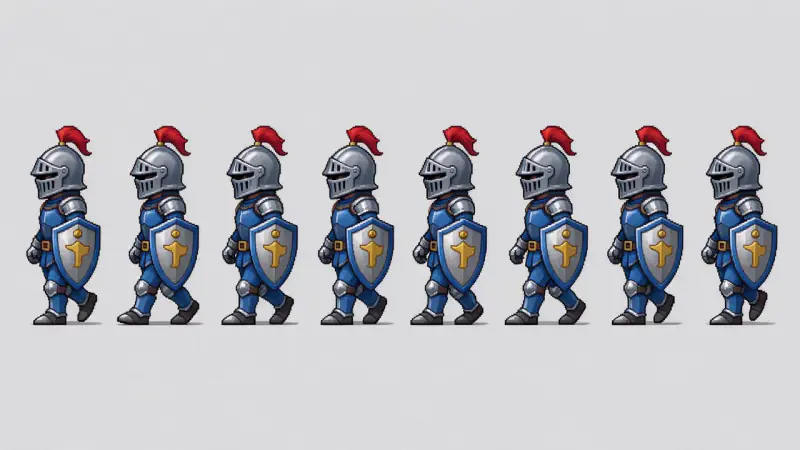
Prompt: "a small knight in blue armor with a red plume and a round shield". Walk cycle, Pixel art 32x32, Side view. Model: Seedream 5 Flash, 7 credits. Second try: on the first, the eight poses were almost the same.
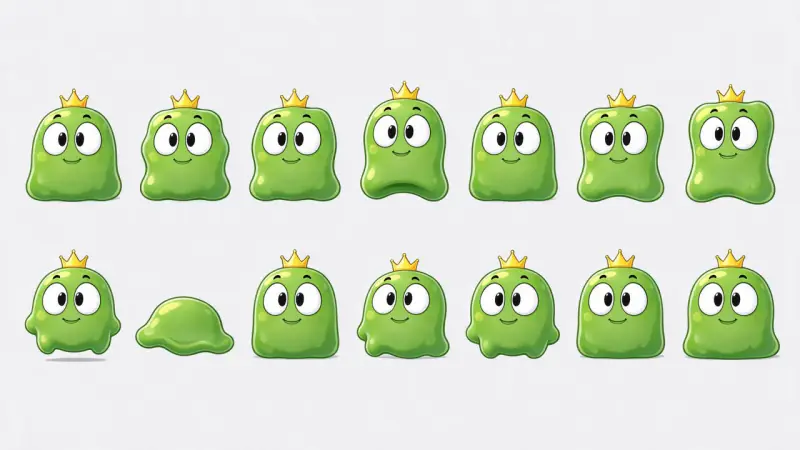
Prompt: "a round green slime monster with big eyes and a tiny crown". Idle, Cartoon, Front-facing. Model: Seedream 5 Flash, 7 credits.
How it works
Describe your character: who it is, its colors and what it wears or holds.
Pick the motion (walk, idle, run, attack, jump), the art style and the view.
Seedream 5 Flash draws one wide sheet with the poses in rows, in about half a minute. Cut it into frames in your editor or engine.
Ideas and uses
| Motion | What the sheet shows | Good for |
|---|---|---|
| Walk cycle | Steps from one foot to the other | Side-scrollers, RPG towns |
| Idle | Breathing, blinking or bouncing in place | Characters standing still |
| Run cycle | Faster, longer strides | Platformers, chases |
| Attack | Wind-up, strike and follow-through | Fighting and action games |
| Jump | Crouch, rise, peak and land | Platformers |
Sprite sheets from a description
The AI Sprite Sheet Generator draws a game character in several poses on one sheet. You describe the character, pick the motion, the art style and the view, and the model lays the frames out in rows on a plain background. It is a fast way to get a first version of a character or to try out a look before you draw or commission the final art.
Choosing a style
Pixel art gives the retro look of classic 2D games. Cartoon gives smooth, bold shapes for casual and mobile games. Anime suits RPGs and visual novels. Flat vector gives clean, simple shapes that scale well.
Getting the sheet into your game
Import the image into your engine and slice it on a grid. In Unity, set the texture to Sprite with Multiple mode and use the Sprite Editor. In Godot, use a SpriteFrames resource or an AnimatedSprite2D. In Phaser, load it as a spritesheet with the frame width and height. If the frames are uneven, cut them out one by one in an editor first.
Frequently asked questions
What does the generator make?
One image: a sprite sheet with the poses of your character in neat rows. It does not export JSON, GIF or frame data. Cut the sheet into frames in your game engine or a pixel editor.
Are the frames real 16x16 or 32x32 pixel art?
No. The style option sets the look. The sheet itself is a large image (about 2048 by 1152 pixels), so for true low-resolution pixel art, scale the frames down and clean them up in a pixel editor.
Is it free?
You can try it free. Sign up with an email address and you get 40 free trial credits. One sheet costs 7 credits, so the trial covers several sheets. Free trial results carry a small watermark.
Are the frames evenly spaced and consistent?
Usually, but not always. AI models can change small details between frames or space them unevenly. Check each frame before you use the sheet in a game.
How is this different from the sprite sheet packer?
This tool draws a new character from your words. The sprite sheet packer is a free in-browser tool that packs frames you already have into one sheet with a JSON map.
Can I use it in Unity, Godot or Phaser?
Yes, as a normal sprite sheet image. Import the image, slice it into frames on a grid and set up the animation in your engine.