Sprite Sheet Maker
Describe your character and pick one action. You get a sprite sheet: the frames on an even grid with a transparent background, and a JSON frame map.
Updated
Example outputs
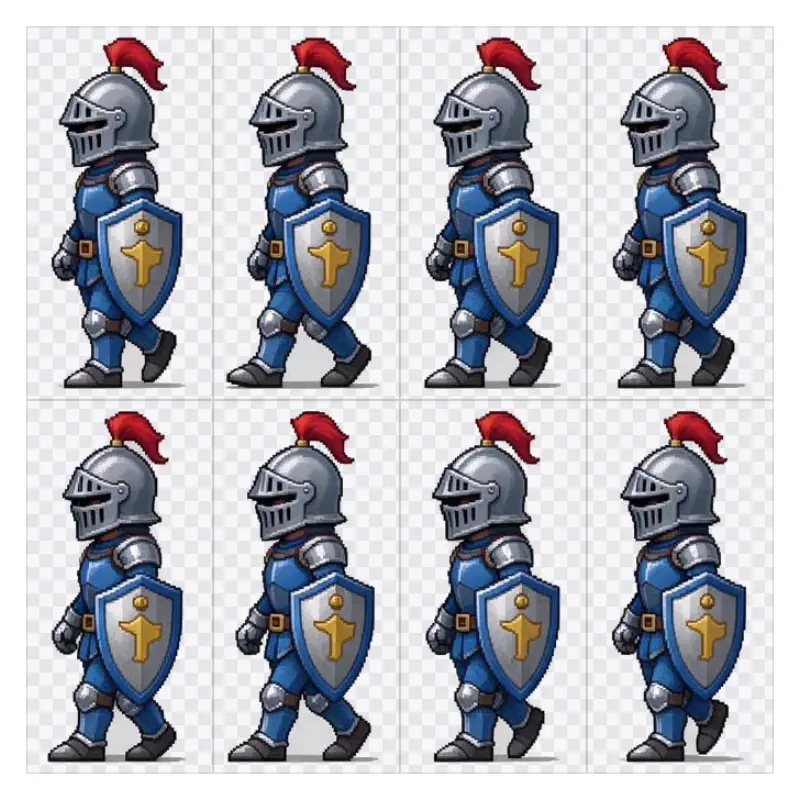
Walk cycle, 8 frames, pixel art, side view: "a small knight in blue armor with a red plume and a round shield". Drawn by Seedream 5 Flash for our AI sprite sheet generator page (7 credits), then cut by this tool into 170 x 340 px frames with the feet on one line. The checks show where the PNG is transparent.
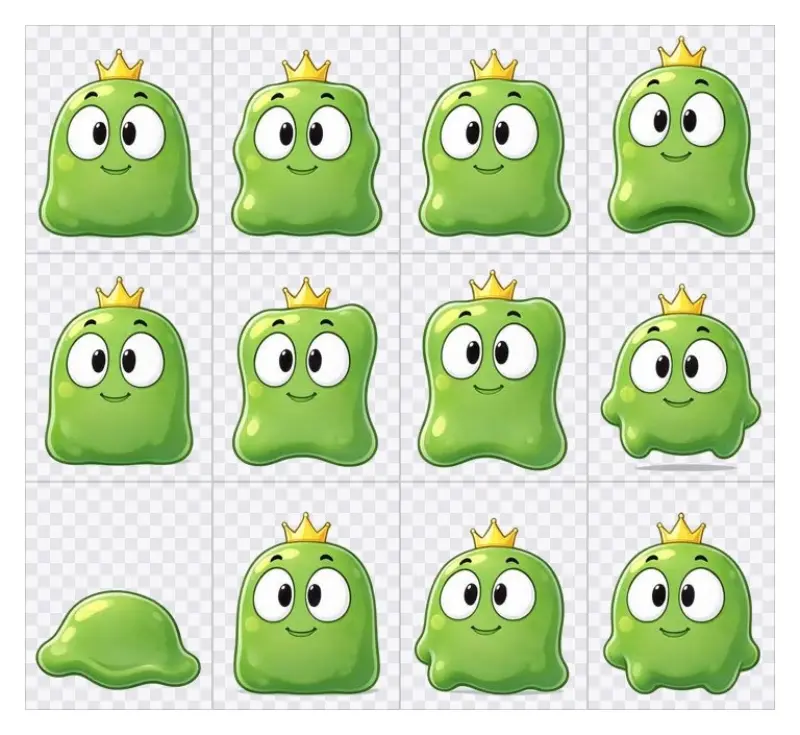
Idle, cartoon, front view: "a round green slime monster with big eyes and a tiny crown". Drawn by Seedream 5 Flash for our AI sprite sheet generator page (7 credits) with 14 frames; this tool keeps the first 12, the most a sheet takes.
The JSON frame map of the knight sheet (Phaser atlas format, with the grid)
How it works
Describe your character and pick an action, the number of frames, an art style and a view. Seedream 5 Flash draws that action as a row of frames on a plain background.
Our server finds each frame, cuts it out with a transparent background and puts the frames on an even grid: every frame the same size, the character centered and the feet on one line, so the loop does not jump.
Download the PNG and the JSON frame map and load them in Phaser, Godot or Unity, or slice the PNG by cell size. Check each frame: the AI sometimes draws one more or one less than you asked.
Ideas and uses
From one drawing to a game-ready sheet
The AI draws your character doing one action, frame after frame, on a plain background. Our server then makes the sheet: it finds each frame, takes the background out (soft edges keep no grey halo), and puts every frame in a cell of the same size, centered on the character with the feet on one line. The JSON frame map gives each frame its place and time, so the animation plays in Phaser, Godot or Unity without hand work.
Tips for clean frames
- Describe one character: name the outfit, colors and one prop. Short descriptions keep the frames consistent.
- Side view for platformers: walk and run cycles read best from the side.
- Pick fewer frames for small moves: 4 frames suit an idle or a jump, 6 to 8 a walk or a run.
- Check every frame: AI can add or drop a prop between frames. Make another sheet if one frame is off.
The free packer
If you already have frames and only need to pack them into a sheet, the free sprite sheet packer at /tools/sprite-sheet-packer runs in your browser with no upload and no account. Set the columns, padding and frame size, preview the loop and download the PNG and JSON.
Frequently asked questions
What does the sprite sheet maker make?
A sprite sheet PNG with 4 to 8 frames of one action (walk, run, idle, jump or attack) on an even grid with a transparent background, and a JSON frame map. You can also download the AI drawing the frames were cut from.
Does it export JSON?
Yes. The JSON lists every frame with its place on the sheet and 100 ms per frame, in the JSON array format that the Phaser atlas loader reads. It also gives the grid (frame width and height, columns and rows) for loaders that slice by cell size, such as Godot hframes and vframes or Unity Grid By Cell Size.
Will I get exactly the number of frames I picked?
Usually, not always. The AI draws the frames and sometimes adds or drops one. Every frame it draws is cut out and placed on the grid, up to 12, and the JSON says how many you got. If a frame is off, make another sheet.
How much does it cost?
One AI drawing; the cutting runs on our server and costs nothing extra. The Generate button shows the price. New accounts get free trial credits, and trial images carry a small watermark. The packer is free.
Is the pixel art true pixel art?
It looks like pixel art, but each frame is a few hundred pixels tall, not a sprite drawn on a 32 x 32 grid. To use it at a true game size, scale the sheet down with nearest neighbour and clean it up by hand.
Can I use the sprites in my game?
Every paid plan includes commercial use of what you make here. Check that your character is not too close to someone else's.