PNGTuber Maker
Upload one character image. AI makes four transparent states (idle, talking, blink idle, blink talking) for Veadotube mini and OBS, or you add your own art for each state and export for free.
Updated
Example outputs
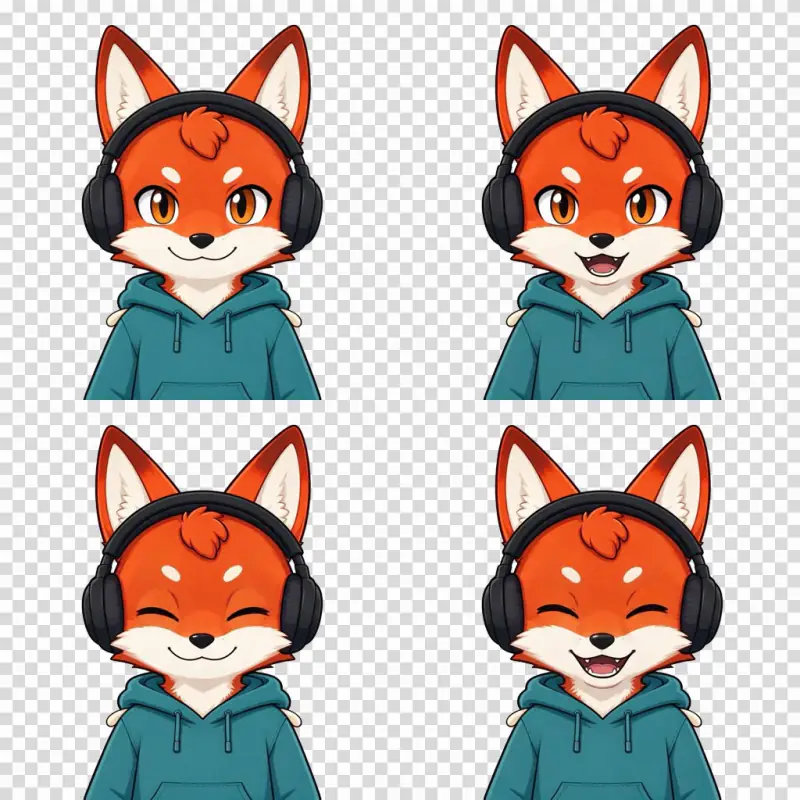
Made with "Make AI states" above from one uploaded image of an original fox character (drawn with Seedream 5 Flash). Top: idle, talking. Bottom: blink idle, blink talking. The grey checkerboard shows where the PNGs are transparent. Models: Nano Banana Pro edit 1K and Bria background removal, 134 credits.
How it works
Upload one image of your character with the eyes open and the mouth closed, ideally on a plain background.
Press "Make AI states" (134 credits): Nano Banana Pro draws the talking, blink idle and blink talking versions, and Bria cuts all four out onto a transparent 1024 x 1024 canvas. It takes about one to two minutes. Or press "Use my own art" (free) and add your own image for each state.
Export a Veadotube mini ZIP (four 1024 px PNGs), Twitch emote sizes (28, 56 and 112 px) or a 128 px Discord emoji. The PNGs also work as image sources in OBS.
Ideas and uses
| Platform | Format | Canvas size | States included |
|---|---|---|---|
| Veadotube mini | ZIP of 4 PNGs | 1024 x 1024 px each | Idle, talking, blink idle, blink talking |
| Twitch emote | 3 PNGs per state | 28, 56, 112 px | Any state (choose one) |
| Discord emoji | 1 PNG | 128 x 128 px | Any state (choose one) |
PNGTubing basics
PNGTubing is a way to stream or create video content with a virtual avatar made from still images. Unlike a full 3D VTuber model, a PNGTuber needs no face tracking, no motion capture rig and no special hardware. The avatar responds to your voice through a microphone: when you are quiet it shows the idle image, when you speak it shows the talking image, and it blinks on a random timer.
The result is a distinct, cartoon-like look that fits pixel art, anime, furry, mascot and hundreds of other styles. Because there are only four images to draw instead of a rigged mesh, you can design a PNGTuber in an afternoon.
The main PNGTuber apps in 2026 are Veadotube mini (free, widely used), PNGTuber Plus (itch.io, more features, paid) and the Steam app PngTuber Maker (paid, with a pose editor). This tool exports files in the format Veadotube mini expects.
Designing clear states
Each state communicates something. Idle is the default, resting face. Talking adds an open mouth and some energy. Blink states add a closed-eye frame that plays for a fraction of a second when the random blink interval fires.
A few tips for states that read well on camera:
- Keep the canvas the same size across all four images. Veadotube mini aligns states by their canvas edges. If your talking image is 1100 x 1024 and your idle is 1024 x 1024, the mouth will appear to shift when the avatar switches.
- Make the open mouth obvious at small sizes. In a 200 px overlay on a stream, a subtle mouth change will look the same as the closed state. Draw the open mouth large and use a contrasting color for the mouth interior.
- Closed eyes should read as a blink, not a tired face. A clean curved line or a short arc works better than a fully shaded closed-eye drawing at small preview sizes.
- Leave breathing room around the character. If the character fills the entire canvas, part of it may be cropped depending on how the viewer sizes the overlay. A small margin lets you scale without clipping.
How background removal works
The AI path starts from your one image. Nano Banana Pro, an image edit model, makes three copies of it: one with the mouth open, one with the eyes closed and one with both. It is asked to change nothing else, and in our tests the outfit, colors and pose stayed the same, but check the four states side by side before you stream.
Then Bria, a background removal model, cuts each of the four images out onto a transparent background, and each cutout is centered on the same 1024 x 1024 canvas. A plain background behind your character gives the cleanest edges.
The AI set costs 134 credits: 3 edits at 38 credits and 4 cutouts at 5 credits. The free path skips both: you bring your own state images.
Exporting for Veadotube, Twitch and Discord
This tool exports three types of packages:
Veadotube mini ZIP. Four 1024 x 1024 px PNG files named idle.png, talking.png, blink-idle.png and blink-talking.png. Load the ZIP into Veadotube mini by dragging the PNG files into their respective state slots in the avatar editor.
Twitch emote pack. Three sizes of one state (your choice): 28 x 28 px, 56 x 56 px and 112 x 112 px. All three are in a ZIP for upload to the Twitch Creator Dashboard. Twitch limits static emotes to 25 KB, so check the file sizes if your art is very detailed.
Discord emoji. One 128 x 128 px PNG of the state you choose. Upload it directly to your Discord server under Server Settings, Emoji.
Frequently asked questions
What is a PNGTuber?
A PNGTuber is a virtual avatar made from PNG images instead of a 3D model. When you stream or record, software like Veadotube mini swaps between your character images in response to your microphone input: idle when you are silent, talking when you speak, and blinking on a timer. PNG avatars are lightweight, easy to create and work with any art style.
What are the four PNGTuber states?
The standard four states for Veadotube mini are: idle (mouth closed, eyes open), talking (mouth open, eyes open), blink idle (mouth closed, eyes closed) and blink talking (mouth open, eyes closed). The software switches between them based on microphone volume and a random blink interval. You do not need all four: idle and talking alone are enough to get started.
What size should a PNGTuber be?
Veadotube mini recommends a canvas of 1024 x 1024 px, up to a maximum of 2048 x 2048 px. All four state images must be the same canvas size so they align perfectly when the app switches between them. This tool exports all states at the same size automatically.
What format does Veadotube mini use?
Veadotube mini accepts PNG, GIF, APNG and WebP files. Static PNG is the simplest and most common format. Animated formats (GIF, APNG) let each state have a short looping animation, but each frame loads as a separate texture in RAM, so keep animated states short. This tool exports static PNG files.
Can I use this tool for free?
Using your own art for the states and exporting the ZIP, Twitch sizes or Discord emoji is free and runs in your browser, with no account. AI states cost 134 credits per set. New accounts get 40 free trial credits, which is not enough for one AI set, so it needs a plan or a credit top up.
How do I set up a PNGTuber in Veadotube mini?
Download and open Veadotube mini. Create a new avatar, then drag and drop each PNG into the corresponding state slot: idle, talking, blink idle, blink talking. Set the microphone sensitivity under Audio Settings so the avatar reacts at the volume level you want. Resize and reposition the avatar in the preview window, then add it as a source in OBS or Streamlabs.
What is the difference between a PNGTuber and a VTuber?
A VTuber most often uses a full 3D or 2D rigged model that tracks your face in real time. A PNGTuber uses a small set of flat PNG images and switches between them based on audio input, with no face tracking needed. PNGTubers are much simpler and cheaper to set up and have a distinct, stylised look that many streamers prefer.
Can I use my own art for the states?
Yes. Press "Use my own art", then replace each state with your own image. Every state is centered on the same 1024 x 1024 canvas before export, so draw your states on the same canvas size and they line up. Your own art keeps its own background: use transparent PNGs if you want a transparent avatar.