Fountain to FDX Converter
Turn a .fountain file into a Final Draft .fdx, or an .fdx into Fountain, and download a PDF in the standard screenplay layout. Free, no account, and your script never leaves your browser.
Updated
Example outputs
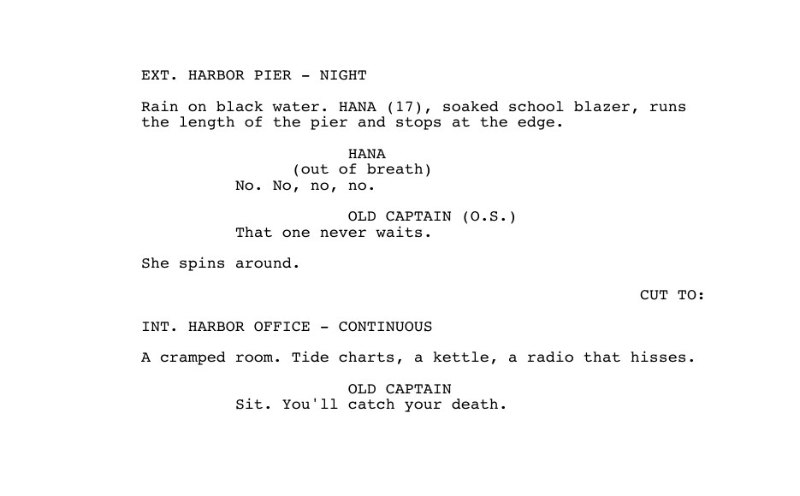
A short Fountain scene in, a Final Draft file and this PDF page out
How it works
Drop a .fountain, .fdx or plain text file on the box, choose one, or paste the screenplay as Fountain text. The converter reads it in your browser and tells you what it found: pages, scenes and characters.
Download the other format. A Fountain script becomes a Final Draft .fdx file with real paragraph types (scene heading, action, character, parenthetical, dialogue, transition, shot). A Final Draft file becomes clean Fountain text.
Download a PDF if you need pages to print or share. It uses 12 point Courier, the standard margins and indents, page numbers from page two, a title page, and (MORE) and (CONT'D) where a speech breaks across pages.
Ideas and uses
| Fountain (.fountain) | Final Draft (.fdx) | ||
|---|---|---|---|
| What it is | Plain text with a few marks | XML that Final Draft opens | Pages to print or share |
| Element types | Scene heading, action, character, parenthetical, dialogue, transition, centered text, lyrics, and shots by convention | The same, with a real shot element | Printed in the standard layout |
| Title page | Key: value lines at the top | Title page paragraphs | Its own first page, unnumbered |
| Dual dialogue | A ^ after the second cue | A DualDialogue block | Two columns side by side |
| Bold, italic, underline | **bold**, *italic*, _underline_ | Styled text runs | Courier bold and oblique, underlines |
| Acts, sequences, synopses | # and ## lines, = lines | Outline elements | Not printed |
| Notes | [[double brackets]] | Kept as bracketed action | Not printed |
Fountain and Final Draft, side by side
Fountain is a plain-text screenplay format: you write the way a script looks, and a few simple rules (a heading starts with INT. or EXT., a name in capitals starts a speech) tell an app what each line is. It opens in any text editor, travels well in email and version control, and many writing apps read it.
Final Draft (.fdx) is the format of the Final Draft app and the one many productions ask for. It is XML: every paragraph says what it is (Scene Heading, Action, Character, Parenthetical, Dialogue, Transition, Shot), which keeps the formatting exact when the file moves between people.
This converter reads either one and writes the other, so you can draft in plain text and hand over a Final Draft file, or take a Final Draft file into a Fountain workflow.
The standard page, in the PDF
A screenplay page has a fixed shape, so one page runs about one minute of screen time. The PDF follows it: US Letter, 12 point Courier at ten characters to the inch, six lines to the inch, margins of 1.5 inches on the left and 1 inch elsewhere.
- Scene headings and action run the full 6 inch line.
- Character cues start at 3.7 inches from the edge of the page.
- Dialogue starts at 2.5 inches and runs 3.5 inches; parentheticals start at 3.1 inches.
- Transitions sit flush right.
Page breaks follow the usual rules: a heading keeps its first lines with it, action breaks between sentences with at least two lines on each page, and a speech that must break gets (MORE) at the foot and the cue again with (CONT'D) at the top of the next page.
Frequently asked questions
Is my script uploaded anywhere?
No. Reading the file, converting it and making the PDF all happen in your browser. The script is not sent to our server and nothing is stored after you close the tab.
Will the .fdx open in Final Draft?
Yes. The file uses Final Draft's own paragraph types, so scene headings, action, character cues, parentheticals, dialogue, transitions and shots arrive as those elements, with dual dialogue, scene numbers and the title page. Acts and sequences become Final Draft outline elements, which do not print.
Does it keep bold, italic and underlined words?
Yes. Fountain marks (**bold**, *italic*, _underline_) become styled text in Final Draft and in the PDF, and styled text from a Final Draft file comes back as Fountain marks.
What happens to shots when I convert to Fountain?
Fountain has no shot element. The common convention is a line in capitals on its own that starts with a camera phrase, such as CLOSE ON THE LETTER or ANGLE ON MAYA, so that is how shots are written, and such lines come back as shots when you convert to Final Draft. A shot without a camera phrase is written as forced action. Both print the same way.
How is the PDF laid out?
US Letter, 12 point Courier, 1.5 inch left margin and 1 inch elsewhere. Character cues sit at 3.7 inches, dialogue at 2.5 inches for 35 characters, parentheticals at 3.1 inches. A scene heading never ends a page, action breaks only between sentences, and a speech that breaks across pages gets (MORE) and the cue again with (CONT'D).
Can I convert plain text?
Usually, yes. Fountain was made to read screenplays typed as plain text: a line that starts with INT. or EXT. is a scene heading, a name in capitals over a line is a character cue, and so on. If something is read the wrong way, add the Fountain mark that forces it (a period before a heading, an exclamation mark before action).
Is there a size limit?
Files up to 8 MB. A feature screenplay is usually well under 1 MB.
Can I edit the script after converting it?
Yes, in any screenplay app. In Ziztu, the AI Script Writer imports Fountain and Final Draft, gives notes with the AI Script Doctor, and turns scenes into shots for an animated film.